In a nutshell: To optimize your LinkedIn profile: use a professional photo and a banner with your value proposition, write a headline that says what you do, for whom and with what result, tell your story in the About section, customize your URL, use Featured as a portfolio, describe your experience in terms of impact and repeat your strategic keywords across the profile.
Your LinkedIn profile is no longer just an online résumé. Today it’s your professional storefront, a networking channel and a powerful way to create career and business opportunities.
With over a billion members worldwide, LinkedIn is the professional social network. Still, most people only use a small slice of what it can do.
Half-finished profiles, generic headlines and bare-bones job descriptions mean professionals and companies miss out on valuable chances to get seen and make connections.
In this complete guide, you’ll learn how to optimize your LinkedIn profile so it becomes a real strategic asset for your online presence.
1. Profile photo: your first impression
Before anyone reads your name or title, the first thing they see is your photo.
That’s why it has to convey credibility, approachability and professionalism.
Profiles with a professional photo tend to get way more views and connection requests, because they instantly feel trustworthy.
Best practices:
- Use a sharp, high-resolution photo
- Go for a neutral or slightly blurred background
- Your face should fill about 60% of the image
- Use natural or evenly spread lighting
- Look approachable and confident
What to avoid:
- Sunglasses
- Party or social event photos
- Group photos
- Heavy filters
2. Banner image: your personal brand billboard
The banner is one of the most underused spots on LinkedIn.
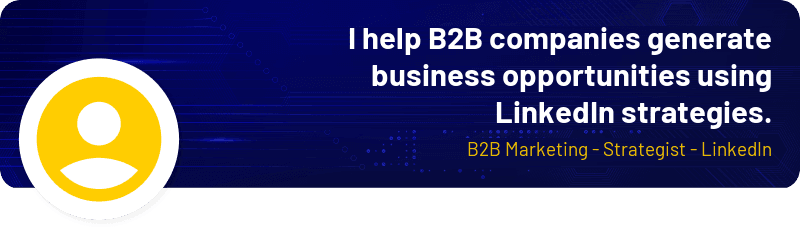
Your profile photo shows who you are; your banner can show what you do and the value you bring.
Think of it as a mini billboard for your professional positioning.
You can use it to highlight:
- your field
- your value proposition
- your specialty
- a tagline or positioning statement
You can create your banner with simple design tools.
Example angles:
- Specialist: I help B2B companies generate business opportunities with LinkedIn strategies.
- Executive: Marketing and demand generation leadership for tech companies.
- Consultant: Strategy, positioning and growth for B2B businesses.
3. Name and pronunciation
Sounds simple, but a lot of people get this field wrong.
Ideally, use:
✔ Your full name (or the name you’re known by in your industry)
✔ Correct spelling
✔ No emojis or extra descriptions
If you work with international clients, LinkedIn lets you record how to pronounce your name, which makes it easier to connect with people from other countries.
4. Headline: the most strategic field on your profile
After your photo, your headline is what most influences whether someone clicks on your profile.
By default, LinkedIn uses your current job title. But stopping there means wasting one of the most valuable spots on your profile.
A great headline shows:
- what you do
- who you do it for
- what result you deliver
Go-to formula:
I help [audience] achieve [result] using [method or expertise].
Examples:
- I help B2B companies generate sales opportunities with LinkedIn and demand marketing strategies.
- Demand generation specialist | Growth strategies for tech companies.
5. About: your professional story
The About section is the perfect place to share your story, vision and value proposition.
A strong summary helps turn a casual visitor into a connection or a business opportunity.
Recommended structure:
- Strong opening: a line that sparks curiosity or calls out a common problem in the market.
- What you do: explain your field and specialty.
- Who you work with: make it clear who your audience is.
- What sets you apart: show your approach, method or experience.
- Results: include numbers, case studies or relevant wins.
- Call to action: invite the reader to keep the conversation going.
Example:
| Strong opening | Lots of companies invest in digital marketing but still struggle to turn visibility into real business opportunities. |
| What you do | I work in digital marketing strategy, helping companies structure their online presence and use content and digital channels more strategically. |
| Who you work with | I mainly support B2B companies that need to sharpen their positioning and generate qualified demand. |
| What sets you apart | I believe in marketing driven by strategy and consistency, combining planning, data analysis and relevant content. |
| Results | Throughout my career, I’ve worked on projects that helped companies expand their digital visibility, build market authority and grow lead generation. |
| Call to action | If you’re into marketing, professional positioning or demand generation, I’d love to swap ideas here. |
6. Custom URL
LinkedIn automatically creates URLs with random numbers, like: linkedin.com/in/john-smith-87283h2
But you can edit it into something cleaner: linkedin.com/in/johnsmith
A custom URL makes it easier to:
- share your profile
- build your personal brand
- get indexed by search engines
7. Featured: your portfolio inside LinkedIn
The Featured section works like a showcase right on your profile.
You can add content that reinforces your authority, like:
- articles
- presentations
- case studies
- videos
- high-engagement posts
It’s a great way to show social proof and hands-on experience.
8. Recent activity: the algorithm factor
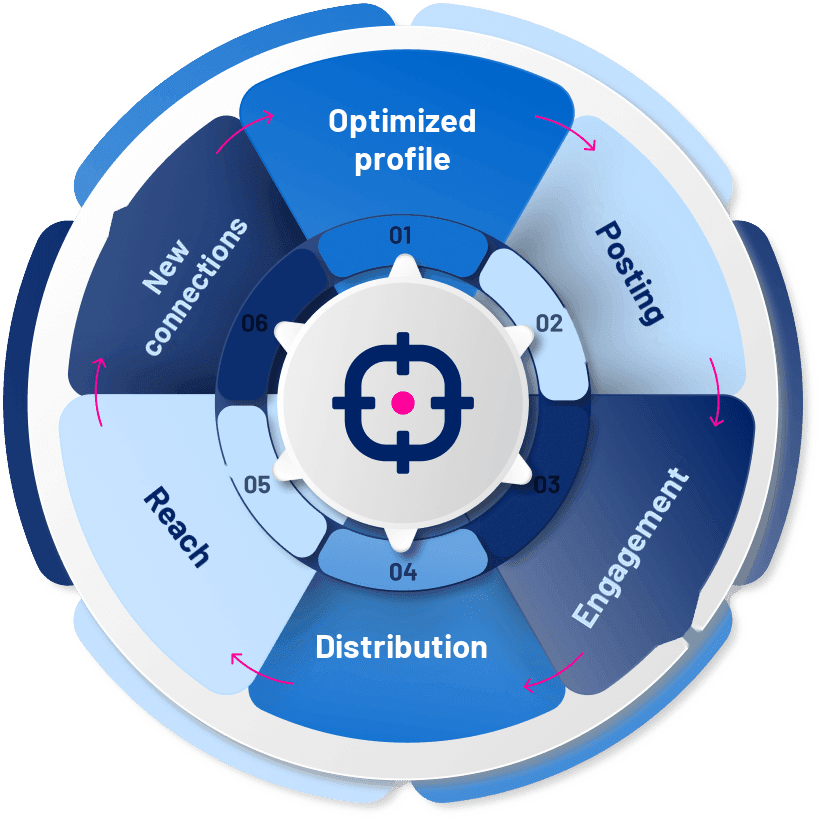
A well-built profile matters, but consistent activity is what keeps you visible on the network.
Profiles that post and engage regularly tend to show up more in search and in people’s feeds.
Best practices:
- post at least once a week
- leave thoughtful comments on posts in your niche
- reply to comments and interactions
- join relevant conversations
9. Experience: focus on impact
Lots of people describe their experience on LinkedIn by listing tasks. What works better is highlighting the results and impact you created.
Generic example:
Responsible for marketing campaigns.
More strategic example:
Planned and optimized LinkedIn Ads campaigns that grew qualified lead generation by 120% in six months.
Whenever you can, include:
- metrics
- growth you drove
- results you achieved
10. Recommendations: social proof
Recommendations are basically professional testimonials inside LinkedIn.
They show how other people see your work and boost your profile’s credibility.
You can ask for recommendations from:
- clients
- managers
- teammates
- business partners
💡 Tip: an easy trick is to write recommendations first. It really boosts your chances of getting one back.
11. Skills and endorsements
Skills help LinkedIn figure out which searches your profile should show up in.
Don’t add a ton of them.
Focus on the most strategic skills for your field.
Example for marketing:
- demand generation
- LinkedIn Ads
- B2B marketing strategy
12. Certifications
Certifications show you keep your skills sharp and know your stuff.
Some of the most common ones:
- LinkedIn Marketing Labs
- HubSpot Academy
- Google Ads
- industry-specific certifications
Just finished a cool course? Share it with your network!
13. Media in your experience
LinkedIn lets you attach files to your experience entries, turning your profile into a real portfolio.
You can add:
- presentations
- articles
- videos
- case studies
- external links
This kind of content shows the value of your work in practice.
How to optimize your LinkedIn profile to show up in search
Just like Google, LinkedIn has its own search engine. It uses keywords to decide which profiles show up in the results.
That’s why you should work strategic terms into different parts of your profile.
The main places are:
- headline
- About section
- experience
- skills
For example: if you want to be found as a demand generation specialist, that phrase needs to show up more than once on your profile.
Wrapping up
Your LinkedIn profile has become one of the most important assets of your professional online presence.
When it’s well built, it can work as your:
- business card
- sales page
- professional portfolio
- networking channel
Spending time optimizing your profile helps you get more visibility, build authority and open doors to new opportunities.
Start with the basics and keep sharpening your positioning over time.
Before long, your profile stops being just a professional page and becomes a real opportunity engine.
Frequently asked questions
What should I put in my LinkedIn headline?
Use this formula: I help [audience] achieve [result] using [expertise]. Don’t settle for just your current job title.
What’s the ideal LinkedIn profile photo?
A sharp photo with a neutral background, good lighting and your face taking up about 60% of the frame.
How do I show up more in LinkedIn search?
Repeat the keywords you want to be found for in your headline, About section, experience and skills.
How many skills should I add?
A few strategic ones. Highlight the skills that matter most in your field instead of listing dozens.