
In a nutshell: To set your LinkedIn Ads budget, start from your goal: minimum budget = lead goal × estimated CPL × 1.2 (the extra 20% covers the learning phase). Factor in objective, audience size, ad format and industry competition, set aside roughly $1,500 to $3,000 a month for testing, split spend across the funnel and adjust based on CPL, frequency and lead-to-opportunity rate.
Setting your LinkedIn Ads budget is one of the most critical (and most misunderstood) decisions for anyone starting to advertise on the platform. Spend too little and the algorithm can’t learn or deliver results. Spend without a strategy and a powerful platform turns into a money pit.
The good news: there’s a method to calculate, structure and adjust your budget based on real data, not guesswork.
In this article, you’ll see how LinkedIn Ads spend works, which variables drive cost and how to land on a number that makes sense for your business.
Why is advertising on LinkedIn more expensive?
Before we talk numbers, you need to understand the nature of the platform. LinkedIn’s CPC (cost per click) and CPM (cost per thousand impressions) are significantly higher than Google and Meta Ads. That’s not a bug; it’s a direct result of the quality of the audience.
On LinkedIn, you can target by job title, seniority, industry, company size and even professional skills. That level of precision comes at a price. A click can cost $6, $15 or even more depending on your audience.
That said, the absolute cost matters less than the cost per qualified result. A campaign generating leads at $400 on LinkedIn can be more profitable than one generating leads at $40 on Meta if the quality and close rate are much higher.
What drives how much budget you need?
The answer: there’s no universal number. The right budget depends on a mix of variables you need to look at before making any call.
Campaign objective
Awareness campaigns (reach and brand awareness) tend to have lower CPMs and can work on smaller budgets, since they don’t require direct conversion. Lead generation and conversion campaigns, on the other hand, need enough volume for the algorithm to learn and optimize (which means a bigger budget and a longer runway).
Audience size and specificity
Very niche audiences (under 50,000 people) usually have higher CPMs, since more advertisers are competing for a smaller group. Broader audiences tend to deliver more cheaply, but can sacrifice relevance.
Ad format
Formats have different average costs (US ballpark figures, which vary a lot by industry):
| Single Image | CPC can vary a lot, but usually lands between $5 and $12. It’s the most widely used format, so the auction is more competitive (which drives prices up in crowded segments like tech and finance). |
| Video | Tends to cost more per impression than Single Image. Video expands reach but may not drive direct clicks. It’s best for the top of the funnel, with retargeting afterward. CPM is the most common billing model for this format (roughly $30 to $60). |
| Message Ads | The cost per send is fairly low (around $0.30 to $0.80), but the effective cost per click can shoot up if open and response rates are low. |
| Lead Gen Forms | CPL tends to land between $75 and $200. The form comes pre-filled with LinkedIn profile data, which cuts friction and boosts conversion. |
Industry competition
Industries like tech, financial services and business consulting have more advertisers fighting for the same audiences, which pushes minimum bids up. Less saturated industries can have lower CPCs.
How to calculate your minimum viable budget
Step 1: Set your target result
Start with the result you want. Ask yourself: how many leads, booked meetings or conversions do I need from this campaign each month?
Example: you need 20 qualified leads a month.
Step 2: Estimate your expected cost per lead (CPL)
If you don’t have past LinkedIn campaign data, use market benchmarks as a starting point. Average B2B CPL on LinkedIn Ads varies a lot by industry, but a conservative starting estimate for the US is:
- SaaS and tech: $150 to $400 per lead
- Consulting and professional services: $200 to $500 per lead
- Corporate education and training: $80 to $250 per lead
If you’ve run campaigns on other platforms, multiply your average CPL by 2x to 3x to estimate your starting LinkedIn CPL. With optimization over time, that number tends to come down. 😉
Step 3: Multiply and add a learning buffer
With your goal and estimated CPL in hand:
Minimum budget = lead goal × estimated CPL × 1.2
The 1.2 factor (an extra 20%) covers the algorithm’s learning period during the first 15 to 20 days of the campaign, when costs tend to run higher before optimization settles.
Practical example:
- Goal: 20 leads/month
- Estimated CPL: $250
- Minimum budget: 20 × $250 × 1.2 = $6,000/month
👉 Tip: don’t freak out over that number. Examples and benchmarks are just there to illustrate. Your business may look very different. When in doubt, test gradually.
Step 4: Choose a daily or lifetime campaign budget
LinkedIn lets you set your budget two ways:
- Daily budget: Campaign Manager spreads spend across the days. A good choice for always-on campaigns.
- Lifetime budget: you set the total campaign amount and the algorithm distributes it automatically. Recommended for campaigns with set start and end dates (launches, events, webinars).
For always-on demand generation campaigns, a daily budget gives you more control and flexibility to adjust.
What’s the recommended minimum spend?
LinkedIn lets you start campaigns with fairly low budgets. Technically, you can set $10 a day. Will that be enough? Maybe! But you’ll probably need to scale up gradually as your campaign metrics come in. (More on this in how much LinkedIn Ads costs.)
Testing phase (first 30 to 60 days)
To validate audiences, creatives and formats before scaling, aim for roughly $1,500 to $3,000 a month. That lets you run ad sets with creative variations and collect enough data to make sharper decisions.
ABM (Account-Based Marketing) campaigns
Campaigns aimed at a specific list of target accounts may need a bit more budget. So you need to weigh it up: how much are you willing to invest to land that ideal customer? If the return justifies it, moving more budget into the campaign might make sense.
How to split budget across campaigns
If you have several campaigns running at once, your budget split needs to reflect your conversion funnel.
Recommended split by funnel stage
A good rule of thumb if you’re building out the full funnel on LinkedIn:
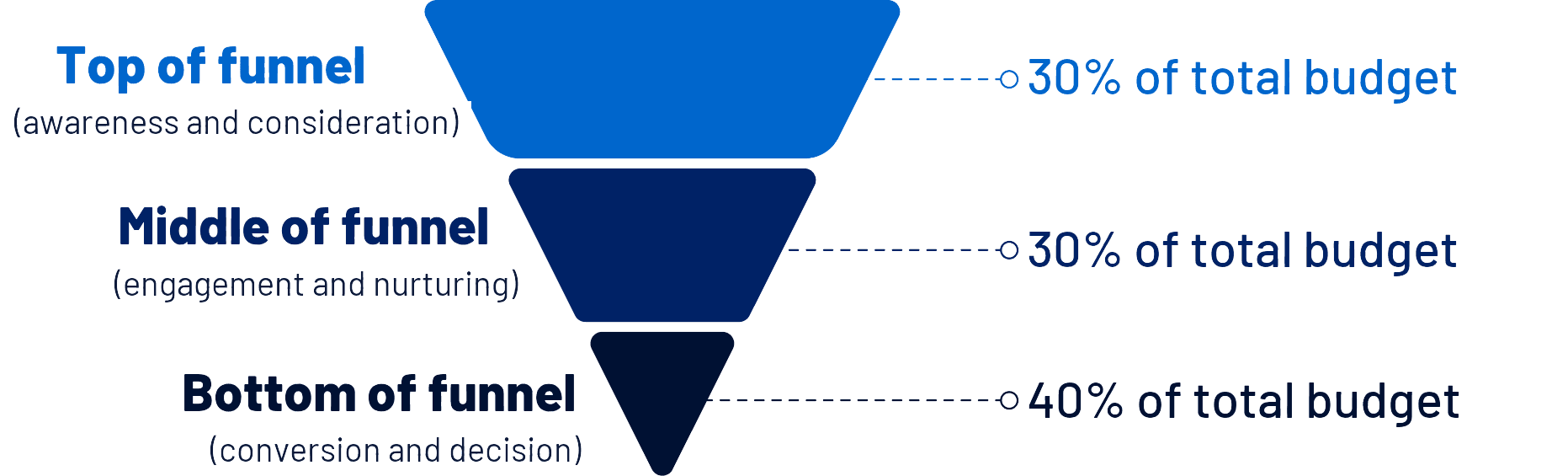
This split prioritizes conversion without giving up on building a qualified audience for the months ahead. As your retargeting pool grows, you can dial down the top and ramp up the bottom.
Don’t spread your budget too thin
A common mistake is creating lots of campaigns with tiny budgets. One campaign at $100 a day learns and performs better than four at $25 each. Whenever you can, consolidate similar campaigns and give each one enough budget.
When to adjust your budget
Budget isn’t a one-and-done decision. Review it based on clear performance signals.
Signs to increase your budget
- CPL stable or dropping over the last 2 weeks.
- Lead-to-opportunity conversion rate above expectations.
- Pipeline from LinkedIn with a positive ROI.
- Ad frequency still low (under 3): there’s room to scale without saturating the audience.
Signs to cut or reallocate your budget
- CPL climbing week after week with no creative or targeting improvements.
- Frequency above 5 with a falling CTR (the audience is saturated).
- Leads with a low sales acceptance rate (could be an audience qualification problem).
- Top-of-funnel campaigns eating more than 40% of budget without contributing to the funnel.
Sample budget structure for a B2B company
To make it concrete, here’s how a company with a B2B marketing strategy could structure $10,000 a month on LinkedIn Ads:
| Campaign | Objective | Audience | Monthly budget |
| Awareness — Thought Leadership | Brand awareness | IT directors and VPs | $1,500 |
| Consideration — Document Ad | Nurturing and lead generation | Followers + site visitors | $1,500 |
| Conversion — Lead Gen Form | Demo booking | Target account list (ABM) | $4,000 |
| Retargeting — Bottom of funnel | Converting hot leads | Pricing page visitors | $3,000 |
This structure keeps you present across the whole funnel, prioritizes conversion and keeps feeding your retargeting pool with new people every month.
Wrapping up
Setting your LinkedIn Ads budget isn’t a simple equation, but it follows a clear logic: start with the result you need, estimate your cost per result, add a learning buffer and split it smartly across the funnel.
More than the absolute amount you spend, what determines a campaign’s success is how well budget, objective, audience and creative fit together. A well-built campaign at $2,500 a month delivers more than a poorly planned one at $10,000.
LinkedIn Ads rewards people who think before they set things up. Use data to your advantage and review your budget as often as you review your creatives.
Want to go deeper on your LinkedIn Ads strategy? Check out our article on the most common mistakes on the platform and how to avoid them.
Frequently asked questions
What’s the formula for a LinkedIn Ads budget?
Minimum budget = lead goal × estimated CPL × 1.2. Example: 20 leads × $250 × 1.2 = $6,000 a month.
How much should I spend during testing?
Roughly $1,500 to $3,000 a month for the first 30 to 60 days, to validate audiences, creatives and formats before scaling.
Daily budget or lifetime budget?
Daily for always-on demand generation campaigns; lifetime for campaigns with set start and end dates, like events and webinars.
When should I increase my budget?
When CPL has been stable or dropping for 2 weeks, lead-to-opportunity conversion beats expectations and frequency is still under 3.