In a nutshell: The most common LinkedIn Ads mistakes are: audiences that are too broad or too narrow (aim for 50,000 to 300,000 people), ignoring Matched Audiences, using the same creative across the whole funnel, bloated Lead Gen Forms, broken conversion tracking, pausing campaigns before 2 to 4 weeks, letting frequency climb past 5 and never testing new formats.
LinkedIn Ads is one of the most powerful paid media platforms for B2B companies, and also one of the most misused. With CPCs often higher than on Google or Meta, every dollar you spend needs a strategy behind it. Small setup, targeting or creative mistakes can turn a promising campaign into a budget drain.
In this article, you’ll find the most common LinkedIn Ads mistakes advertisers make and, more importantly, how to avoid them. 😉
Why does LinkedIn Ads need extra attention?
Before we get into the mistakes, some context. LinkedIn brings together more than 1 billion professionals and offers targeting you won’t find anywhere else in B2B: job title, seniority, industry, team size, skills and much more. That richness of data is exactly what makes the platform valuable, and what makes mistakes more expensive.
A click on LinkedIn can cost anywhere from about $5 to well over $15, depending on the audience and format. That means any slip, whether in audience, offer or tracking, hits your wallet right away.
Mistake 1: Targeting that’s too broad (or too narrow)
The problem
Targeting is the heart of any LinkedIn campaign. Many advertisers fall into one of two extremes: they build huge audiences to “reach more people” or they narrow things down so much the audience can’t support learning and delivery.
An audience over 500,000 people usually signals a lack of focus. One under 15,000 people may not have enough volume for the algorithm to optimize.
How to avoid it
- Aim for audiences between 50,000 and 300,000 people for lead gen and conversion campaigns.
- Use no more than 2 to 3 targeting layers at once (e.g. job title + industry + company size).
- Avoid stacking lots of exclusions right at the start, since that drains the audience before the campaign can learn.
- Test separate audiences by ICP (Ideal Customer Profile): one group for IT directors, another for CFOs, for example.
Mistake 2: Ignoring Matched Audiences
The problem
Lots of advertisers only use LinkedIn’s native targeting and completely ignore Matched Audiences, a feature that lets you import contact lists, upload target company lists and build retargeting audiences.
That mistake leaves some of the most precise and profitable targeting on the platform sitting on the table.
How to avoid it
- Upload target account lists for Account-Based Marketing (ABM) campaigns.
- Set up the LinkedIn Insight Tag on your site to build website retargeting audiences.
- Use Predictive Audiences (which replaced LinkedIn’s Lookalike Audiences in 2024) based on your customer lists to expand reach without losing quality.
Mistake 3: Using the same creative for the whole funnel
The problem
Someone who’s never heard of your company needs a completely different message than someone who’s already visited your site a few times. Running the same ad at every funnel stage is one of the most damaging (and most common) mistakes.
How to avoid it
Structure your campaigns in three layers:
Top of funnel (awareness)
- Focus on education and authority: market trends, industry data, valuable content.
- Recommended formats: Thought Leadership Ads, Document Ads (similar to a carousel), short videos.
- Call to action: “Learn more”, “Read the full study”.
Middle of funnel (consideration)
- Focus on solving problems: webinars, case studies, comparisons.
- Recommended formats: Single Image, Carousel, Message Ads.
- Call to action: “Download the e-book”, “Watch the case study”, “See how it works”.
Bottom of funnel (conversion)
- Focus on decision and social proof: demos, trials, customer testimonials.
- Recommended formats: Conversation Ads, Lead Gen Forms, Dynamic Ads.
- Call to action: “Book a demo”, “Talk to an expert”, “Request a proposal”.
Mistake 4: Neglecting your Lead Gen Form
The problem
The Lead Gen Form is one of LinkedIn’s standout features. It auto-fills the member’s data from their profile, drastically cutting conversion friction. But many advertisers build forms with unnecessary fields, poorly worded questions or zero personalization, which tanks completion rates.
How to avoid it
- Ask only for the data that’s essential for your sales process. Name, email and company are usually enough for a first touch.
- Write a clear, benefit-driven headline: “Get the Complete B2B Sales Guide” converts better than “Fill out the form”.
- Add a custom thank-you message with next steps. Lots of advertisers leave this blank.
- Connect the form straight to your CRM or set up an automatic alert so the lead gets contacted within 24 hours.
Mistake 5: Not tracking conversions properly
The problem
Campaigns without proper tracking are flights to nowhere. Without the LinkedIn Insight Tag installed correctly and conversions set up in Campaign Manager, you can’t tell what’s working, and the algorithm can’t optimize for the results that matter either.
How to avoid it
- Install the LinkedIn Insight Tag on every page of your site.
- Set up specific conversion events: thank-you page visits, form submissions, contact button clicks.
- Use a tag debugging tool (like your browser’s developer tools or Google Tag Assistant) to check the pixel is firing correctly.
- If you use Google Tag Manager, deploy the Insight Tag through GTM and validate every event before launching campaigns.
Mistake 6: Pausing campaigns too early
The problem
LinkedIn Campaign Manager needs time to learn. Many advertisers pause campaigns after 3 or 4 days because early results don’t look promising, and that means missing the algorithm’s optimization window.
Unlike Meta Ads, where learning can happen in days, LinkedIn often needs 2 to 4 weeks to stabilize delivery and start optimizing for the best people.
How to avoid it
- Give each campaign at least 30 days of budget before making optimization calls.
- Evaluate results in 7- to 14-day windows, not day by day.
- Prioritize middle- and bottom-of-funnel metrics (qualified CTR, leads generated, CPL) over CPM and impressions alone.
- Make incremental changes: swap one creative at a time instead of rewriting the entire campaign at once.
Mistake 7: Ignoring ad frequency
The problem
Frequency (how many times the same person sees your ad) is an often-ignored metric on LinkedIn. When it goes above 4 or 5 impressions per person in a short period, engagement drops and costs go up. People start ignoring the ad or, worse, developing a negative view of your brand.
How to avoid it
- Monitor frequency regularly, especially with smaller audiences (under 50,000 people).
- Rotate creatives every 2 to 3 weeks to keep things fresh.
- Gradually expand the audience or add new targeting layers when frequency goes past 5.
- Only use optimized ad rotation when you have at least 3 creative variations live per campaign.
Mistake 8: Not testing different formats
The problem
Single Image ads are where most advertisers start. The problem is that many never go beyond them. LinkedIn offers a range of ad formats that work very differently depending on the goal and funnel stage.
How to avoid it
Test at least one alternative format per quarter:
- Thought Leadership: amplify posts from executives’ or employees’ personal profiles, boosting engagement and authenticity.
- Document Ads: let people scroll through a PDF right in the feed. Great for e-books, reports and guides.
- Message Ads: create personalized message flows in the inbox. Good for high personalization at the bottom of the funnel.
- Dynamic Ads: automatically personalize the creative with the member’s name and photo (a bit like Google Display campaigns).
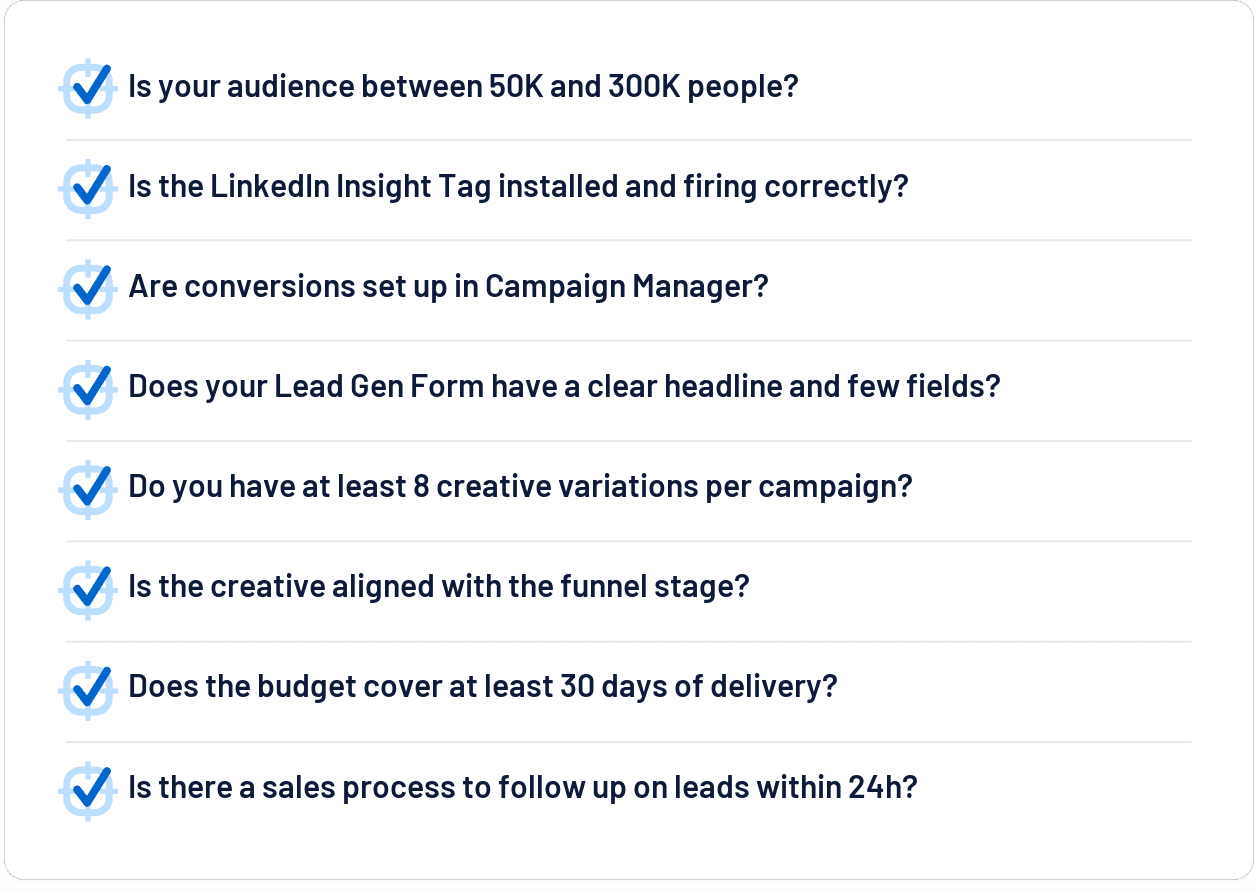
Checklist: before you launch your next LinkedIn campaign
To make it easy to put into practice, use this validation checklist before turning on any campaign:
Wrapping up
LinkedIn Ads has huge potential for B2B companies, but it takes more discipline, patience and strategy than other platforms. Most of the mistakes on this list aren’t complex technical failures; they’re choices you can fix with planning and a clear monitoring process.
Avoiding these mistakes won’t guarantee instant results, but it removes the biggest roadblocks keeping your campaigns from performing. From there, it’s all about continuous optimization.
👉 Found this useful? Share it with someone who’s investing in LinkedIn Ads and could use these tips.
Frequently asked questions
What’s the ideal audience size on LinkedIn Ads?
For lead gen and conversion campaigns, 50,000 to 300,000 people. Above 500,000 usually means a lack of focus; under 15,000 may not give the algorithm enough volume.
How long should I wait before pausing a campaign?
LinkedIn usually needs 2 to 4 weeks to stabilize delivery. Evaluate in 7- to 14-day windows, not day by day.
What’s the maximum recommended frequency?
Past 4 or 5 impressions per person in a short period, engagement drops. Rotate creatives every 2 to 3 weeks.
How many fields should a Lead Gen Form have?
Only the essentials: name, email and company are usually enough for a first touch.