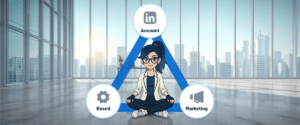
In a nutshell: To advertise on LinkedIn: set up your Campaign Manager account (company page, user access, billing and Insight Tag), pick an objective, target by company and job title, choose your format, create ads that feel like content, start with around $100 a day per campaign and optimize based on CTR, CPC and conversions.
If you’re in B2B and want to turn LinkedIn into a real demand and revenue machine, this guide is for you.
Based on the most effective recent strategies (and plenty of expert takes), we’ll demystify LinkedIn Ads and show you how to build campaigns that actually convert, without looking like just another ad.
Why LinkedIn Ads for B2B?
LinkedIn is the professional platform that brings together decision-makers and influencers from companies in every industry, all over the world.
Sure, a lot of people think of it as a pricier ad platform. But when the strategy is on point, the value for money is hard to beat.
And here’s what really matters: the secret is focusing on demand generation and building brand memory, not just chasing cheap clicks.
Step by step: creating and setting up your campaigns
1. Set up your Campaign Manager account
First things first: make sure your setup in LinkedIn Campaign Manager is ready and optimized. Everything you do later depends on this step!
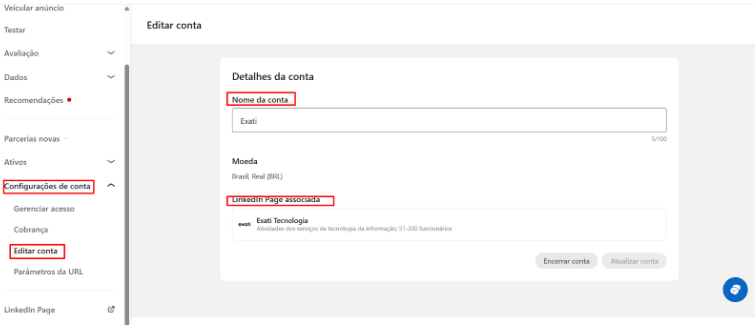
1. Link your company page
Your company page needs to be associated with your ad account. Here’s how:
- In Campaign Manager, go to “Account settings” > “Edit account“.
- Enter the name or URL of your LinkedIn Page. Make sure the URL uses the /company/ format and click “Save changes”.
2. Give your team access
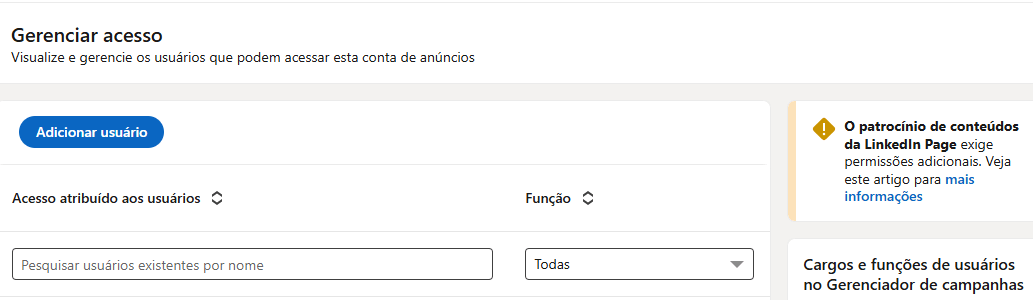
If you work with freelancers, agencies, teammates or other partners who need to create or monitor campaigns, you’ll need to give them access.
- In Campaign Manager, go to “Account settings” > “Manage access“.
- Click “Add user“, enter the team member’s name and assign the right role (e.g. Viewer, Campaign Creator, Account Manager).
Heads up: each role comes with different permissions. Assign them carefully to keep your ad account secure.
Not sure which role to pick? LinkedIn explains each one on the right side of the page 😉
3. Set your currency and payment method
- In Campaign Manager, go to “Account settings” > “Billing“.
- Add your credit card details or set up monthly invoicing.
- Set the account currency. This usually happens when you create the account and can’t be changed later.
Important: your account can only run ads once a valid payment method is in place.
4. Install the Insight Tag
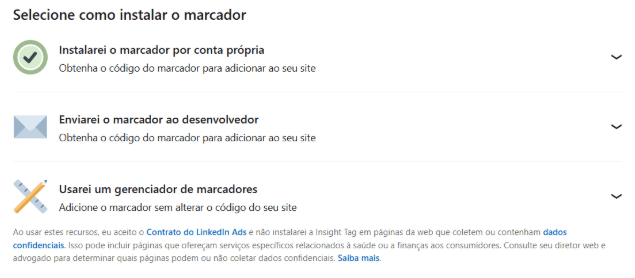
This one’s crucial. The Insight Tag is LinkedIn’s tracking pixel, used to track conversions, build custom audiences (retargeting) and optimize your campaigns. You need it on every page of your website.
- In Campaign Manager, go to “Data” > “Signals manager” > “Insight Tag”.
- You can set it up yourself or send it to a developer.
2. Choose your campaign objective
Just “putting an ad up” won’t cut it. Every campaign needs a purpose that matches where your buyer is right now.
In B2B, the trick is picking objectives that follow the journey of the person on the other side of the screen, guiding them from first touch all the way to the purchase decision.
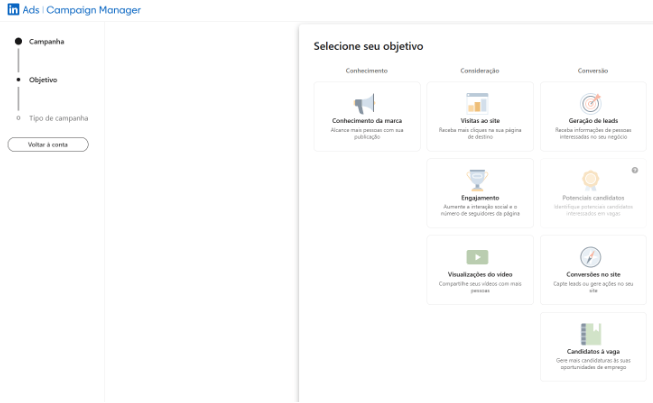
These are the objective groups you’ll find on LinkedIn:
- Awareness: when you want more visibility for your brand (e.g. impressions, video views).
- Consideration: when you want to spark interest and engagement (e.g. website visits, engagement, video views).
- Conversions: when the goal is to drive actions and capture data (e.g. lead generation, website conversions, messages).
Expert tip: for most B2B campaigns focused on sending people to your site to learn more, start with the “Website Visits” objective. It optimizes delivery for people likely to click and explore your content. For the full breakdown, check out our guide to LinkedIn Ads objectives.
3. Target your audience
This is where LinkedIn really shines. Being able to target professionals based on company data is what makes the platform so powerful for B2B.
The secret? Be specific.
These are the main targeting filters:
- Company: company name, industry, company size.
- Job: job title, seniority, job function.
- Education, skills, groups: refine even further based on qualifications and professional interests.
- Custom lists: upload email or company lists for retargeting or prospecting specific accounts (target companies or leads, perfect for ABM).
Bonus tips:
- Avoid tiny audiences (under 20,000 people), since they may not get enough reach.
- Use exclusions to tighten things up, for example removing your own employees or current customers from prospecting campaigns.
TURN OFF audience expansion. “Audience Expansion” and the “LinkedIn Audience Network” can water down your budget by showing your ads to people outside your ICP. Keep both off so your spend hits exactly who you want.
4. Pick the right ad format
There are lots of ways to show up in your buyer’s feed, but not every format fits every moment.
The idea is to mix business with pleasure: pick the format that makes the most sense for your goal and delivers your content the way your audience actually wants to consume it.
Main formats:
| Format | What it is and how to use it |
| Single Image | An image in post format plus caption text. Use it when you have a short message, a specific offer or want to test how an idea lands. |
| Carousel | Think of it as an interactive photo album: 2 to 10 images or videos, each with its own link. Great for showing different product features, a step-by-step or several products/services at once. |
| Video | Perfect for product demos, customer testimonials, brand storytelling or explaining complex ideas in a dynamic way. It boosts engagement and message retention. |
| Event | Promote your events (webinars, workshops, conferences) right in the feed, so people can RSVP and add them to their calendar. |
| Text Ads | Those small, minimalist ads on the side or top of LinkedIn: a short headline, one supporting line and a tiny image (almost an icon). |
| Spotlight Ads | A dynamic, kind of “magic” format: it shows the member’s own profile photo next to your company logo. It can say something like: “John, see how [Your Company] can help you”. |
| Message Ads | A single, direct message that lands in your audience’s inbox, with a subject line, body text (like a short email) and one call-to-action button. |
| Conversation Ads | A “choose your own adventure” experience: instead of one button, you offer several reply options so people pick what they want to talk about. |
| Document Ads | Share a document (PDF, e-book, whitepaper) right in the feed so people can read or download it without leaving LinkedIn. |
Want to go deeper on each one? Check out our guide to LinkedIn ad formats.
5. Create ads that don’t look like ads (and convert more)
This is the heart and soul of your LinkedIn campaign.
The secret is creating content that blends into the organic feed and delivers value and connection instead of getting ignored. Think like a content creator, not a traditional advertiser.
A few tips you can use right away:
1. Lead with emotion (and pain)
Before you try to sell anything, show that you get what your customer is going through. Hit on the challenge that keeps them up at night or the ambition that drives them. Once you connect emotionally, the sale becomes a natural result of trust.
2. Make it unmistakably yours
Use visual elements that scream “this is us!”. Colors, fonts and styles that are 100% your brand help you earn a permanent spot in people’s memory. Over time, they won’t even need to read your name to know the post is yours.
3. Keep it real (skip the fake stuff)
Nobody can stand those too-perfect stock photos anymore. Show your team rolling up their sleeves, your product in real life or situations your audience actually lives. Authenticity builds a kind of trust no stock image can buy.

4. Nail the hook
Your headline is the invitation to the conversation. Write lines that spark healthy curiosity or make people stop and think. The goal is to make someone stop scrolling and go: “wait, I need to read this”.
5. Let your customers do the talking
Nothing is more convincing than seeing someone who already solved the problem with your help. Bring in real testimonials, numbers you’re proud of and concrete results. It takes the weight off the promise and keeps things grounded in reality.
6. Respect your reader’s time
Everyone on LinkedIn is in a hurry. Be direct, deliver value right away and solve a problem. If the copy is long, make sure every line earns its place and the reader walks away better off.
7. Make the next step crystal clear
Don’t leave people guessing. Be a friendly guide and tell them exactly what to do next: “grab the e-book”, “book a quick call” or “see how it works here”.
8. Give your message time to stick
No need to swap your ad every week. Repetition isn’t boring, it’s strategic. For your brand to be remembered, people need to see your message a few times. Give your idea time to move in and settle down in your audience’s mind.
6. Set your budget and bidding strategy
How much should you spend to get started?
So your campaigns don’t get buried and you can collect real data to learn what works, a good starting point in the US is at least $100 a day per campaign.
Think of it as the fuel your ad needs to gain traction and give you the answers you need to grow. (More on this in our guide to setting your LinkedIn Ads budget.)
Choosing how you want to pay:
- Automated bidding (the “autopilot”): you let LinkedIn take the wheel and it tries to get the best results within your budget. It’s convenient, but you lose some predictability on what each click will cost by the end of the day.
- Manual bidding (“full control”): like driving stick, you decide exactly the max you’re willing to pay per click (CPC) or per thousand impressions (CPM). It’s a bit more work, but there are no surprises on your bill.
Advice from people who’ve been there:
Our take: grab the wheel with manual bidding. Use LinkedIn’s suggested bid as a reference point, but adjust it to stay in full control of your wallet.
That way you don’t pay “list price” for no reason, and you can fine-tune as you see how the campaign performs.
7. Monitor, analyze and optimize all the time
Launching a campaign is just the beginning. Real success comes from constant monitoring and data-driven optimization.
These are the metrics you need to watch:
- CTR (click-through rate): think of it as your interest thermometer. It shows whether your ad is interesting enough to make people stop what they’re doing and click. High CTR? Congrats, your message clicked with your audience!
- CPC (cost per click): what you pay for each visit your ad drives. Keep an eye on it to make sure you’re attracting the right people without burning through your budget too fast.
- Landing page conversion rate: there’s no point walking people to the door if they don’t come in, right? This shows how many visitors actually did what you wanted (like downloading a resource or requesting a call). It’s what separates the curious from the truly interested.
- Engagement and comments: the digital version of word of mouth. When people like, comment or share, they’re telling you your content was worth it. These are strong signals your brand is building a real connection, not just “pushing” an ad.
On optimization:
A/B tests: don’t guess what your audience likes, ask them! Run two versions of an ad and see which one performs better. It’s the smartest way to learn fast. Just make sure you know what you’re testing: copy, image, offer, etc.
Refine your audience: watch who’s engaging and don’t be afraid to clean house: cut the people who don’t fit your profile and double down on those bringing real results. Platforms like LinkedScope also make it much easier to exclude or include the job titles your ads are reaching.
Bid adjustments: don’t leave your money on autopilot forever. Adjust what you pay as you see how the campaign performs, so every cent is working hard for your return.
Bottom line: advertise smarter on LinkedIn
Mastering LinkedIn ads is a huge strategic edge for B2B companies.
By putting value and precise targeting first, you turn the platform into a trusted channel to educate the market and open qualified doors for your sales team.
The secret is combining strategic patience with a sharp eye on the data that actually drives revenue. Every well-built campaign helps you build a solid foundation of authority, turning ad spend into a sustainable growth engine for your business.
With the steps in this guide, you’ve got the map to create campaigns that respect your audience’s time and deliver the return your company expects.
Now it’s time to put it into practice. Ready to turn your goals into real connections and closed deals?
Frequently asked questions
How much does it cost to start advertising on LinkedIn?
A solid starting point is at least $100 a day per campaign, enough to collect real data and learn what works.
Do I need to install the Insight Tag?
Yes. The Insight Tag is LinkedIn’s pixel: without it you can’t track website conversions or build retargeting audiences.
Which objective should I pick for my first campaign?
For most B2B campaigns that send people to your site, start with the Website Visits objective.
Automated or manual bidding?
Manual bidding gives you more control over cost. Use LinkedIn’s suggested bid as a reference and adjust based on performance.