
In a nutshell: when your LinkedIn lead gen form gets opened and nobody submits, the ad already did its job. The problem sits between the open and the submit. Check three things: the audience (does it match the offer?), the form (only the essential fields) and the offer (does the person know exactly what they’ll get?). If the audience is cold, asking for a meeting right away is usually too big a step. Test the form across formats (image, document, video, Conversation Ads and so on) and angles, or run content to the cold audience and save the form for retargeting. And reset expectations: a small budget reaches a small slice of the market, and the B2B journey is long.
The other day someone sent this message to a LinkedIn Ads community:
“I’ve got a LinkedIn campaign running with native lead gen, three audiences set up, and still zero conversions. The conversion is for access to a product demo. What would you optimize?”
I went through the screenshots.
About 24K impressions; 166 clicks; 107 form opens.
Zero leads.
Yep.
107 people raised their hand halfway. They clicked, opened the form… and bailed.
In this post I break down what to do when your LinkedIn lead gen form doesn’t convert: the checklist to diagnose it, the test I’d run and the expectations you need to set before touching anything.
What does it mean when a lead gen form gets opens but no leads?
It means the ad worked and the form didn’t. The person saw it, cared enough to click, and got stuck halfway.
That’s a very different diagnosis from “nobody clicks”:
- Few clicks: the problem is the ad (creative, message, offer) or the audience.
- Clicks and opens, but no submits: the problem is the form, the offer, or the gap between what the ad promised and what the form asks for.
Remember that the LinkedIn Lead Gen Form opens right inside LinkedIn, already filled in with profile data. Submitting is one tap.
So if someone opened it and didn’t submit, they weren’t too lazy to type. They read what you were asking for and decided it wasn’t worth it.
That’s where you need to look.
Where should you start the diagnosis?
I’d start with this checklist, in this order.
1. Does the audience match the offer?
An audience that’s too broad brings in curious clicks. Someone finds the ad interesting, opens the form, sees “book a meeting” and thinks: “I’m not the one who decides this.”
Ask yourself:
- Do the people you’re reaching have decision-making power (or influence) over the purchase?
- Do the companies match the firmographics (industry, size and so on) of the ones that buy from you?
- Do all your audiences make sense for the same offer? A buyer audience and a sales rep audience, for example, probably want different things.
If you need to revisit size and filters, the post on LinkedIn Ads targeting shows how to size your audience from your ICP.
2. Are all the fields and questions really necessary?
Every extra field is one more reason to quit.
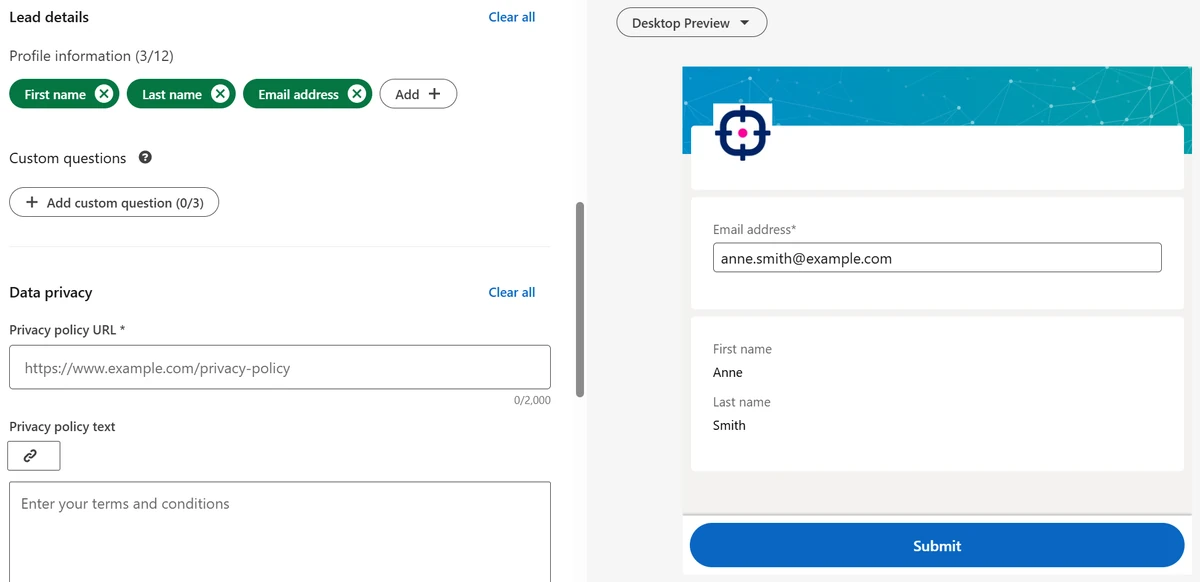
Profile fields (name, email, company, job title and so on) come pre-filled.
But custom questions have to be answered by hand, and fields like phone number make a lot of people stop and think twice (I’m one of them).
Review:
- Is phone required? Does it need to be, on this first touch?
- Are there qualifying questions (revenue, “when are you planning to buy”) that sales can find out later?
- Is the pre-filled email a personal one? If you require a work email, the person has to type it. And if there’s mandatory verification, that’s more friction.
Keep only what you need to start the conversation. Your CRM and your sales team can fill in the rest.
3. Do the ad and the form make it clear what the person will get?
“Demo access”, for example, can mean two very different things:
- Instant demo access: a video, a sandbox, a recorded tour. Low commitment.
- A call with a sales rep: a meeting with someone from sales who’s going to qualify them. High commitment.
If the ad suggests the first and the form delivers the second (or it just isn’t clear), people freeze.
Also check what happens after the submit.
Does the thank-you message say what’s next? Is there a link to the demo, to a calendar, to a resource?
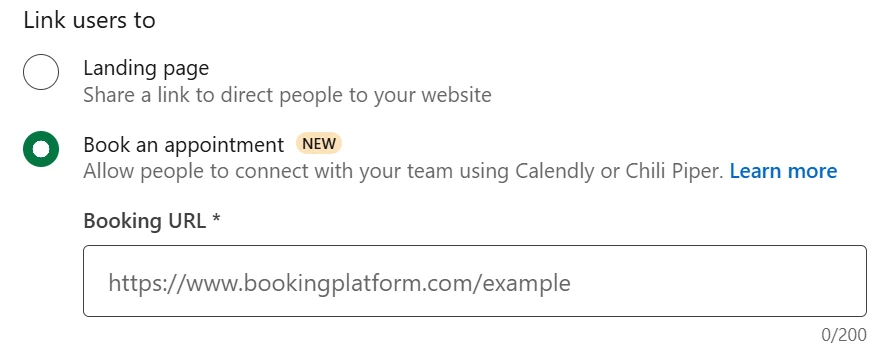
If the offer is a meeting, you can shorten that path. In the form’s confirmation step, the Book an appointment option sends people straight to your Calendly or Chili Piper calendar right after they submit.
And in Campaign Manager, the Appointments booked column shows how many bookings came from there.
That won’t win back the people who quit, but setting clear expectations from the ad onward will.
Is asking a cold audience for a meeting asking too much?
Most of the time, yes. And this is my opinion, not a rule.
A cold audience has never heard of you. They’re scrolling the feed, see your ad for the first time and you go: “give me your contact info so a sales rep can call you.”
That’s like proposing on the first date.
Personally, I’d rather offer something valuable first: a resource that solves a real problem for the people who buy from you, plus content distribution. Then build the relationship from there.
The meeting makes sense for people who already know you, have already consumed your content and are already evaluating solutions. In other words, for retargeting (in theory).
That doesn’t mean a form never works with a cold audience. It works when the offer matches how well the person knows you. And you can test it.
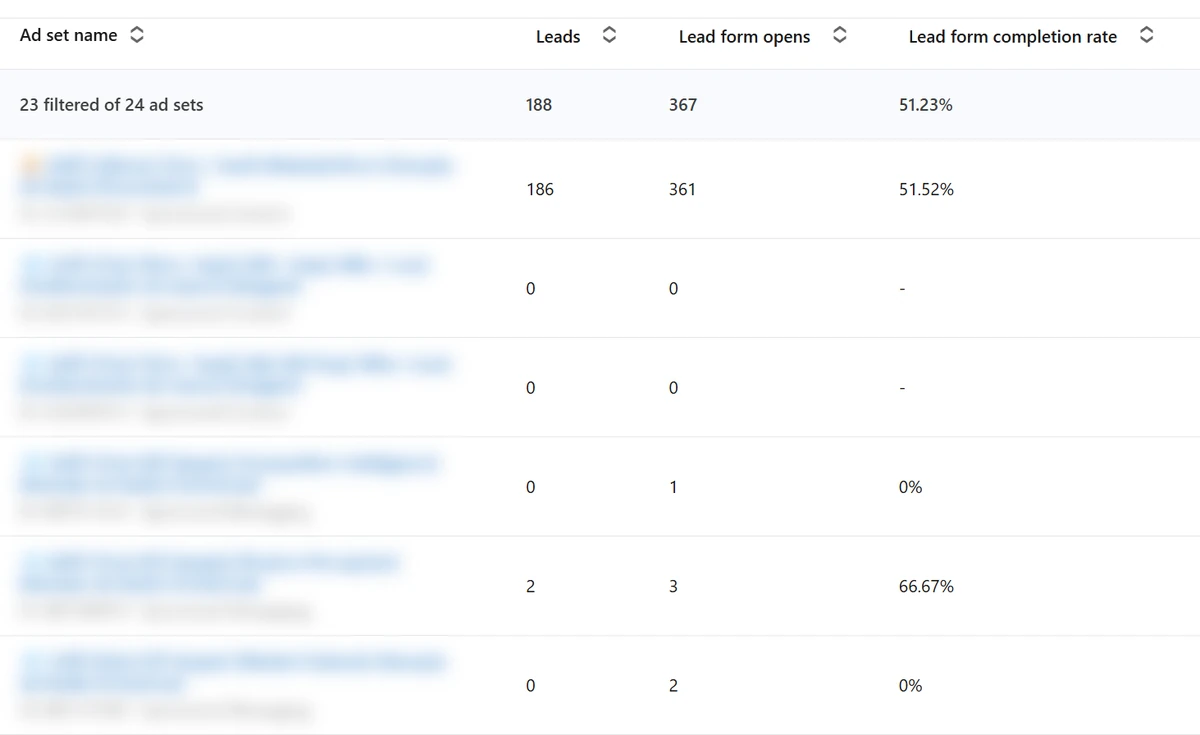
A real example from an account we work with. The ad set offering a downloadable resource, with a document ad and a form, got 361 opens and 186 leads: more than half of the people who opened it submitted.
Meanwhile, the Conversation Ads ad sets with a form on a cold audience added up to 6 opens and 2 leads.
How do you test a LinkedIn lead gen form?
I see two paths. If you want to stick with the cold audience, test the form in a structured way. If not, give each campaign its own job.
Path 1: test the form on a cold audience, changing format and angle
The lead gen form isn’t tied to one format.
You can attach the same form to several ad types, and each one creates a different experience before the ask:
| Format + form | How it works | When to test it |
|---|---|---|
| Image + form | Direct offer, one click and the form opens | When the offer is clear and speaks for itself |
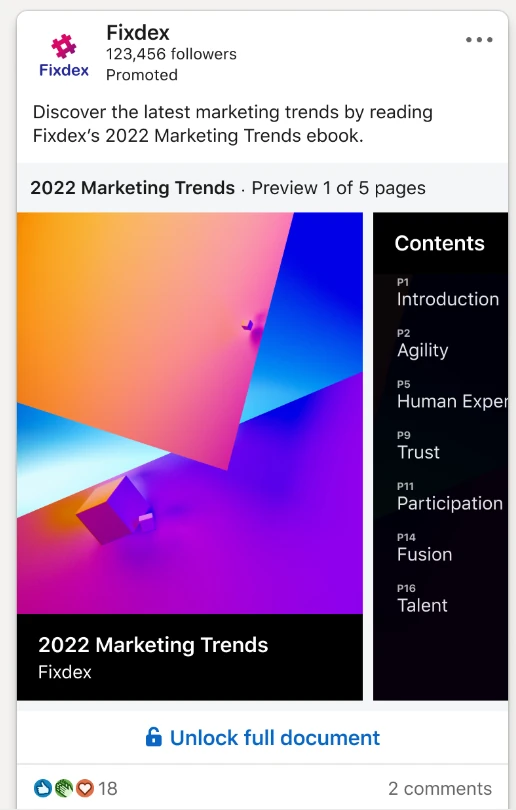
| Document + form | People read the first pages in the feed and the form unlocks the rest | When you have a resource that shows value before the ask |
| Video + form | The video shows the product or the problem, and the form comes as the next step | When the demo itself is the argument |
| Conversation Ads + form | A conversation with reply options, and the form sits behind one of the buttons | When you want to offer different paths (resource, demo, chat) |
There are more options (carousel, event, message), but these four already make a solid test. The post on LinkedIn ad formats covers each one.
Two rules to keep the test valid:
- One format per ad set. In LinkedIn Ads, the format is set at the ad set level (what the API calls a campaign) and limits which ads can go in it. To compare formats, create one ad set for each.
- Change the angle within each format. Pain, proof (a result, a customer), curiosity. The format changes the experience; the angle changes the reason to keep going.
You can go further: run the same format with offers that ask for different levels of commitment (resource vs. recorded demo vs. meeting) and see where the submits happen.
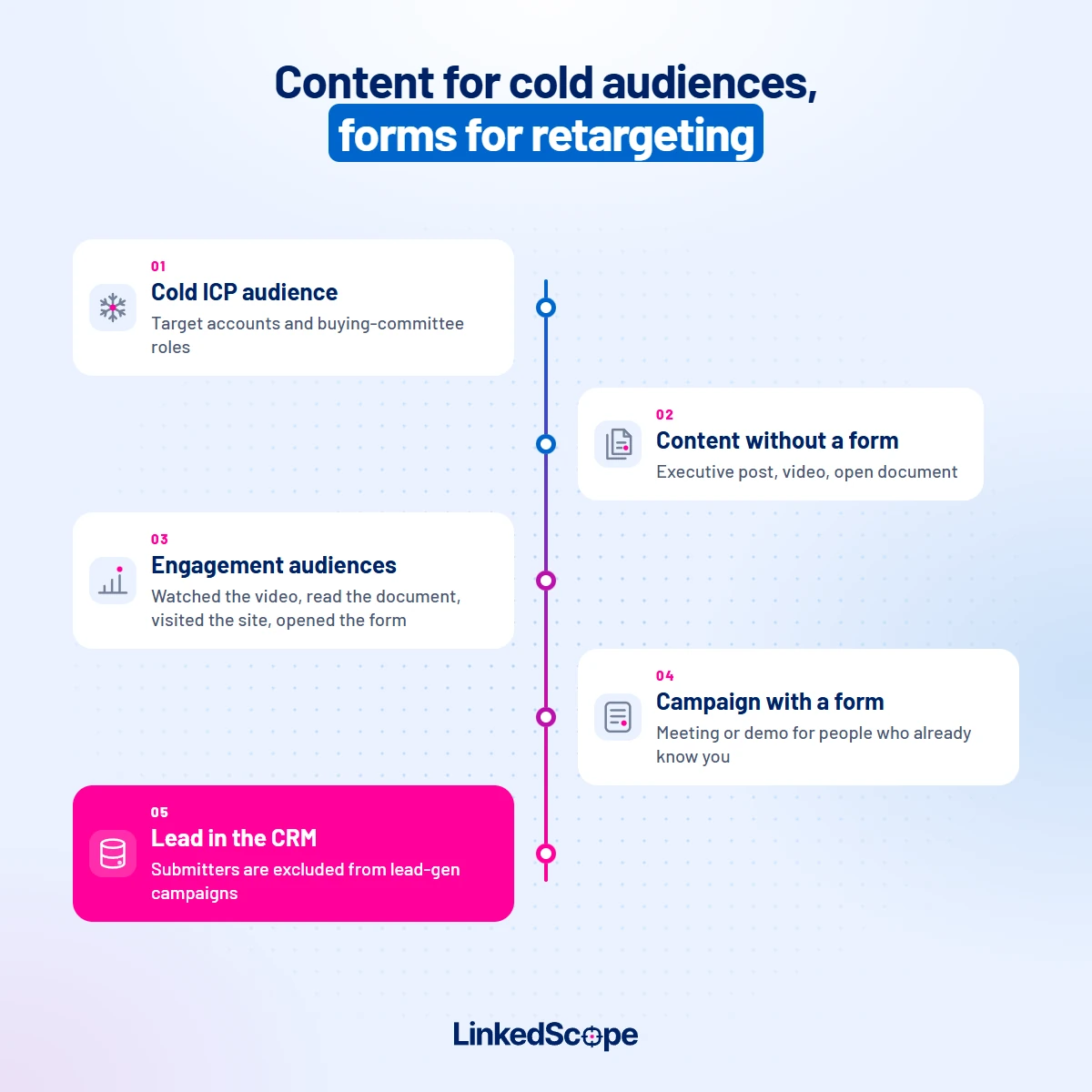
Path 2: content for the cold audience, form for retargeting
Here, each campaign has a job.
- Cold campaign to your ICP with relevant content. No form. An executive’s post, a short video, an open document, a useful diagnostic. The goal is to be remembered and drive engagement.
- Lead gen campaign on retargeting. For people who engaged with that content, watched the video, visited your site or opened a form and didn’t submit. That’s where the demo comes in.
Those 107 people who opened the form and didn’t submit? They become an audience.
LinkedIn lets you build an audience of people who opened the form (including submitters) and one of people who submitted. Use the first as your audience and the second as an exclusion, layered with your ICP.
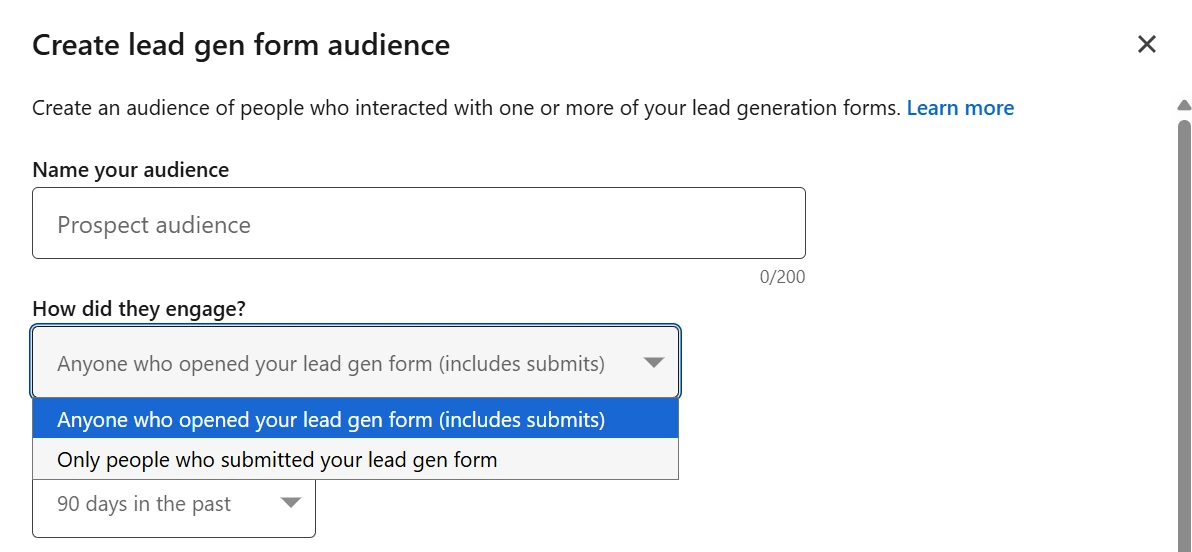
For that group, show the offer again with a different angle, or a lighter offer.
Just watch one thing: the audience needs at least 300 members for the campaign to deliver. Until then, the content campaign keeps feeding it.
Our step by step for these audiences is in the post on LinkedIn Ads retargeting. And if budget is tight, our post on LinkedIn Ads on a small budget shows how to set this up with just a few campaigns.
How long should you wait before changing the campaign?
More than a week, in most cases. But 107 opens and zero submits is already enough of a signal to review the form and the offer, no need to wait any longer.
Now, two expectations you need to get right.
A small budget reaches a small slice of the market
Your budget decides how many people in your audience you reach, and how often.
With a small budget and a big audience, the campaign will show your ad to a small fraction of the market (metrics: Reach and Audience penetration).
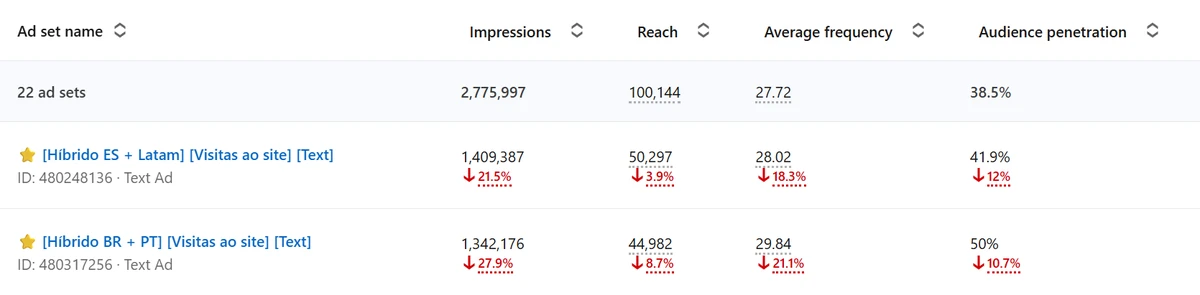
Swapping creative or format won’t increase reach: what caps penetration is the budget.
That’s why audience size matters so much. An audience the size of your ICP (target accounts × buying committee members at each one) keeps your budget focused on the people who buy from you. An audience of hundreds of thousands of people dilutes everything.
The full math is in the post on LinkedIn Ads targeting.
The B2B journey is long
People buying B2B software rarely decide on the first ad they see.
There’s a committee, a budget, a current solution, the company’s timing. Most of your audience isn’t buying right now. They will be a few months from now, and the idea is that they remember you when the time comes.
That’s the logic of demand generation on LinkedIn: build memory before asking for contact info.
So measure what you can measure in the short term (opens, submits, engagement, ICP companies being reached) and give the rest time. The math closes in the pipeline, not in week one.
Patience, yep. But patience with a diagnosis, not the kind where you wait and touch nothing.
Want to see leads from LinkedIn native lead forms landing straight in your CRM, alongside the ICP companies engaging with your ads? See how LinkedScope works and try it free for 15 days. 😉
Frequently asked questions
Why does my LinkedIn lead gen form get opens but no submits?
Because the person was interested in the ad but gave up when they saw what the form asks for. The most common causes are an audience that doesn’t match the offer, too many fields and questions, and an offer that doesn’t make clear what the person will get, like a “demo” that’s actually a sales meeting.
How many fields should a LinkedIn lead gen form have?
Only what you need to start the conversation. Profile data comes pre-filled, but custom questions and fields like phone number add friction. Leave detailed qualification to your CRM and sales team.
Should you use a lead gen form with a cold audience?
It’s worth testing, as long as the offer matches how well the person knows your brand. Asking someone who’s never heard of you for a meeting usually converts poorly. A valuable resource or a recorded demo asks for less commitment.
Which LinkedIn ad formats support lead gen forms?
Image, carousel, video, document, Conversation Ads, message ads and event ads. With a document ad, people read the first pages in the feed and the form unlocks the rest.
Can you retarget people who opened the form but didn’t submit?
Yes. Create an engagement audience of people who opened the form and another of people who submitted. Use the first in your campaign and the second as an exclusion, layered with your ICP. The audience needs at least 300 members for the campaign to deliver.
How long should you wait to evaluate a lead gen campaign?
Usually more than a week, because the B2B journey is long and a small budget reaches only part of your audience. But lots of opens with zero submits already justify reviewing the form and the offer before that.