In a nutshell: LinkedIn Ads retargeting means showing ads again to people who already engaged with your brand. That covers website visitors (via the Insight Tag) and people who engaged with your single image, document, video, conversation, Lead Gen Form or event ads, or with your LinkedIn Page. These audiences live under Matched audiences, with windows of up to 365 days (up to 180 for the website). To make it work: build a fixed audience kit, cross retargeting with your ICP, send a different message for each signal and exclude people who already converted. An audience needs at least 300 members and can take up to 48 hours to be ready.
You know those ads that chase you around the internet after you looked at a pair of sneakers once?
The ones that show up on every site, in every app, with the persistence of the IRS chasing someone who forgot to file?
Yep. That’s retargeting.
The difference is that in B2B, done right, it’s not annoying. It’s what makes the director who watched your video last week remember you when the topic lands on their company’s agenda.
In this LinkedIn Ads retargeting guide, I’ll show you which audiences you can build, the kit I set up on every account and how to use it without burning budget. Let’s go.
What is LinkedIn Ads retargeting?
Retargeting is showing ads again to people who already had contact with your brand.
On LinkedIn, that contact can happen in two places:
- On your website: people who visited your pages, tracked by the Insight Tag.
- Inside LinkedIn itself: people who watched your video, opened your form, engaged with your document ad, visited your LinkedIn Page, registered for your event…
And no, retargeting and remarketing aren’t the same thing, even though a lot of people use them as synonyms:
- Retargeting is paid media based on a behavior: visited the site, watched the video, opened the form. The person doesn’t even need to have given you their contact info.
- Remarketing is reaching back out to people you already know, like the leads and customers in your database. Originally by email. Today, also by uploading your contact list as an audience on ad platforms.
The confusion comes from Google Ads, which calls its retargeting “remarketing”. Here, the focus is retargeting. If you want to combine Google and Meta traffic with LinkedIn, the B2B retargeting playbook shows the four flows.
These audiences live under Matched audiences, alongside the company and contact lists you upload.
And why does this matter so much in B2B?
Because sales are slow and a whole committee buys. Nobody sees an ad and signs a contract the same day. Retargeting keeps the conversation going with people who already showed interest while the company works its way to a purchase.
What types of retargeting audiences does LinkedIn Ads offer?
Each source has its own actions and windows:
| Source | Who can be included | Windows |
|---|---|---|
| Website (Insight Tag) | People who visited the whole site, specific pages or clicked buttons on the site | 14, 28, 30, 60, 90 or 180 days |
| Single image ad | People who clicked or engaged in any way | 30, 60, 90, 180 or 365 days |
| Document ad | People who clicked, engaged or downloaded the document | 30, 60, 90, 180 or 365 days |
| Video ad | People who watched at least 25%, 50%, 75% or 97% of the video | 30, 60, 90, 180 or 365 days |
| Conversation ad | People who opened the conversation or clicked any button | 30, 60, 90, 180 or 365 days |
| Lead Gen Form | People who opened the form, or only those who submitted it | 30, 60, 90, 180 or 365 days |
| LinkedIn Page | People who visited the Page or clicked its call-to-action button | 30, 60, 90, 180 or 365 days |
| LinkedIn Event | People who registered, watched the stream or engaged with the event | 30, 60, 90, 180 or 365 days |
The creation screen also shows the Conversions API (an audience built from the events you send through the Conversions API) and, as a new option, company engagement, with organic and paid signals.
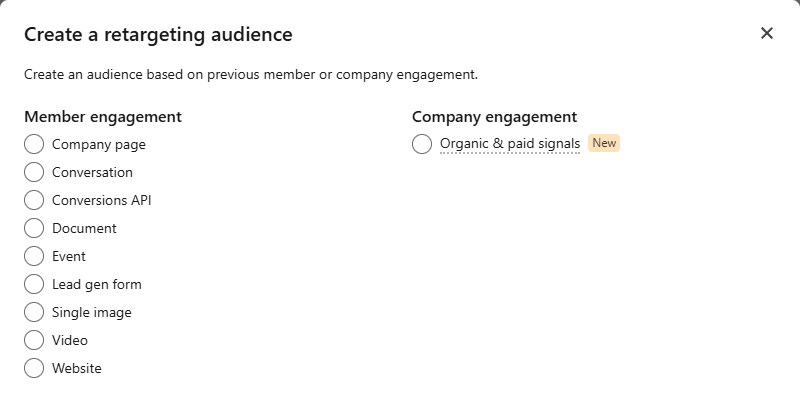
Engagement audiences are built from the ad sets (or the Page and event) you choose as the source. You can combine several of them into one audience.
If you’re still picking a format, check out the main LinkedIn ad formats. Each format creates a type of audience you can use later.
Which retargeting audiences should you create? The kit I always use
On every new account, I create the same kit right at the start. It’s a cheat sheet I always use.
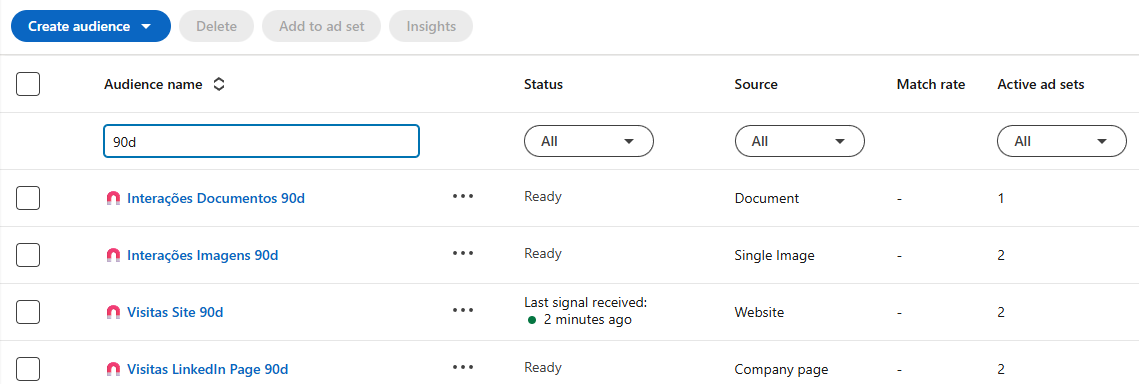
1. Engagement retargeting on LinkedIn
Here I use 90 days as the default window.
| Audience | Who’s in it | What it’s for |
|---|---|---|
| Image engagements 90d | People who engaged with your single image ads | Remind people who saw your content and bring the next message |
| Document engagements 90d | People who engaged with your document ads | Go deeper on the topic of the material they consumed |
| Video views 90d | People who watched at least 50% of your videos | Keep the conversation going with people who paid attention (50% filters out the scrollers) |
| Conversation opens 90d | People who opened your conversation ads | Follow up with people who opened the message and didn’t click |
| Conversation CTA clicks 90d | People who clicked any button in your conversation ads | A more direct offer, like a demo or a call with the team |
| Form opens 90d | People who opened a Lead Gen Form | Win back people who opened the form and didn’t submit |
| Form submissions 90d | People who submitted a form | Exclusion: they’re already leads, no need to pay to capture them again |
| LinkedIn Page visits 90d | People who visited your company’s LinkedIn Page | Re-engage people who went looking for your company |
| LinkedIn Page CTA clicks 90d | People who clicked your Page’s call-to-action button | A more direct offer for people who already wanted to act |
2. Website retargeting
- Website visits 30d / 60d / 90d / 180d: the same audience in different windows. The shorter the window, the more recent the interest (and the smaller the audience).
- Thank-you page visits 90d: people who converted on your site. Just like form submissions, they become an exclusion in your lead gen campaigns.
- Specific page visits 30d / 60d / 90d / 180d: niche retargeting. Whoever visited your pricing page, a solution page or a case study gets the ad on that topic.
3. The lists that go with it
They’re not retargeting, but they work side by side with it:
- ICP: a company list built from your ICP filters. It’s the list you cross your retargeting with (more on that below).
- Exclusion: customers, competitors, partners and off-ICP companies. There’s a whole post on it: LinkedIn Ads exclusions.
- Open deals: companies with an open deal in your CRM. They get bottom-of-funnel messaging and come out of your top-of-funnel campaigns. How to build that reinforcement campaign is in the post on lookalike audiences and retargeting with CRM data.
How do you create a retargeting audience on LinkedIn Ads?
Website audience
- Install the Insight Tag across the whole site (in the header or footer shared by every page). Without it, there’s no website audience. The tag walkthrough is in the guide on how to advertise on LinkedIn.
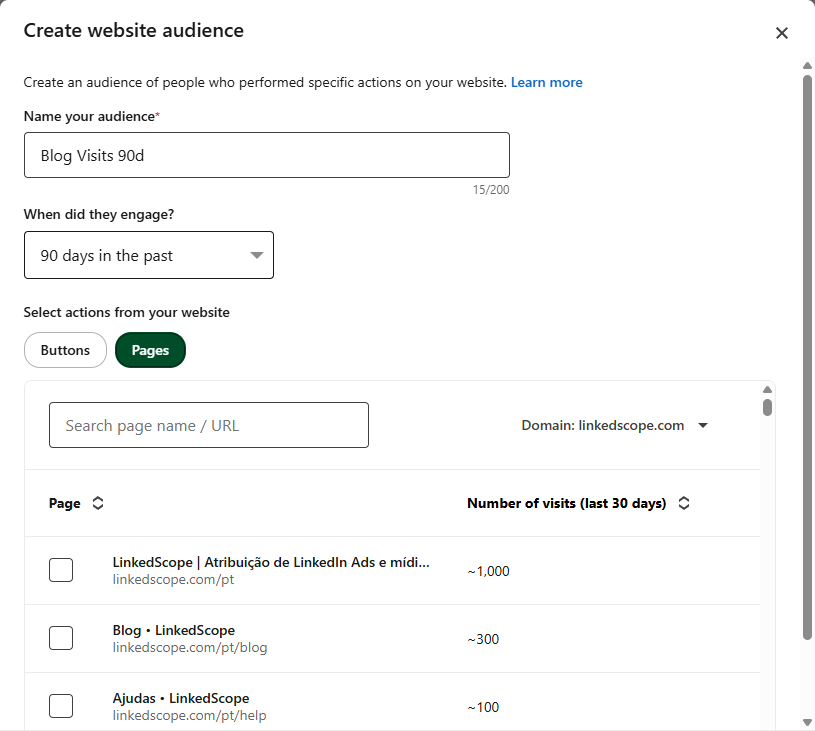
- In Campaign Manager, go to Audiences > Create audience > Retargeting audience and choose Website.
- Choose the actions on your site. Under Pages, LinkedIn lists your domain’s pages with the number of visits, and you can search by name or URL. Under Buttons, the audience comes from people who clicked a button on your site.
- Choose the window and name it with your naming convention.
Engagement audience
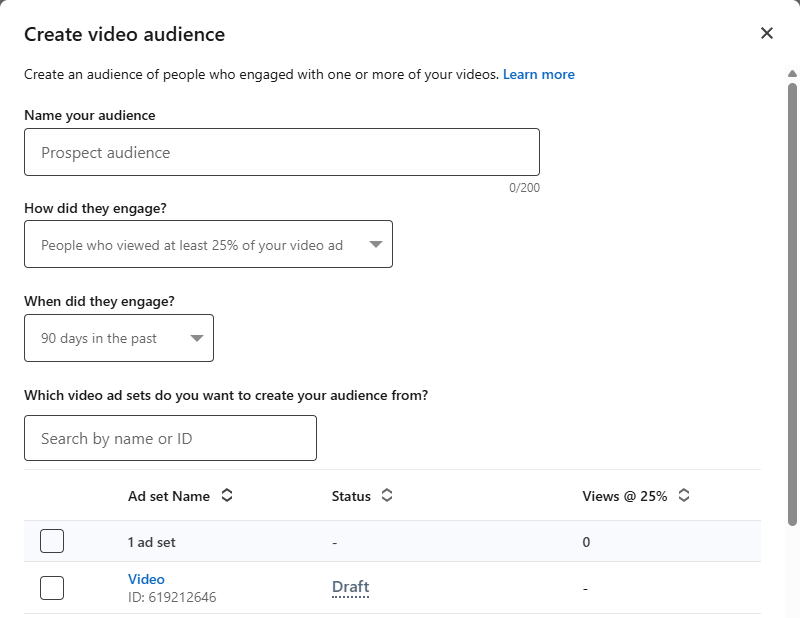
- Choose the source: video, Lead Gen Form, single image, document, conversation, Company page or event.
- Choose the action: for example, watched 50% of the video or opened the form.
- Choose the origin: the ad sets, the Page or the event the audience will come from.
- Choose the window and name it.
Two things that trip a lot of people up:
- It takes time to be ready. LinkedIn takes up to 48 hours to process a retargeting audience (sometimes longer), and up to another 24 hours to start delivering. Create it before you need it.
- 300-member minimum. Below that, the campaign won’t run. Low-traffic accounts need a longer window.
How do you use retargeting without burning budget?
Cross retargeting with your ICP
Not everyone who engages with your content is a buyer. You’ll get students, competitors, vendors, the curious.
So in the campaign audience, combine retargeting (AND) with your company list or ICP criteria. Build it as a saved audience, the way I show in the LinkedIn Ads targeting guide.
Just don’t overdo it: retargeting is already a small audience. Crossing it with too many filters can drop it below 300.
One message for each signal
The worst retargeting is showing the same ad to people who already saw it.
Use the signal to decide the next message:
- Watched half the video? Show the case study.
- Downloaded the document? Show the next step on that topic.
- Opened the form and didn’t submit? Show the offer again, with a different argument.
- Visited the pricing page? Time to invite them to a conversation.
Remove people who already converted
Form submissions and thank-you page visits go in as exclusions in your lead gen campaigns. Otherwise you pay to capture people who are already leads.
And if your exclusion list is out of date, the waste is silent. More on that in the post on LinkedIn Ads exclusions.
Watch the frequency
Small audience plus big budget = the same person seeing the same ad way too many times.
That’s when you actually become the IRS of the story.
Keep an eye on frequency, refresh your creatives regularly and, if the audience is small, hold back on budget.
Standardize the names
I use something like “Document Engagements 90d (Campaign X)”. One glance tells you the source, the window and where the audience is used.
Sounds like overkill. Until the account has 200 audiences.
Clean up your audiences
Each ad account has a limit of 1,000 audiences, and expired and archived audiences count too.
Hit the limit? Existing audiences and campaigns keep running, but you can’t create a new one until you delete the ones you no longer use. Start with the expired ones.
Why isn’t my retargeting audience delivering?
The most common causes:
- Fewer than 300 members. Widen the window, add more ad sets as the source or loosen the ICP crossing.
- It’s still processing. A new audience can take up to 48 hours, plus 24 to deliver.
- Insight Tag issues. A tag missing from some pages, or a domain blocked in the tag settings, won’t feed the website audience.
- A combination LinkedIn doesn’t accept. Some audiences, like website and contact list audiences, can’t be combined with member interests and traits.
- Audiences in Europe. In the European Economic Area and Switzerland, LinkedIn only reaches members who allowed this in their advertising settings. Retargeting audiences can be smaller there.
- A weak source. A video with few views creates an audience too small to be worth a campaign. Wait for the source to build volume.
How do you keep your lists and audiences up to date?
Retargeting audiences update themselves: people who engage come in, people outside the window drop out.
The lists that go with them (ICP, exclusion, contacts), though, go stale fast if you upload a CSV every now and then.
In LinkedScope, Target Accounts and Exclusion sync automatically as company audiences on LinkedIn Ads every week. And your CRM contacts become audiences on LinkedIn, Google and Meta.
Then, to know whether retargeting is working, set up your conversions properly: it’s all in the post on LinkedIn Ads conversion tracking.
Want your ICP and exclusion lists always up to date on LinkedIn Ads, without uploading CSVs? See how LinkedScope works and try it free for 15 days. 😉
FAQ
What is LinkedIn Ads retargeting?
It means showing ads again to people who already had contact with your brand: people who visited your website (via the Insight Tag) or engaged with your ads, forms, events or LinkedIn Page. These audiences live under Matched audiences in Campaign Manager.
Which retargeting audiences should you create on LinkedIn Ads?
A basic kit: single image and document ad engagements, video views of at least 50%, conversation ad opens and clicks, form opens and LinkedIn Page visits and clicks, over 90-day windows; website visits over 30, 60, 90 and 180 days and visits to specific pages. Form submissions and thank-you page visits become exclusions.
What’s the minimum size of a LinkedIn retargeting audience?
300 members. Below that, the campaign using the audience won’t start delivering.
How long does a retargeting audience take to be ready?
Up to 48 hours to process (sometimes longer) and up to another 24 hours to start delivering. That’s why you should create your audiences before launching the campaign.
What’s the maximum retargeting window on LinkedIn Ads?
365 days for engagement audiences (video, Lead Gen Form, single image, document, conversation, LinkedIn Page and event) and 180 days for website visitors.