In a nutshell: the ideal audience size on LinkedIn Ads is the size of your ICP: number of target accounts × buying committee members at each one. If Campaign Manager’s estimate goes way past that, your targeting is too loose. LinkedIn requires at least 300 members, joins values of the same attribute with OR and different attributes with AND. But that AND doesn’t tie job title and company to the same position, and company size filters only work on members whose company page is properly linked on their profile. So: build the audience as a saved audience, check it in Audience Insights and validate it later with the job titles and companies you actually reached.
A 2 million-person audience to sell high-ticket B2B software?
Something’s off.
I see this all the time: someone opens Campaign Manager, stacks job title, industry, company size, skills… and celebrates when the number gets nice and fat.
But in B2B, an oversized audience is usually a sign of bad targeting, not an opportunity.
In this LinkedIn Ads targeting guide I’ll show you how to calculate the right audience size for your ICP, how the AND/OR logic really works, and the gotchas almost nobody talks about. Let’s go.
What’s the ideal audience size on LinkedIn Ads?
Short answer: the size of your ICP. No more, and not much less.
And you can do the math before you even open Campaign Manager:
Ideal audience size = number of target accounts × buying committee members per account
An example:
- You sell to 800 companies that fit your ICP.
- At each one, about 8 people influence the purchase (decision-maker, influencers, users, whoever signs off on the budget).
- Your ideal audience lands around 6,400 people.
Then you set up your targeting and LinkedIn estimates 180,000.
Yep. That’s 170,000 people who aren’t in your plan. And they’ll compete for your budget with the people who matter.
A few rules of thumb:
- Technical minimum: LinkedIn only runs campaigns with an audience of at least 300 members.
- Estimate way above your math: loose targeting. Go back and tighten job title, company or industry.
- Estimate way below: either your ICP really is small (normal in ABM), or you have too many filters canceling each other out. Figure out which one before you launch.
- Keep the budget in mind: a big audience with a small budget turns into scattered impressions. Nobody sees your ad enough times to remember you.
If you want to run the budget math too, check out how to set your LinkedIn Ads budget.
What about LinkedIn’s 50,000-people recommendation?
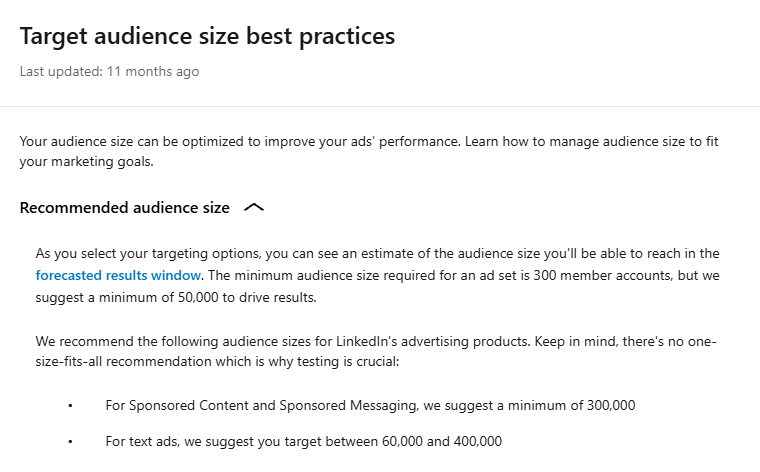
If you’ve read LinkedIn’s own help page, you’ve seen it: the minimum is 300 people, but they “suggest” at least 50,000 to drive results.
And for Sponsored Content and Sponsored Messaging, the most used formats in B2B? At least 300,000.
Let me be blunt: for B2B, that’s nonsense.
A bigger audience helps the algorithm deliver and spend your whole budget. In other words, it helps whoever sells the media. Not necessarily you.
Remember the math above? If your ICP adds up to 6,400 people, inflating the audience to 300,000 puts almost 294,000 people outside your plan competing for your budget.
A small audience doesn’t need more people. It needs a matching budget and frequency under control.
The ideal size is the size of your ICP. Period.
LinkedIn Ads targeting attributes (and when to use each one)
If you’re just getting started, take a quick look at the ultimate LinkedIn Ads guide first.
LinkedIn lets you target by a ton of things. These are the ones that matter most in B2B:
| Attribute | What it is | When to use it | Watch out |
|---|---|---|---|
| Job title | The title on the member’s profile, standardized by LinkedIn | When you know exactly who makes the decision | Super Titles group several titles and can bring in people you didn’t expect |
| Job function + seniority | Area (Marketing, Finance…) and level (Manager, Director…), inferred from the title | To cover title variations without listing them all | It’s a broad category, interpreted by LinkedIn |
| Company name or company list | Specific companies, picked one by one or uploaded | ABM and any ICP with a closed list of accounts | Depends on the member’s link to the company page |
| Industry | Industry of the company the member works for | When your ICP is defined by market | A company can have several industries, some of them inferred by LinkedIn. The primary one is what the admin picked and may be outdated |
| Company size | Employee count range of the company | To keep out companies that are too small or too big | Only works for members whose company is properly linked on their profile (more below) |
| Experience and education | Years of experience (estimated by LinkedIn from work history) plus schools, degrees and fields of study on the profile | When the audience depends on education (e.g. MBA alumni) or to keep out people very early in their careers | Many members leave education blank, and years of experience is only an estimate. It quietly cuts good people out |
| Skills and interests | Listed skills and inferred interests | As a complement, never as the foundation | Inflates the audience fast, with little precision |
My take: the foundation of your audience is company + job title. Industry and company size come in when you don’t have an account list yet. Skills and interests, only for testing.
How AND/OR logic works in LinkedIn targeting
This is where half the confusion lives. The rule is simple:
- Within the same attribute, it’s OR. Job title “CMO” OR “Marketing Director”: anyone with either one gets in.
- Between different attributes, it’s AND. Job title AND industry AND company size: the member has to match all of them.
- In exclusions, it’s OR. Matched any exclusion criterion? Out.
Beautiful in theory. In practice, there’s one detail that changes everything.
The targeting “AND” doesn’t tie job title and company together
I once showed in a LinkedIn post (in Portuguese) that you can reach a “Marketing Director at Nubank” (a big Brazilian fintech) who isn’t a director and doesn’t even work at Nubank.
Sounds like a joke. It isn’t.
Picture targeting set to Marketing Director AND Technology industry AND companies with 200+ employees.
What you expect: marketing directors at tech companies with 200+ employees.
What you get: LinkedIn doesn’t require those attributes to come from the same position.
If someone has more than one position marked as current, each criterion can be matched by a different one.
So in comes a person who’s Marketing Director at a 2-person agency and, at the same time, an HR manager at a 500-employee tech company.
The job title came from one place. The industry and company size came from another.
- Right title + wrong company: in.
- Wrong title + right company: also in.
And it’s more common than it looks. Consultants, partners in small firms, board members, professors, anyone with a side business… they usually have two or more current positions.
How to reduce the problem
- Use specific job titles instead of just function + seniority.
- Prefer a company list over industry + size when you know which accounts you want. A list + job title can still cross positions, but the universe gets much smaller and more controlled.
- For real ABM, use a contact list: then you’re picking the person, not a combination of attributes.
- Track the job titles and companies you actually reached. That’s where this crossover shows up, not on the setup screen.
Why a company size filter may not do what you expect
Job title, industry and company size don’t come from an official registry.
LinkedIn infers them from each member’s profile, based on the company page linked to their current position. When that link fails, the attribute ends up unknown or wrong:
- the member typed the company name without linking the page;
- they linked the wrong page, like a company with the same name or the parent company instead of the subsidiary;
- the company has no page, or its size was calculated from the few employees who linked the page.
In practice, a company size filter only acts on the members LinkedIn is able to classify.
When you exclude a size range, out go the members it knows are in that range. Anyone with an unknown size stays.
And guess who neglects their company page the most? Small companies. Exactly the ones you wanted out.
Result: the audience estimate drops less than expected (or not at all), and leads from small companies keep trickling in.
I ran the test: how much a company size filter leaks
To keep this out of theory land, I ran LinkedIn’s own audience estimates for two audiences in the United States.
| Audience | No company size filter | Excluding companies with up to 50 employees | Including only companies with 51+ employees | Left with unknown size |
|---|---|---|---|---|
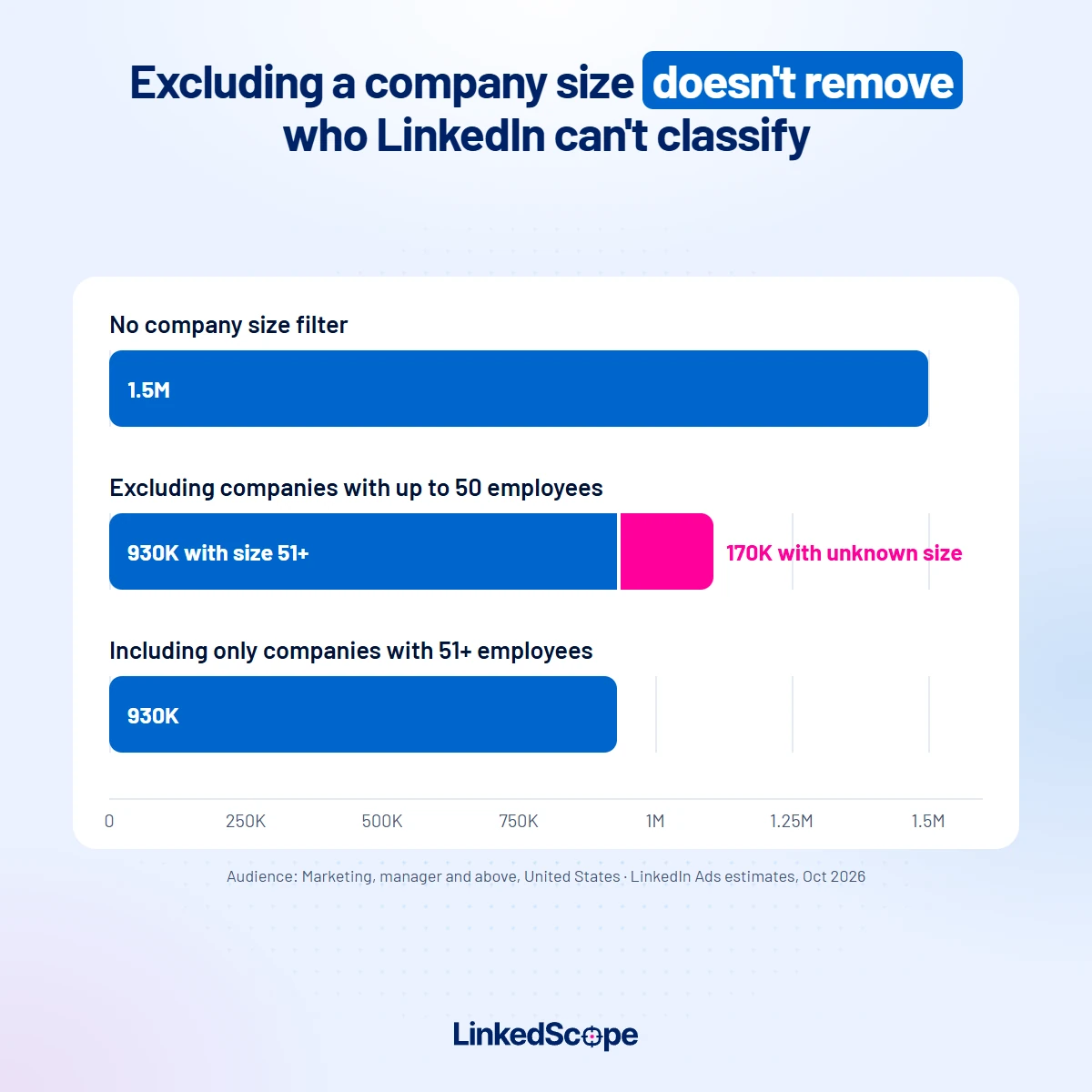
| Marketing, manager and above | 1.5M | 1.1M | 930K | at least 170K (15%) |
| Director and above, any function | 21M | 15M | 11M | at least 4M (27%) |
LinkedIn Ads audience estimates (rounded by LinkedIn itself), pulled in October 2026.
Translating the first row: I excluded companies with up to 50 employees and was left with 1.1 million people.
But of those, at most 930K provably work at a company with 51+ employees.
The other 170K? LinkedIn doesn’t know how big their company is. And they’re still in the campaign.
The director audience is worse: more than a quarter of what’s left after the exclusion has no known company size.
Moral of the story: including the ranges you want is more precise than excluding the ones you don’t.
The audience gets smaller, but only with people LinkedIn knows are in the range. The price is losing everyone with an unknown size, including some who’d be in your ICP. If you know which accounts you want, a company list is still the cleanest path.
I wrote a whole post about this: LinkedIn Ads exclusions, covering who to remove from your campaigns and when to use a list instead of company size.
How to validate before you trust the filter
- Compare the audience estimate before and after each company size, industry or exclusion filter. If the number doesn’t move the way it should, the filter isn’t doing what you think.
- Run the math from the table above: estimate excluding the range × estimate including only the ranges you want. The difference is the size of the leak.
- Look at the companies that actually received your ads, not just what you set up.
- Cross-check with who converts: if leads keep coming from the excluded range, the leak is in the profile data, not in the creative.
- When the rule is “never advertise to these companies,” use a company list as an exclusion, not a company size attribute.
And if you want to review the whole campaign, not just the audience, use the LinkedIn Ads campaign checklist.
Why does your report show industries you didn’t target?
You targeted Software and the report shows Education, Staffing, IT Services?
Relax. It’s not always a mistake. Industry on LinkedIn isn’t a single field.
A company can have more than one industry. The primary one is whatever the admin picked on the page.
But LinkedIn can assign additional industries to the company, and those count for targeting too.
A lot of it is inferred. LinkedIn runs a model that looks at the company name, size and the profiles of the people who work there (skills, job titles, education, past companies) to decide which industries the company fits.
For some pages, it uses its own classification instead of what the admin entered.
The page keeps whatever the admin picked. LinkedIn’s industry list gets new versions every now and then, with new and more specific options.
If the admin picked a generic industry years ago and never revisited it, the company stays there. That’s why so many software companies still show up under “IT Services”.
No industry on the page? The member’s profile wins. If the company has no industry, LinkedIn uses the industry the member added to their own profile.
It’s all in LinkedIn’s official help on targeting options.
Bottom line: your report isn’t necessarily wrong. LinkedIn just doesn’t rely on the primary industry alone.
In practice:
- Industry is great for slicing a market, bad at guaranteeing who gets in. If you know which accounts you want, use a company list.
- Excluding an industry leaks the other way too. Excluded Education? A software company that LinkedIn also tagged as education may go out with it.
- Before launching, check the industry breakdown in your saved audience’s Audience Insights.
Long story short: industry and company size are a black box. You can’t see who got in or who got cut because of them.
With a company list, you know exactly which companies you are targeting. And it matters even more for exclusions: excluding an attribute can punch holes in your targeting without you noticing.
Audience Expansion: on or off?
Audience Expansion lets LinkedIn show your ad to people “similar” to the ones you targeted.
For a closed ICP, I turn it off. No second thoughts.
You spent hours nailing job title and company. It makes no sense to let the algorithm open the floodgates on its own.
It can make sense in a top-of-funnel campaign with an audience too small to deliver. Even then, keep an eye on who gets in.
Build your audience as a saved audience and check it in Audience Insights
Everything we’ve covered so far has the same root: targeting uses how LinkedIn interprets the profile, not necessarily what the person stated or what you have in mind.
Seniority is a good example. It comes from how LinkedIn classifies each current position, and a person can have more than one.
I ran the numbers on LinkedIn’s estimates: selecting only Director in the United States, the audience is 11 million. Of those, at least 500K also count as Manager, 590K as Owner and 350K as CXO.
In other words: “Director only” isn’t quite “only.”
That’s why the safest workflow is:
- Create the audience first as a saved audience, not directly in the campaign.
- Open that audience’s Audience Insights and check the breakdown by seniority, job title, industry, company size and company. Lots of analysts in an audience that should be decision-makers? An industry you didn’t pick? Fix it before you spend.
- Only then apply the audience to the campaign. Every campaign inherits an already validated audience, and changes happen in one place.
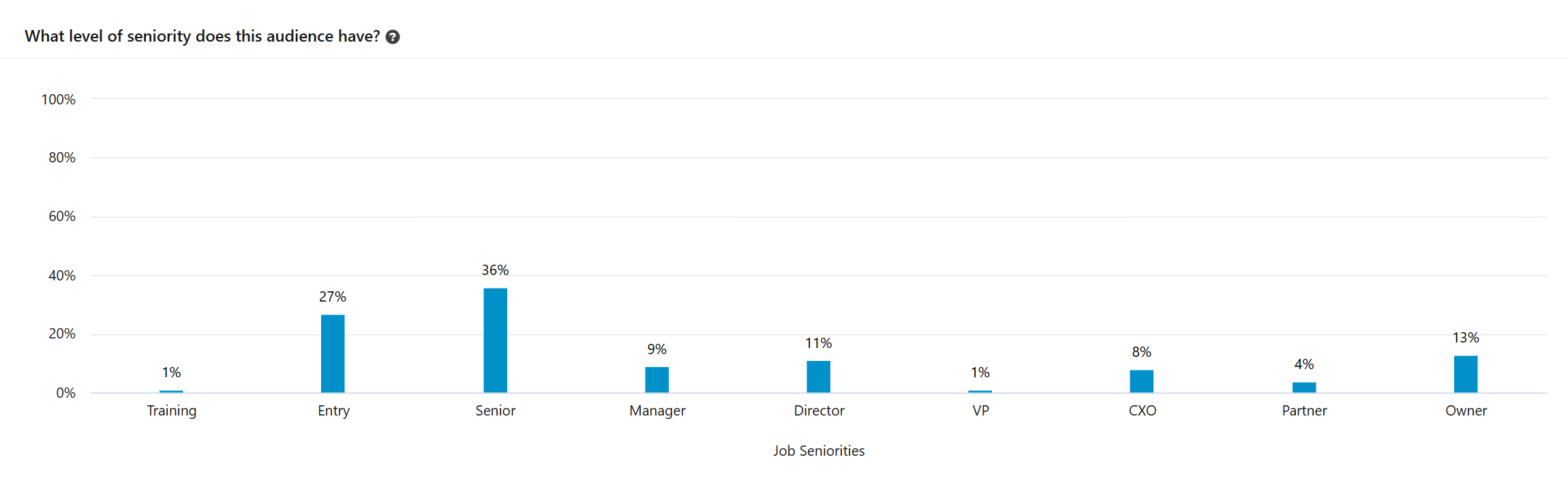
That screenshot is from a real audience of ours. It has no seniority filter, and Audience Insights makes it painfully clear: 27% Entry and 36% Senior.
For retargeting and content campaigns, that’s fine. For a campaign that needs to reach whoever signs the contract, it’d be time to tighten things up.
Which custom audiences should you create on LinkedIn Ads?
Targeting by attribute is only half the game.
The other half is custom audiences (Matched Audiences): lists you upload and retargeting of people who already engaged with your brand.
On every new account, I create these right at the start:
- Company lists: ICP, exclusion and open CRM deals. What to do with each CRM list is in the post on lookalike audiences and open-deal retargeting.
- Engagement retargeting: people who engaged with your image, document, video, conversation and Lead Gen Form ads, or with your LinkedIn Page.
- Website retargeting: people who visited your site, specific pages or your thank-you page (via the Insight Tag).
Two rules apply to all of them: cross retargeting with your ICP in the saved audience, and use people who already converted (form submissions, thank-you page) as an exclusion.
Each audience in detail, with windows, screenshots and the step by step to create it, is in the LinkedIn Ads retargeting guide.
And keep your lists alive, because they go stale fast. In LinkedScope, Target Accounts and Exclusion sync automatically as LinkedIn Ads audiences every week.
Classic LinkedIn Ads targeting mistakes
- Celebrating a big audience. In B2B, the right number is your ICP’s.
- Stacking skills and interests to “add volume.” Volume of whom?
- Using only function + seniority when you know the exact job titles.
- Trusting company size to remove small companies without checking the estimate.
- Leaving Audience Expansion on in an ABM campaign.
- Setting it up and never looking again at who you actually reached.
There are more mistakes (beyond targeting) in common LinkedIn Ads mistakes and how to avoid them.
What counts is who you reached, not what you set up
You can build the most polished targeting in the world.
Exact job titles, company list, Audience Expansion off, audience validated in Audience Insights…
And still, who actually sees your ad gets decided at delivery. With dual positions, unknown company sizes, Super Titles and everything else we’ve covered.
That’s why good targeting is targeting that holds up at delivery. Setup is half the job. The other half is looking at who the campaign actually reached and course-correcting.
In Campaign Manager: professional demographics (with limits)
LinkedIn itself shows this in the Professional demographics report, under Performance. You can break it down by job title, function, seniority, industry, company size and company.
It helps, but it’s limited:
- In the job title view, the screen lists only the 25 job titles with the most impressions.
- There are only 3 metrics: impressions, clicks and average CTR. No spend, no conversions, no leads.
- Plenty of job titles fall below the reporting minimum, which LinkedIn applies to protect member privacy.
- And you can’t act from there. Found a job title that shouldn’t be there? You’ll have to open campaign after campaign and fix it by hand.

In LinkedScope: Reached Job Titles
In Reached Job Titles you see every job title LinkedIn reports for your campaigns, not just the top 25.
And with way more metrics: ad spend and share of spend, impressions, engagements, engagement rate, dwell time, clicks, conversions and leads for each title. You can filter by campaign and by ad set.
But the best part is acting right from there:
- Thumbs up (positive): the job title goes into your campaigns’ job title targeting.
- Thumbs down (negative): the job title goes into the exclusions.
- Synced: it applies to every active and paused campaign you choose. No opening them one by one.
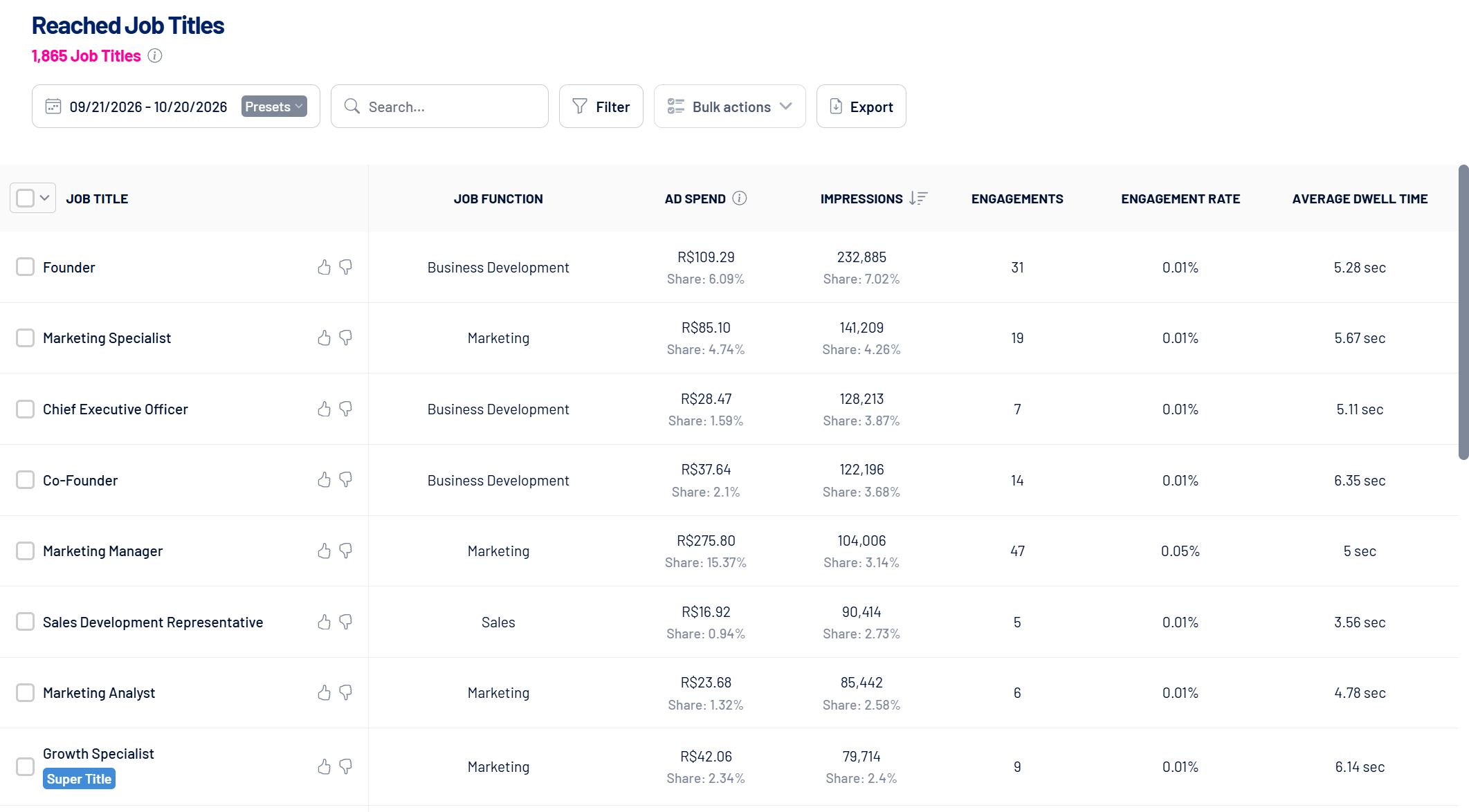
To give you a sense of the difference: on our own account, in the same period, Campaign Manager listed 25 job titles. LinkedScope showed 1,865.
Remember that “Marketing Director at Nubank” who isn’t a director? That’s where he shows up. And that’s where you take him out of the game, with one click.
One honest caveat: LinkedIn applies privacy rules to demographic data (values with few events aren’t reported), and that applies to any tool. The difference is how much of it you get to see and what you can do with what it delivers.
And what if job titles you never targeted show up? That’s normal. The usual reasons:
- targeting by function, seniority or other criteria beyond job title;
- Super Titles, which group several related job titles;
- people with more than one current job title on their profile;
- Audience Expansion turned on in the ad set;
- targeted job titles changed mid-campaign.
LinkedScope flags this right on the screen. It’s not a bug: it’s how LinkedIn delivers.
What about the companies that saw your ads?
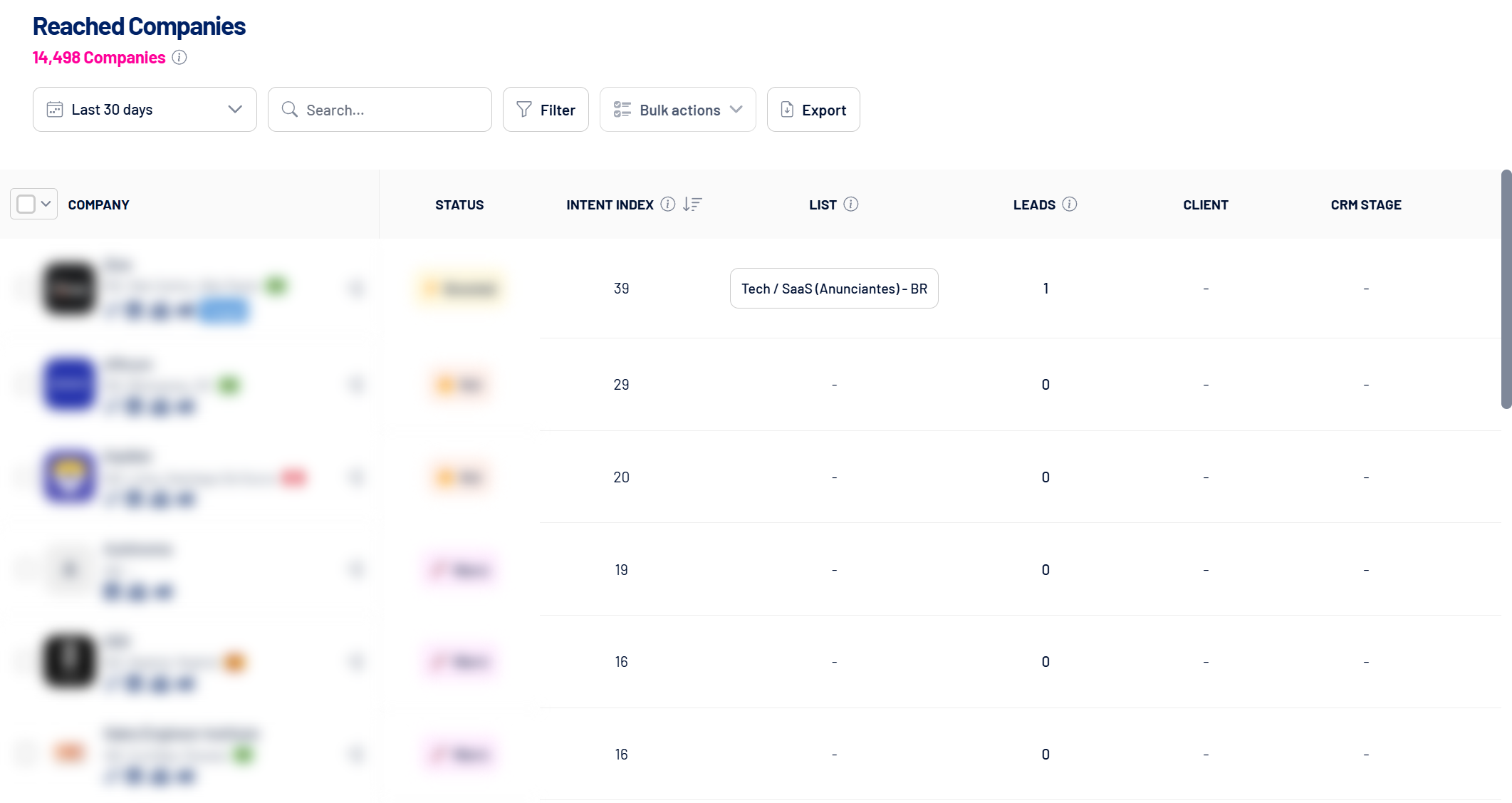
Same logic, looking at the company. Reached Companies shows which companies you reached, with each one’s Intent Index. Found one that shouldn’t be there? Send it straight to your Exclusion list. (I break it all down in how to see which companies your LinkedIn Ads reached.)
And companies outside your targeting will show up, even when you used a list:
- the person works at more than one company;
- they changed jobs during the campaign;
- Audience Expansion was on;
- the targeted company is the parent of other companies (headquarters and subsidiaries);
- the company list changed mid-campaign;
- with industry targeting, the company has additional industries assigned by LinkedIn (what we covered above).
That’s why you look at what was delivered, not just what was set up. That’s where the leak shows.
Want to see this running on your campaigns? See how LinkedScope works and try it free for 15 days. 😉
FAQ
What’s the ideal audience size on LinkedIn Ads?
The size of your ICP: number of target accounts multiplied by the buying committee members at each one. If Campaign Manager’s estimate goes way above that, your targeting is too broad.
What’s the minimum audience size to run a LinkedIn Ads campaign?
300 members. Below that, LinkedIn won’t run the campaign.
LinkedIn recommends audiences of 50,000 people. Do I have to follow that?
Not in B2B. LinkedIn’s help page suggests at least 50,000 people (and 300,000 for Sponsored Content and Sponsored Messaging), but the ideal size is the size of your ICP: target accounts times buying committee members. Inflating the audience only adds people outside your plan competing for your budget. The technical minimum is 300 members.
How does AND/OR logic work in LinkedIn targeting?
Values of the same attribute are joined with OR, different attributes are combined with AND, and exclusions work with OR. But the AND doesn’t require job title and company to come from the same position on the member’s profile.
Why is my ad showing to job titles I didn’t target?
Because of job function or seniority targeting, Super Titles, Audience Expansion, or members with more than one current position on their profile, where each criterion is matched by a different position.
Is LinkedIn’s company size filter reliable?
Only for members whose company is properly linked on their profile. Anyone who didn’t link the page, or linked the wrong one, has an unknown company size and isn’t removed by a company size exclusion. In a test with LinkedIn estimates, excluding companies with up to 50 employees from a US marketing audience left at least 15% of the remaining audience with no known company size. Including the ranges you want is more precise than excluding the ones you don’t, and a company list is more precise still.
Why does my LinkedIn Ads report show industries I didn’t target?
Because a company can have several industries on LinkedIn. The primary one comes from the page, but LinkedIn assigns additional industries by inference, and all of them count for targeting. When the company has no industry, the member’s profile industry is used. To control who gets in, use a company list.
Which custom audiences should you create on LinkedIn Ads?
Start with company lists (ICP, exclusion and open CRM deals) and retargeting: people who engaged with your ads and your LinkedIn Page and people who visited your website. Cross retargeting with your ICP and use people who already converted (form submissions, thank-you page) as an exclusion.