
In a nutshell: A LinkedIn Ads audit checklist should cover six areas: an objective that matches your audience’s stage, conversion tracking (Insight Tag and events), ad status and fatigue, the real quality of your targeting (demographics), A/B tests with one variable at a time, and your bidding and budget strategy. Auditing should be a weekly or biweekly habit, not a quarterly event.
Most companies advertising on LinkedIn have never done a real audit. They look at the dashboard, see the money got spent and hope it “worked”. That’s not campaign management. That’s gambling.
A LinkedIn campaign checklist done right isn’t red tape. It’s the only way to know if you’re buying your ICP’s attention or just shoveling budget into LinkedIn’s bank account with nothing to show for it.
This guide won’t tell you to “check that your ads are live”. You already know that. This is about what you’re probably overlooking (and what’s costing you results).
What to do before starting your LinkedIn campaign checklist
The mistake starts with the premise. Marketers treat a LinkedIn Ads audit like a calendar event, something that happens once a quarter in an alignment meeting with a pretty deck and vague takeaways.
A real audit is an ongoing process of reading signals. And LinkedIn sends those signals all the time. The question is: are you set up to hear them?
Before we go item by item, burn this into your brain: data without context is noise.
A 0.8% CTR can be excellent in one segment and a disaster in another. A $300 cost per lead can be cheap for an enterprise deal and ridiculous for a low-ticket product.
Calibrate your eye before you calibrate your campaigns.
1. Check that your LinkedIn campaign objective is right
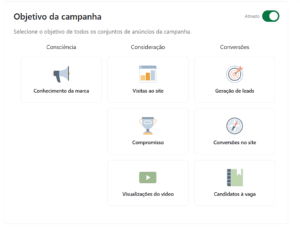
LinkedIn groups objectives into three big stages of the journey: Awareness, Consideration and Conversions. So far, basic manual stuff.
The real problem: most companies run bottom-of-funnel campaigns to a cold audience that has never heard of the brand. It’s like proposing on the first date. LinkedIn will still deliver impressions, but the result is zero and the blame goes to the “expensive platform”.
What to really audit here:
- Is your campaign objective aligned with where your audience is in the funnel, or are you measuring conversions from people who are just discovering they have a problem?
- Brand awareness: focused on the top of the funnel, the honest indicators are CPM and qualified reach.
- Consideration: more middle-of-funnel, CTR and engagement rate are the right metrics here.
- Conversions: bottom of the funnel, the numbers that matter most are cost per lead and form conversion rate. If your CPL is exploding, the problem is rarely the bid; it’s the creative or the offer.
2. Set up LinkedIn conversion tracking
This should be a prerequisite before a single dollar gets spent. But we still find accounts with the Insight Tag installed wrong, firing in loops or simply missing from critical conversion pages.
A zero-tolerance technical checklist:
- Insight Tag: is it firing on every page of your site, including post-conversion pages (thank-you, order confirmation, etc.)?
- Conversion tracking: does every valuable action (content download, meeting booked, purchase, sign-up) have a tracked event, named so anyone on the team gets it?
- Native Lead Gen Forms: is CPL set up? Are you matching cost against the quality of leads that reach your CRM, or just piling up contacts?
A detail a lot of people miss: by default, LinkedIn attributes conversions with a 7-day view-through window. That means someone who saw your ad (without clicking) and converted later counts as your conversion. Depending on your CRM attribution model, that could be inflating or deflating your numbers. Double-check it.
3. Keep tabs on every ad’s status
LinkedIn reviews new ads within 24 hours. But what happens after approval? Ads keep running indefinitely even when they lose relevance, and the platform won’t warn you when performance tanks.
What to audit here:
- Are there any ads with a Rejected status in the account? Sounds obvious, but in accounts with lots of live campaigns, this stuff slips by for weeks.
- If the ad came from an organic LinkedIn Page update and got rejected, you can’t edit it directly; you need to create a new post. That workflow needs to be documented for your team.
- Ad fatigue: LinkedIn doesn’t have an official fatigue metric, but you can see it in a steady CTR decline as frequency climbs. If frequency is past 4–5 on the same audience and CTR dropped more than 30%, it’s time to rotate creatives.
- For video ads, the metric that matters isn’t total views. It’s the valid view rate under the MRC standard: 50% of pixels on screen for at least 2 seconds. If that number is low, the issue is the creative or the viewing context.
4. Review your campaign audience targeting
LinkedIn has the most precise B2B targeting in the world. And that’s exactly why people get it wrong with so much confidence. Targeting by job title, industry and seniority feels sophisticated, but it’s often just an illusion of precision.
Questions your audit needs to answer:
- Who is actually engaging with your ads? Go to Demographics in Campaign Manager and filter by job title, function and industry. Does what you see match your ICP?
- Are you using Audience Expansion? It can double your reach, but it can also serve your ad to people completely outside your profile. Watch demographics while it’s on. If quality drops, turn it off.
- Are you running to very small audiences (under 50,000)? LinkedIn can hold back delivery when reach is limited. But giant audiences (over 500,000) can be lazy targeting. Find the balance.
- Do you keep retargeting audiences separate from cold audiences? Mixing them in the same campaign is one of the most efficient ways to waste budget there is.
5. Run ad tests and know what to validate
The LinkedIn feed is competitive. You’re fighting for attention with career updates, leadership content and, let’s be honest, a lot of generic content from companies that still haven’t realized their stock-photo graphics don’t work.
A creative checklist that goes beyond the obvious:
- Are you running a structured A/B test, with one variable at a time (just the image, or just the headline, or just the CTA)? Or are you testing everything at random and calling it a “test”?
- Is the offer clear in the first 2 seconds of the ad, especially on mobile where text gets truncated? If people have to tap “see more” to understand what you’re offering, you’ve already lost.
- Is the CTA specific (“Get the 2026 guide”) or generic (“Learn more”)? On LinkedIn, generic CTAs consistently underperform.
- Are you using Sponsored Messaging for warm audiences or cold lists? An inbox message from someone who doesn’t know you feels like spam, and LinkedIn caps delivery to the same member at 1 message every 30 days. Use it strategically, not as a shot in the dark.
6. Keep an eye on bidding strategy and budget
The most important question here isn’t “how much am I spending?” but “how much am I paying for each result that matters?”
What needs to be on your radar:
- Have you set a performance baseline to compare against? Without historical reference, any number looks reasonable.
- Is your bidding strategy aligned with the objective? CPC for click campaigns, CPM for reach and brand awareness, CPV for video. Mismatching bid strategies and objectives is wasted fuel.
- Is your daily budget running out before 6 p.m.? That means you might be missing impressions during the afternoon peak, or your audience is smaller than estimated.
- LinkedIn Campaign Manager’s automatic bid suggestions are a starting point, not a rule. The platform wants you to spend more. Use your account’s historical data as your main reference.
Bottom line: a LinkedIn campaign checklist isn’t a document. It’s a habit
If you got this far hoping for a table to print and stick in a drawer, this post let you down. Because the LinkedIn campaign checklist that actually works is the one that becomes a routine (weekly for high-spend accounts, every two weeks for the rest).
LinkedIn gives you enough data for anyone with an analytical, critical eye to make far better decisions than the market average. The problem isn’t a lack of data. It’s too much autopilot. (Want to know what usually goes wrong? Read common LinkedIn Ads mistakes and how to avoid them.)
Review. Question. Adjust.
Competitors who still think a good campaign is one that’s “running” are paying to hand you the attention they wasted.
Frequently asked questions
How often should I audit LinkedIn Ads campaigns?
Weekly for high-spend accounts and every two weeks for the rest. Auditing is a habit, not a quarterly event.
How do I spot ad fatigue on LinkedIn?
When frequency goes past 4 to 5 on the same audience and CTR drops by more than 30%, it’s time to rotate creatives.
What’s LinkedIn’s default attribution window?
LinkedIn counts view-through conversions within a 7-day window by default, which can inflate or deflate your numbers compared to your CRM.
How do I know if my targeting is right?
Check Campaign Manager demographics by job title, function and industry and see whether the people actually engaging match your ICP.