In a nutshell: warm outbound means prospecting people who have already had some contact with your brand, instead of hitting a cold list. LinkedIn Ads is one of the best sources of that warmth: it puts your message in front of your ICP and gives you back two kinds of signal. The company signal (impressions, engagement and Intent Index per account) tells you where and when to act. The person signal (who reacted to or commented on your ads and posts) tells you who to talk to. Together they build your outreach queue. A company signal on its own, worked through cold email, is still cold outbound.
We learned this one the hard way.
For about five weeks, we ran two outreach flows side by side.
In the first, we took companies our LinkedIn ads were reaching, found people with the right job title at those companies and emailed them.
343 emails. Good deliverability.
Zero replies.
Zero.
In the second, we reached out on LinkedIn to ICP people who had reacted to or commented on our content.
Result: 60% to 83% of connection requests accepted and 13% to 16% replies.
Same offer, same weeks. The difference was the signal (and, as you’ll see, the channel).
In this post I’ll walk you through what warm outbound is, how LinkedIn Ads becomes its signal source and why a “warm” company isn’t enough. The step by step, with every screen, is in the signal-based outbound playbook with LinkedIn Ads.
What is warm outbound?
Warm outbound is active prospecting aimed at people who have already shown some sign of contact with your brand: they saw your ads, engaged with your content, came to your event, opened your material.
It’s still outbound. You start the conversation, not the lead asking to be contacted.
What changes is the starting point:
- Cold outbound: a list built from filters (industry, size, job title) and outreach to people who have never heard of you.
- Warm outbound: the same ICP list, but prioritized by signals that the account or the person already knows you.
- Inbound: the person raised their hand. Filled out a form, asked for a demo. That’s not prospecting anymore, that’s follow-up.
In practice, warm outbound sits between waiting for inbound and blasting the whole list.
If you work with target accounts, it plugs straight into a LinkedIn Ads for ABM strategy.
What is signal-based outbound?
Signal-based outbound is using observable events to decide who to reach out to first and what to talk about.
Those events come in a few flavors:
- Market: the company hired, opened a role, raised money, changed leadership.
- Person: someone changed jobs, commented on a post in your niche.
- Relationship with your brand: the account is seeing your ads, someone reacted to your content, someone downloaded your material.
Warm outbound is prospecting based on the third kind. And that’s where LinkedIn Ads helps, because your own media generates that signal.
Market and job-change signals matter too, but that’s a different conversation. Here the focus is the ad.
How does LinkedIn Ads become a signal source for outbound?
LinkedIn Ads delivers your message to ICP accounts and gives you back data on who responded to it. That data becomes your outreach queue.
The cycle looks like this:
- Distribution: you advertise to ICP companies and job titles, with targeting that’s the right size and without paying to reach customers and competitors (that’s what exclusions are for).
- Engagement: people at those accounts see, click, react, comment, watch.
- Signal: that engagement shows up in two ways, by company and by person.
- Queue: you cross the signals and decide who to reach out to first.
- Outreach: sales shows up with context, not a generic pitch.
- Ads keep running: the account keeps seeing your ads during the sequence.
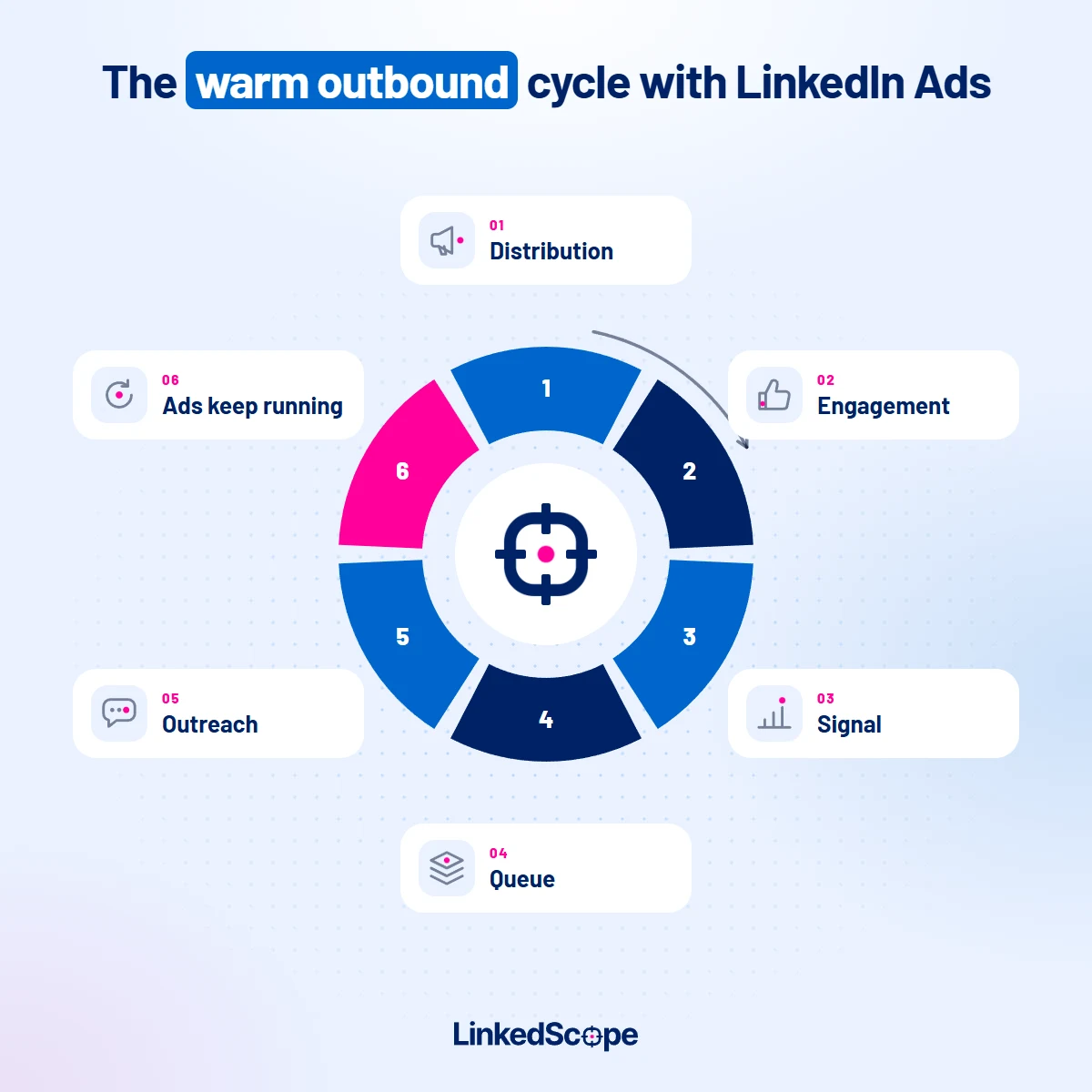
Notice the ad shows up twice: before outreach, warming up the account, and during it, keeping your brand in view while the SDR works on the conversation.
And the “before” needs time. Let the list see your ads for a few weeks before you start the sequence. That way, when the message lands, it continues something the person has already seen. It’s not a first touch.
That’s what we call demand generation connected to sales. Media doesn’t work in a silo away from prospecting.
What signals does LinkedIn Ads generate and what does each one tell you?
LinkedIn doesn’t hand you everything. And understanding what it does hand you is what separates a serious strategy from a tool’s promise.
| Signal | Level | What it tells you |
|---|---|---|
| Impressions by company | Company | The account is being exposed to your message. On its own, it only shows reach. |
| Engagements and clicks by company | Company | Someone at this account engaged with the ad. You don’t know who. |
| Intent Index | Company | A summary of the account’s impressions, engagement, dwell time, clicks, conversions and leads. Helps you rank the list. |
| Reactions and comments on ads and posts | Person | This person, with a name and a profile, engaged publicly with your content. |
| Lead Gen Form lead | Person | They raised their hand. That’s already inbound, so treat it that way. |
You can already see company signals in Campaign Manager itself, under Plan > Companies: each account’s engagement level with your ads and your Page, plus ready-made segments like Highly engaged and Surging accounts.
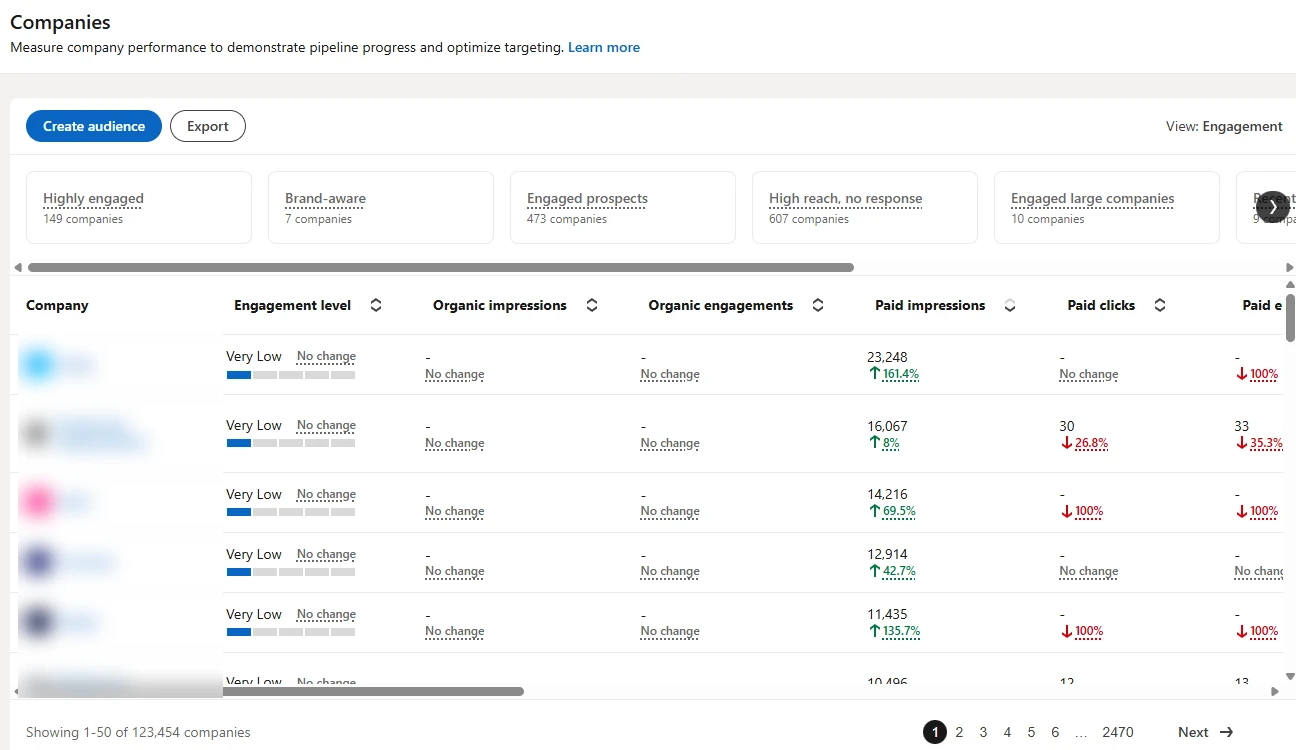
Here’s where a lot of people get it wrong: LinkedIn doesn’t show who saw or who clicked your ad. Delivery data by company and by job title comes aggregated, with privacy limits. I break this down in the post about the companies your LinkedIn Ads reached.
A person only shows up by name when they take a public action (react or comment) or fill out a form.
That’s why the two levels complement each other:
- The company signal tells you where and when: this account is paying attention right now.
- The person signal tells you who: this is the person who engaged.
What about signals that don’t show who it was?
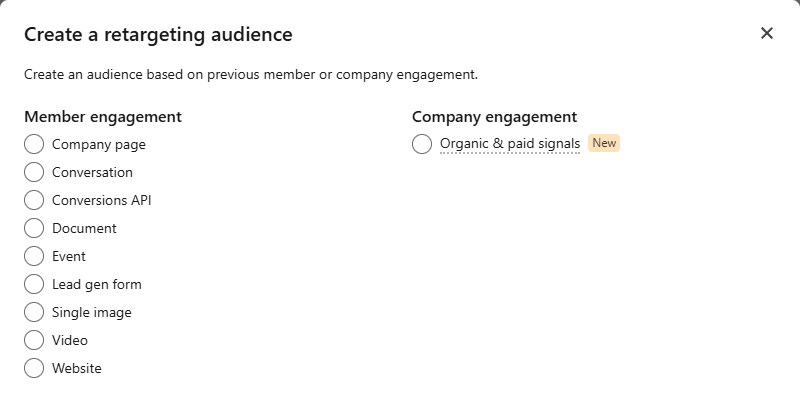
They don’t become a prospecting list. They become a retargeting audience.
Some strong signals simply aren’t identified by person on LinkedIn:
- A visit to your pricing or demo page, tracked by the Insight Tag.
- A Lead Gen Form opened but not submitted.
- A video watched halfway or more.
You know it happened. You don’t know who.
And LinkedIn won’t tell you: it doesn’t give you named website visitors, and LinkedScope doesn’t identify who visited your website either.
What you can do is build a retargeting audience from each of those signals and show those people the right message: proof, case study, comparison, an offer to talk. Whoever raises their hand becomes a lead. Whoever reacts becomes an engager. Then they join the queue. The audience walkthrough is in the post on LinkedIn Ads retargeting.
Company signal or person signal: which one matters more?
The person signal matters more for outreach; the company signal matters more for prioritization. The best case is having both on the same account.
Here’s how I organize it:
| Someone at the account reacted or commented | Nobody at the account reacted or commented | |
|---|---|---|
| Company with a strong signal | Priority 1. Reach out to the person who engaged, using the content as your hook, and look for more people on the buying committee. | Priority 3. Find the key people and reach out with account context, without pretending they know you. |
| Company without a strong signal | Priority 2. Check whether the company fits your ICP. If it does, reach out. If it doesn’t, just say thanks. | Stays in your media. Not the time yet. |
The order matters for a very practical reason: LinkedIn caps how many connection requests you can send per week. Requests are a scarce resource. The signal decides who deserves each one.
Priority 3 is where the trap is. And that’s exactly where we got our zero.
Why didn’t cold email to “warm” companies work?
Because the warmth belonged to the account, not to the person.
Sure, the company was seeing our ads. But the director we picked by job title hadn’t necessarily seen them. And even if they had, an ad in the feed doesn’t make anyone remember you in a crowded inbox.
To them, that email was cold. Just like any other.
Three lessons I took from it:
- A company signal prioritizes, it doesn’t warm up. It tells you which accounts deserve effort right now. It doesn’t give you permission to talk like the person already knows you.
- The channel matters. Cold email is the easiest channel to ignore. On LinkedIn, the person sees your profile, your posts and, often, recognizes the brand from the ads.
- The hook matters even more. With someone who engaged, you have a real topic: the comment they wrote, the subject of the post. Without that, all you’ve got is the pitch.
An honest caveat: the warm side’s sample was small (51 people contacted). But 0 out of 343 versus 13% to 16% isn’t a margin-of-error gap.
How do you reach out without looking like you’re watching people?
Only use what the person did in public, and never mention the ad they “saw”.
With people who reacted or commented, talking about the content is fair game. It was a public action:
- “Saw your comment on the post about LinkedIn Ads exclusions. Do you already keep customers out of your campaigns?”
With people who just work at a company with a strong signal, the rule changes:
- No “I noticed your company has been seeing our ads.” You don’t even know if this person saw them. And it sounds like surveillance.
- Use the account’s context: what’s going on in their industry, a common problem for the role, a useful resource.
- Go with LinkedIn over email. Connection request with a short note, no pitch on the first touch.
The ad already did its job, which is making your brand familiar. The outreach doesn’t need to explain that.
What message should you use for each signal?
The message picks up where the signal left off. Each signal has a hook and a channel:
| Signal | Hook | Channel |
|---|---|---|
| Commented on your ad or post | Pick up the topic of the comment and ask a question about it | LinkedIn connection request with a note |
| Reacted to your ad or post | Offer a resource or a data point on the same topic | LinkedIn connection request with a note |
| Company with a strong signal, nobody engaged | Talk about the typical problem for the role, without mentioning the ad | LinkedIn connection request, then email |
| Visited pricing, opened a form, watched a video | Proof, case study, comparison | Ads only (retargeting) |
Notice the last row has no direct outreach. Without a name, the work stays with your media.
Do the ads keep running after the outreach?
They should. This is where warm outbound gets stronger than traditional outbound.
While the SDR is running the sequence, the account keeps seeing your ads. The person gets your message on LinkedIn and, the same day, sees your case study in the feed.
To do it right:
- Upload the accounts you’re prospecting as a company audience, and the people you’ve contacted as a contact audience.
- Use a different message for people in a sequence: proof, case study, comparison. Not the same top-of-funnel ad.
- Pull anyone who became a customer out of the campaign. That’s what exclusions are for.
It’s the same logic as LinkedIn Ads retargeting, just driven by sales. And it’s the same logic as founder-led growth with LinkedIn Ads: the founder’s content warms things up, sales harvests.
How do you measure whether warm outbound is working?
Compare outreach with and without a signal, using the same metrics, and follow it all the way to pipeline.
Split your sequences by signal source (person who engaged, company with a strong signal, cold list) and track:
- Acceptance of the LinkedIn connection request.
- Replies, positive or not.
- Meetings booked.
- Deals opened in the CRM, by account.
And be careful with the conclusion. If an account that saw your ads closed a deal, that’s influence, not proof of cause. I get into this in the post about the limits of influenced pipeline.
What you can safely claim is comparative: outreach with a signal beats outreach without one, in your operation, with your numbers.
Where does LinkedScope fit in?
Campaign Manager shows you the company. LinkedScope puts both signal levels, company and person, in one place and crosses them with your CRM:
- Reached Companies: the companies your ads reached, with each one’s Intent Index.
- Engagers: who reacted to and commented on your posts and ads, dark posts included, organized by person and by company.
- Spark Prospects: the companies that match the signals you set (intent, media, engagement, CRM and Target Accounts), updated every week.
From there, people go to your outreach tool and companies go to your CRM, with no spreadsheet in the middle. How to set it all up from scratch, screen by screen, is in the signal-based outbound playbook with LinkedIn Ads.
Want to know which ICP accounts are engaging with your ads and who the people behind them are? See how LinkedScope works and try it free for 15 days. 😉
Frequently asked questions
What is warm outbound?
It’s active prospecting aimed at accounts and people who have already had some contact with your brand, like seeing your ads or engaging with your content. It’s still outbound, but it starts from a list prioritized by signals instead of a cold list.
What’s the difference between warm outbound and cold outbound?
Cold outbound reaches out to people who have never heard of you, based only on profile filters. Warm outbound uses the same ICP list, but reaches out first to people who have already shown contact with the brand and uses that context in the message.
Does LinkedIn Ads show who saw my ad?
No. LinkedIn shows delivery data aggregated by company and by job title, with privacy limits. A person only shows up by name when they react, comment or fill out a Lead Gen Form.
Is a company reached by my ads ready for outreach?
Not necessarily. The company signal shows the account is exposed to your message, but not that the person you picked for outreach saw it or cared. Use that signal to prioritize accounts and combine it with person signals whenever you can.
Do website visits and opened forms become prospecting?
Not directly. LinkedIn doesn’t identify by person who visited your website or opened a form without submitting it. Those signals become retargeting audiences: you show the right message to those people and treat as prospects the ones who react, comment or convert.
Can I mention the ad in my outreach message?
Only if the person engaged with it publicly, by reacting or commenting. In that case, talk about the content. Never say the company or the person “saw” your ad: you don’t have that information by person and the message sounds like surveillance.