
In a nutshell: cross-channel retargeting combines the best of each channel in B2B. Google Ads and Meta Ads bring volume to the site, with lots of clicks outside the ICP; retargeting on LinkedIn Ads filters those visitors again by company and job title, so you only pay the expensive click for people who showed interest and have the right profile. The other way around, LinkedIn brings traffic that’s already filtered, and retargeting on Google Ads and Meta Ads gives those same people cheap frequency. Split audiences by landing page, exclude customers and people who already converted, and measure in the CRM, because each platform counts the same conversion as its own.
Everyone who runs paid media has been here.
A Google search campaign running nicely. Clicks, visits, even a few form fills.
Then sales opens the leads: a student working on a thesis, a vendor pitching a service, a competitor checking prices.
On Meta it’s even worse. Cheap visits, lots of visits… and almost none from someone who makes buying decisions at a company in your ICP.
LinkedIn does the opposite. Spot-on aim, but each click tends to cost more.
What if you used one channel to make up for the other’s weakness?
That’s what this playbook does. Four B2B retargeting flows between LinkedIn Ads, Google Ads and Meta Ads, with the step by step for each one.
What is cross-channel retargeting in B2B?
It’s using one channel to bring people to the site and another channel to reach them again. Instead of each platform retargeting only its own traffic, they swap audiences.
It works because each channel has a different strength:
- Google Ads: captures people already searching for the solution.
- Meta Ads: cheap reach and frequency.
- LinkedIn Ads: filters by company, job title, seniority and industry.
In B2B advertising, where there’s a buying committee and the cycle tends to be longer, that swap is gold: you don’t depend on a single channel to be remembered.
The site is the meeting point. Each platform’s tag (LinkedIn Insight Tag, Google tag, Meta Pixel) records who visited, and each one builds its own retargeting audience.
It’s demand generation in practice: Google captures the people who are ready, and retargeting keeps your brand top of mind for the rest of the committee until it’s time to buy.
If you’re still deciding which channel to use and how to split the budget, start with the post on B2B paid media and come back here. And the head-to-heads are in LinkedIn Ads vs Google Ads and LinkedIn Ads vs Meta Ads.
Why use LinkedIn as the filter for Google and Meta traffic?
Because LinkedIn is the only one of the three that knows where the person works and what their job title is.
LinkedIn’s website visitor audience can be combined with professional targeting. LinkedIn describes this use in its website retargeting documentation.
In practice: “visited my site” AND “is a manager or above” AND “works at a company with 200+ employees in my industry”.
Google and Meta bring the volume. LinkedIn throws out whatever isn’t ICP.
You pay LinkedIn’s expensive click only for people who already showed interest and have the right profile.
LinkedIn Ads + Google Ads playbook
Flow 1: from Google Search to LinkedIn retargeting
When to use it: you have search with intent, but the traffic comes in mixed.
- Create a landing page just for Google. A dedicated page (e.g. /lp/google-solution) makes the audience easy to separate later.
- Install the LinkedIn Insight Tag on that page. Without it, LinkedIn can’t see the visitors.
- Create the website audience in Campaign Manager and select that page on the list (you can search by name or URL). The window goes from 14 to 180 days.
- Build the LinkedIn ad set with that audience AND the ICP filters (job title or seniority, company size and industry, or your target account list).
- Use a second-step message. They already know you: a case study, a comparison, a recorded demo, an invitation to talk.
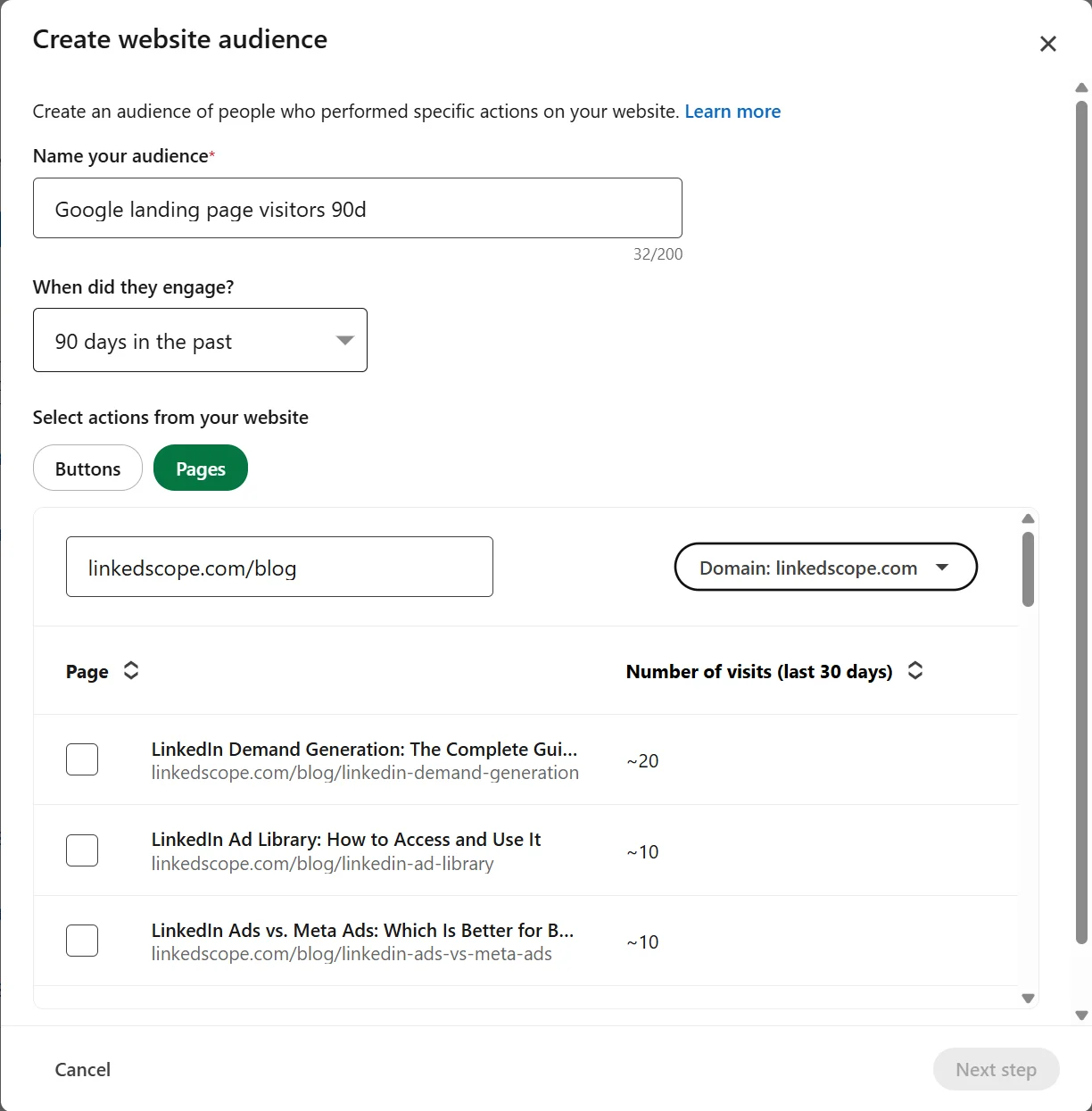
Watch the size. LinkedIn only delivers to audiences with at least 300 members. Google visitors matched with the ICP shrink fast, so this flow needs search volume. The post on LinkedIn Ads retargeting covers the audiences and windows in detail.
Flow 2: Google Ads remarketing for B2B
When to use it: LinkedIn is already sending ICP people to the site and you want more frequency without paying LinkedIn CPMs.
LinkedIn brings the traffic and Google adds the frequency:
- A dedicated landing page for LinkedIn, with the Google tag installed.
- Create a data segment of that page’s visitors in the Google Ads Audience manager (it’s the current name for remarketing lists).
- Use the segment in three places: Display and YouTube for frequency, and Search to adjust bids or ads when that person searches for you or your category.
- Clean up Display placements. Exclude apps and sites that make no sense, or the accidental clicks come back.
Google requires at least 100 active users in the last 30 days for a segment to serve on the Display Network and on Search, according to Google Ads Help.
And you can go beyond the site. Your CRM contact list (decision-makers at Target Accounts, open deals) becomes a Google audience through Customer Match.
LinkedIn Ads + Meta Ads playbook
Flow 3: from Meta to LinkedIn retargeting
When to use it: you want cheap top-of-funnel visits, but you know a good chunk of them isn’t ICP.
Same reasoning as flow 1, with two extra precautions:
- Remove Audience Network from Meta placements. That’s where a lot of accidental clicks come from.
- Don’t use “all visitors” as the audience. Prefer people who reached a page that takes real engagement: the full article, the pricing page, a second page on the site. On LinkedIn, just select those pages in the website audience.
- Match with the ICP on LinkedIn and send the second-step message.
Meta becomes a “cheap sieve” at the top. LinkedIn keeps only the people who passed through it and have the right profile.
Flow 4: Meta Ads retargeting for B2B
When to use it: same reason as flow 2, now on Instagram and Facebook.
LinkedIn brings the traffic and Meta adds the frequency:
- Meta Pixel installed on the LinkedIn landing page.
- A website custom audience with a URL rule for that page. The default window is 30 days and it can go up to 180.
- Reinforcement creative: social proof, behind the scenes, short content. It’s frequency, not a first impression.
Meta recommends waiting until the website audience has a few hundred people before using it in an ad, according to the Meta Business Help Center.
And here you can use the CRM too: contacts at Target Accounts and in open deals become a Meta custom audience. What to do with each CRM list, channel by channel, is in the post on lookalike audiences from CRM data.
How do you split audiences by traffic source?
By landing page. It’s the simplest and most reliable way.
One landing page per channel (or per campaign) keeps each audience clean, because all three platforms build website audiences from the page address.
UTMs are still essential, but for analysis: they’re what tells your analytics and your CRM where each visit and each lead came from.
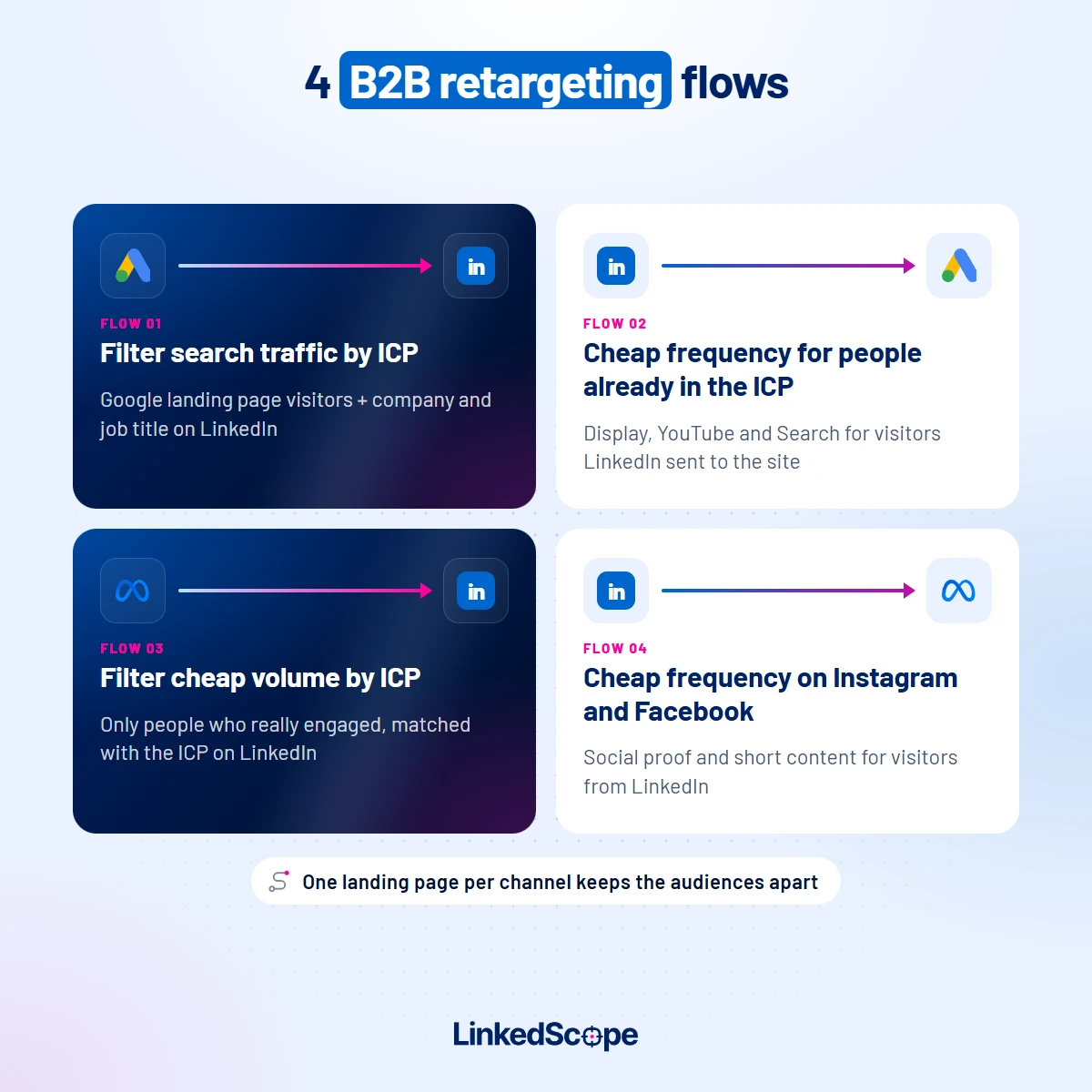
The four flows in a nutshell:
| Flow | Who brings the traffic | Who retargets | What for |
|---|---|---|---|
| 1 | Google Ads (Search) | LinkedIn Ads | Filter search traffic by ICP |
| 2 | LinkedIn Ads | Google Ads (Display, YouTube, Search) | Cheap frequency for people already in the ICP |
| 3 | Meta Ads | LinkedIn Ads | Filter cheap volume by ICP |
| 4 | LinkedIn Ads | Meta Ads | Cheap frequency on Instagram and Facebook |
Who should you exclude from B2B retargeting?
Everyone who shouldn’t see the message again. On all three channels:
- People who already converted: the thank-you page audience or the form submitters.
- Current customers: the closed-won deals list from the CRM.
- Open deals: exclude them or give them a message of their own. Generic retargeting for someone in negotiation can get in the rep’s way.
- Competitors and companies outside the ICP: on LinkedIn, with a company list. The post on LinkedIn Ads exclusions shows how.
Keeping those lists updated by hand, on three platforms, is the kind of chore nobody does every week.
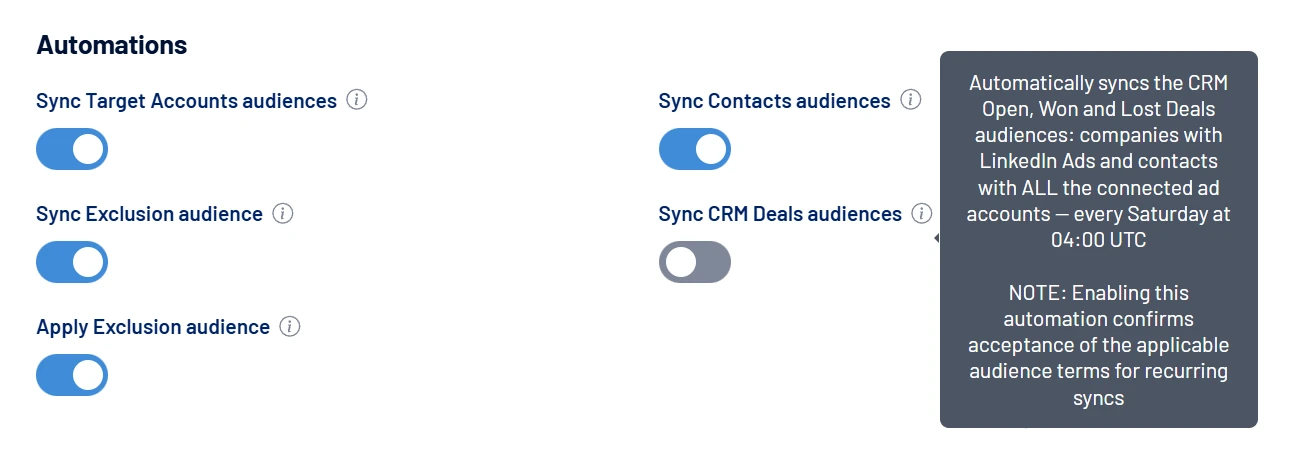
In LinkedScope, the Sync CRM Deals audiences automation does it for you on the Enterprise plan. It keeps three audiences built from your CRM deals, 💼 Open Deals, 💼 Won Deals and 💼 Lost Deals, and refreshes them once a week.
- Contacts: go to every connected ad account, on LinkedIn Ads, Google Ads and Meta Ads.
- Companies: go to LinkedIn Ads, where the audience works as an exclusion or as direct targeting.
In practice, Won Deals becomes an exclusion in your acquisition campaigns on all three channels. Open Deals can get its own message for people in negotiation. And Lost Deals is ready for a win-back campaign down the road.
How do you measure cross-channel retargeting without counting the same conversion three times?
In the CRM. Each platform records the conversion as its own.
The person came from Google, saw the ad on LinkedIn, saw it again on Instagram and filled out the form. All three reports will count that lead.
Add them up and you have three leads. In the CRM, you have one.
What I’d do:
- Send every lead to the CRM with its source (UTM) recorded.
- Look at results by account: which ICP companies visited, engaged and became opportunities.
- Send qualified leads back to all three platforms as conversions, so they optimize for the people sales approved, not for whoever clicks. The post on LinkedIn Ads conversion tracking explains the logic.
And if you’re a paid media specialist who spends more time in Meta and Google than in LinkedIn, I wrote a post just for you: LinkedIn Ads for paid media specialists.
Want your CRM contacts to become audiences on LinkedIn, Google and Meta automatically, and qualified leads to flow back to all three networks as conversions? See how to sync audiences to ad networks with LinkedScope and start your 15-day free trial. 😉
FAQ
What is cross-channel retargeting?
It’s using one channel to bring people to the site and another to reach them again (Google calls it remarketing). In B2B, the most useful version is letting Google Ads and Meta Ads bring volume and LinkedIn Ads filter by company and job title, or the reverse: LinkedIn brings qualified traffic and Google and Meta add cheap frequency.
Can you retarget Google Ads visitors on LinkedIn?
Yes. Send Google traffic to a dedicated landing page with the LinkedIn Insight Tag, create a website audience with that page and combine it with the ICP filters in the ad set. The audience needs at least 300 members for the campaign to deliver.
What’s the minimum audience size for Google Ads remarketing?
Google requires at least 100 active users in the last 30 days for a data segment to serve on the Display Network and on Search.
Does Meta Ads remarketing work for B2B?
It works well as cheap frequency for people already in the ICP, such as visitors who came from LinkedIn or CRM contacts. As cold prospecting in B2B, Meta struggles because it can’t reliably target by company and job title.
How do you avoid counting the same conversion on three platforms?
Measure in the CRM. Each platform records the conversion as its own, so the sum of the reports is higher than the real number of leads. Record each lead’s source in the CRM and look at results by account.