
Automations handle recurring work for you: they keep audiences up to date on the networks, send conversions back to your campaigns, control the monthly budget and adjust LinkedIn delivery. Each one is a toggle you switch on or off in Settings.
- Where: Settings > Account, Automations section, and Settings > Budget
- Who can change it: Owner, Admin and Manager (Operator can’t change budget or audience sync)
- Requirements: a plan with automations and LinkedIn Ads connected
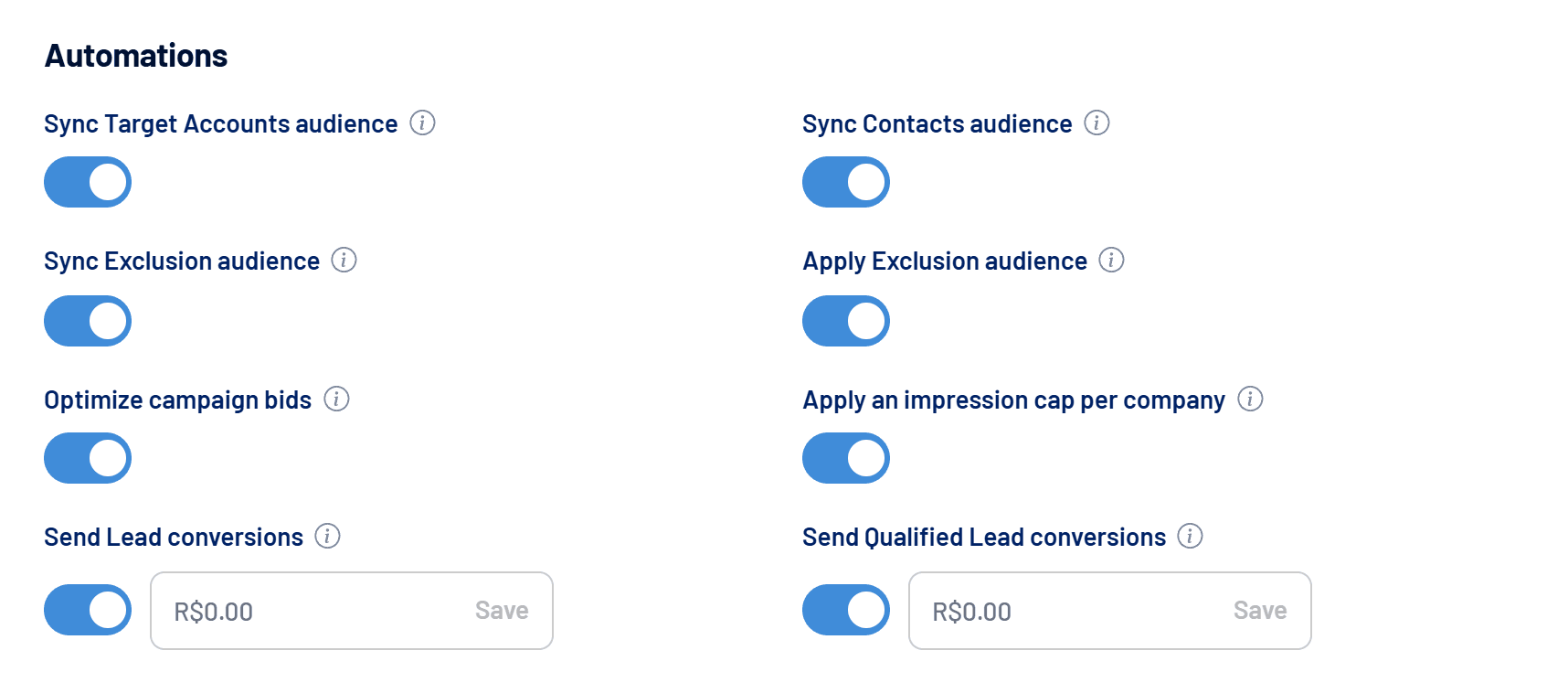
What each automation does
| Automation | What it does | When it runs |
|---|---|---|
| Sync Target Accounts audience | Updates the LinkedIn Ads audience with the companies in your Target Accounts list. | Saturdays, 04:00 UTC |
| Sync Exclusion audience | Updates the LinkedIn Ads audience with the companies in your Exclusion list. | Saturdays, 04:00 UTC |
| Apply Exclusion audience | Applies the Exclusion audience as an exclusion on every active campaign when it syncs. | Every Exclusion sync |
| Sync Contacts audience | Updates the Contacts audiences on every connected ad account (LinkedIn, Google and Meta). | Saturdays, 04:00 UTC |
| Optimize campaign bids | Reviews the bidding strategy of active LinkedIn campaigns to cut costs without losing delivery. | Once a week |
| Apply an impression cap per company | Temporarily excludes companies that take too large a share of impressions, making room for others. | Daily |
| Send Lead conversions | Sends a conversion event to the connected networks for every new lead. | When each lead arrives |
| Send Qualified Lead conversions | Sends a conversion event when a lead is marked as qualified. | When the lead is qualified |
| Pause campaigns when budget limit is reached | Pauses LinkedIn campaigns when monthly spend hits the limit and reactivates them the following month. | Every 6 hours |
Hover over the i icon next to each toggle to see a summary on screen.
How to turn on an automation
- Connect LinkedIn Ads
With LinkedIn disconnected, the toggles are locked. See How to connect LinkedIn Ads to LinkedScope. - Open Settings > Account
The budget limit lives in Settings > Budget. - Switch the automation on
The change is saved immediately. The next run follows the schedule in the table above.
Toggle locked?
If a toggle is disabled, hover over it to see why: the plan doesn’t include automations, the subscription has a pending payment or LinkedIn Ads is disconnected. See Plans, trial and subscription.
Guides for each automation
- How to pause campaigns automatically when the budget limit is reached: monthly limit, 85% and 100% alerts and reactivation.
- How to sync audiences automatically (Target Accounts, Exclusion and Contacts): Target Accounts, Exclusion, Contacts and applying the exclusion.
- How to send Lead and Qualified Lead conversions to ad networks: events, values and how to avoid duplicate conversions.
- Automatic LinkedIn bid optimization: how it works: what changes in your bids and the delivery safeguards.
- Impression cap per company: how it works: when a company is excluded and when it comes back.
Frequently asked questions
Do automations change my campaigns without telling me?
The ones that change campaigns (budget, bids, impression cap and applying the exclusion) only act while their toggle is on, and budget pauses and reactivations send notifications. See Notifications: what LinkedScope tells you and when.
Does switching an automation off undo what it did?
It depends: switching off the impression cap restores the excluded companies. Switching off the budget pause leaves paused groups paused until you reactivate them. Syncs simply stop running.
Why are times in UTC?
Every routine uses universal time. Saturday at 04:00 UTC is midnight between Friday and Saturday in New York (daylight saving time) and 5:00 am on Saturday in London (summer time).