In a nutshell: your CRM is the best audience source you have for paid media. Won deals become the seed of a lookalike audience on Meta Ads and Google Ads, where B2B targeting is weak and lookalikes help a lot. On LinkedIn Ads, be careful: you already pay a premium for precision, so raw contact and company audiences are the foundation, lookalikes (Predictive Audiences) only come in as a test and Audience Expansion stays off, always. Open deals get reinforcement retargeting while sales negotiates, target accounts get warmed up before outreach, customers leave acquisition and lost deals come back after a while. And all of it only works if the audiences stay synced with the CRM and the deals flow back to the platforms as conversions.
Quick question: how much of your CRM turns into a paid media audience today?
At most B2B companies I see, the answer is zero.
Or close to it: someone exported a customer spreadsheet last year, uploaded it to Meta, built a lookalike audience… and nobody touched it again.
Meanwhile, the CRM is full of valuable information. Who bought. Who’s negotiating right now. Who said no. Which companies sales wants to approach.
Each of those lists is an audience with a different job in paid media.
And the job changes from channel to channel. What’s great on Meta can be money down the drain on LinkedIn. The big picture of each channel’s role is in the post on B2B paid media.
Let’s take it one step at a time.
Which audiences can you build from CRM data?
At least five, each with its own job. The table sums it up, and each row has a section below.
| CRM audience | What it’s for | Where to use it |
|---|---|---|
| Won deals | Lookalike seed and exclusion from acquisition | Lookalike on Meta and Google (carefully on LinkedIn); exclusion everywhere |
| Open deals | Reinforcement retargeting during the negotiation | LinkedIn, with Meta and Google adding frequency |
| Target accounts | Warm up before sales reaches out | LinkedIn (company audience) |
| Active customers | Leave acquisition, move into upsell and retention | Exclusion everywhere; their own campaign if it makes sense |
| Lost deals | Win them back after a while | LinkedIn, Meta and Google |
One important difference before we go on.
Meta and Google only understand people: you upload emails or phone numbers and they look for matches.
LinkedIn understands people and companies. You upload the company list and advertise to the people who work there, filtering by job title, function and seniority.
That changes everything in B2B, because your CRM usually has one or two contacts per deal. And the buying committee has a lot more people than that.
What is a lookalike audience and why does it work so well on Meta and Google?
A lookalike audience is an audience “similar” to a list you provide as the seed. The platform looks at who’s on your list and finds other people with a similar profile and behavior.
In B2B, the best seed there is is your list of won deals. Those are the people who actually bought from you.
So why does it shine on Meta and Google?
Because native B2B targeting is weak on those channels. You can’t reliably target “CFOs at companies with 200 to 1,000 employees”.
A lookalike solves part of that: instead of guessing interests, you show the algorithm what your customer looks like and let it find similar people.
How to create a lookalike audience on Meta Ads
- Upload the contacts from won deals as a custom audience (customer list, with email and phone).
- Create the lookalike audience from it. Meta needs at least 100 people from a single country in the seed, according to the Meta Business Help Center.
- Start with 1%, the closest to the seed, and only open up to larger ranges if you run out of reach.
How to create a lookalike audience on Google Ads
Watch out for a catch here: Google stopped generating similar audiences in May 2023.
In their place there are lookalike segments, which work in Demand Gen campaigns (YouTube, Discover, Gmail).
- Upload the contacts from won deals through Customer Match in the Audience manager.
- In the Demand Gen campaign, create a lookalike segment using that list as the seed, as described in Google Ads Help.
- Understand it’s a suggestion, not a fence. By default, Google uses the lookalike segment as a signal for the algorithm, not as a hard limit on who sees the ad.
The Customer Match list also works as an audience signal in other campaign types, but the lookalike itself is a Demand Gen thing.
Can you use a lookalike audience on LinkedIn Ads?
Yes, with Predictive Audiences, but carefully: on LinkedIn you’re already paying a premium precisely for precision. Expanding the audience by similarity can throw away what you’re paying for.
Think about it.
LinkedIn’s CPM is much higher than Meta’s. That premium exists because LinkedIn knows where people work, their job title and the size of their company.
Then you take that precision and ask the algorithm to find “similar” people?
If the algorithm gets it wrong, you pay LinkedIn prices to show ads to people outside your ICP.
LinkedIn’s old Lookalike Audiences stopped being created in February 2024. Their place was taken by Predictive Audiences: LinkedIn’s AI takes a seed from you and looks for members more likely to act the same way.
How to create a Predictive Audience on LinkedIn Ads
- Pick one source. In Campaign Manager, under Audiences, create a predictive audience from a single source: contact list, company list, conversion, lead gen form or retargeting, according to LinkedIn Help.
- Use the best seed you have: the contacts or companies from won deals.
- Adjust the size. LinkedIn suggests an audience size, and you can change it.
- Run it in a separate ad set, never mixed with the ICP audience, so you can compare cost per qualified lead and per opportunity.
The warning: since you’re paying more precisely for targeting, Predictive Audiences is a test, not your foundation. If cost per opportunity doesn’t beat the ICP audience, turn it off.
Your foundation on LinkedIn is still raw audiences:
- Contact audience: the people in your CRM, by email.
- Company audience: the company list, combined with job title, function and seniority to reach the buying committee.
The company audience is the weapon Meta and Google don’t have. Use it.
What about LinkedIn Audience Expansion?
Turn it off. Always. Don’t confuse it with Predictive Audiences: there you build an audience on purpose and test it separately. Audience Expansion widens any of your audiences without you noticing.
Audience Expansion shows your ads to members with attributes similar to your audience. And the detail that catches a lot of people: according to LinkedIn Help, it’s turned on automatically in ad sets where it’s available.
In other words, if you don’t uncheck it, your “precise” audience is already being expanded.
To turn it off: in Campaign Manager, open the ad set, go to the Audience section and uncheck Enable Audience Expansion.

Two things make it worse:
- The audience size estimate doesn’t include the people added by the expansion. You look at the number and think everything’s under control.
- Impression, click and demographic reports mix your audience with the expanded audience. It gets hard to tell how much of the budget went to the people you chose.
I say this all the time and I’ll say it again here: with CRM audiences on LinkedIn, Audience Expansion off. Always.
How do you retarget open deals on LinkedIn Ads?
By advertising to the companies that are negotiating with you, while sales negotiates. To me, this is the most underrated use of the CRM in paid media.
Picture the scenario.
The rep had the meeting and sent the proposal. Now the decision is in the hands of a committee: the director, finance, the technical team, sometimes legal.
The rep talks to one or two of those people. The others have never heard of you.
That’s where the reinforcement campaign comes in. While the deal is open, the whole committee keeps seeing ads that:
- Build trust: case studies from similar customers, numbers, testimonials.
- Handle objections: security, implementation, support, “what if it doesn’t work?”.
- Show authority: founder content, events, recognition.
To set it up:
- Create the company audience of open deals from the CRM.
- Combine it with function and seniority to reach the committee, not the whole company.
- Use bottom-of-funnel ads: case studies, social proof, answers to objections. No generic top-of-funnel offers.
- Align with sales. Reps need to know this campaign exists so they can bring it up in the conversation (“did you see that case study we published?”).
Two cautions.
LinkedIn only delivers to audiences with at least 300 members. If you have few open deals, the audience may be too small; in that case you can combine open deals with target accounts at an advanced stage.
And no ads that contradict the proposal. A discount promotion showing up for someone negotiating price is asking for trouble.
Meta and Google can come in as cheap frequency for the contacts in those deals, but LinkedIn is the one that reaches the committee through the company audience. How to combine the three channels is in the B2B retargeting playbook.
How do you use target accounts on LinkedIn Ads before outreach?
By warming up the account with ads before sales knocks on the door. When the rep shows up, the brand is no longer a stranger.
The target account list becomes a company audience on LinkedIn. You combine it with the committee’s job titles and run valuable content: education, opinion, proof.
Then you track who reacts. The company that starts engaging moves up in sales’ queue.
That’s the core of LinkedIn Ads for ABM, and the outreach step by step is in the warm outbound post.
What should you do with active customers and lost deals?
Customers leave acquisition. Lost deals come back after a while.
A customer seeing a “discover our solution” ad is wasted budget, and sometimes even awkward. Exclude the won deals list from acquisition campaigns on all three channels. The LinkedIn Ads exclusions post shows how to do it by company.
If it makes sense, create a campaign just for them: product news, upsell, community.
Lost deals, on the other hand, are a forgotten gold mine.
The company said no because of timing, budget or because it chose someone else. Six months later, things may look different.
No need to go after them the next day. Let it cool down for a few months and come back with what changed: a new case study, a new feature, a new result.
How do you keep CRM audiences up to date?
By syncing, not exporting. A list exported once gets stale within weeks.
Open deals become won or lost. Customers churn. Target accounts come and go.
If the audience doesn’t keep up, you start sending negotiation ads to people who are already customers, or you stop excluding someone who just bought.
A few numbers to keep in mind:
- LinkedIn: the audience needs at least 300 members for the campaign to run, according to the LinkedIn documentation.
- Google: the Customer Match list needs at least 100 matched people to run.
- Meta: the lookalike seed needs at least 100 people from a single country.
- Matching: each network only finds part of your list. Work email, phone with country code and full name help.
You can do all of this by hand: export from the CRM by stage, upload to each network, repeat every week.
Truth is, nobody repeats it. That’s why automatic syncing makes such a difference.
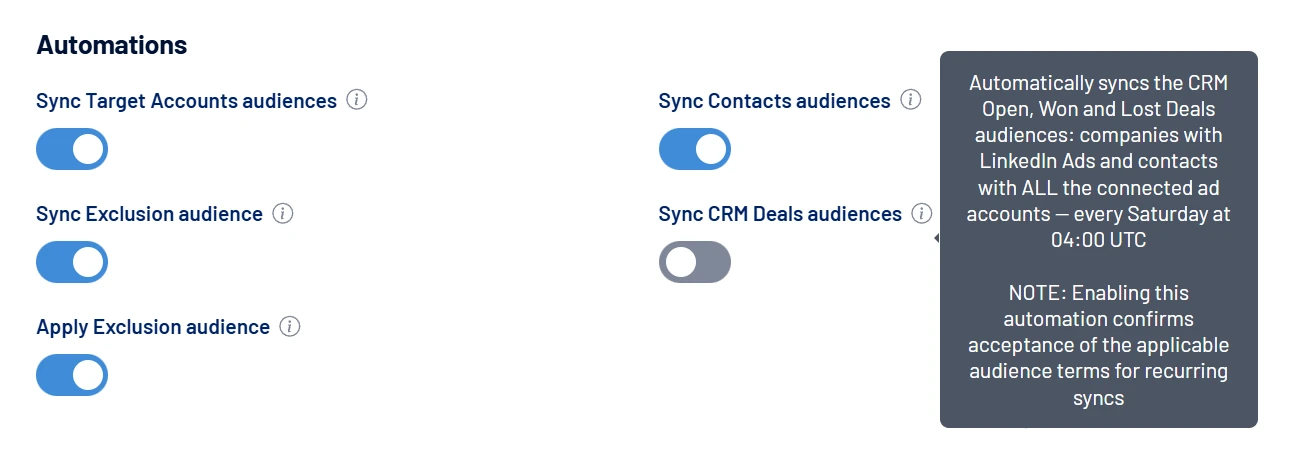
In LinkedScope, that’s the job of the Sync CRM Deals audiences automation on the Enterprise plan. It keeps the 💼 Open Deals, 💼 Won Deals and 💼 Lost Deals audiences updated every week: contacts go to LinkedIn Ads, Google Ads and Meta Ads, and companies go to LinkedIn Ads.
If you want the details on how each audience is built on LinkedIn, the LinkedIn Ads retargeting post and the LinkedIn Ads targeting pillar complement this one. And to understand how CRM data reaches your ads, see the LinkedIn Ads and CRM integration.
How do you send CRM conversions back to LinkedIn, Google and Meta?
By sending the funnel milestones back as conversion events. The audience tells the platform who sees the ad. The conversion tells it what success looks like.
And this is where a classic B2B problem lives.
If the platform only sees the form submission, it optimizes for forms. It goes after more people like the ones who fill out forms, not the ones who buy. The result: cheap leads, students, the curious, vendors.
When you send back what happened next in the CRM (qualified lead, opportunity created, deal won), the algorithm learns who moves through the funnel and starts prioritizing similar profiles.
And that holds even on LinkedIn, without contradicting what I said above: you’re not expanding the audience, you’re just showing delivery who, within the audience you chose, is worth more.
Each platform has its own path:
- LinkedIn Ads: the Conversions API accepts online and offline events. LinkedIn itself suggests one conversion rule per CRM stage, from pipeline to closed-won, with the deal value to calculate return. And qualified leads feed the qualified leads optimization goal in lead generation ad sets.
- Google Ads: offline conversion imports, matching the CRM event to the ad click or to the lead’s email (sent hashed).
- Meta Ads: the Conversions API also takes CRM stages, and lead campaigns can optimize for people who reach later stages, not just for people who fill out the form.
Three cautions:
- Speed: send the event as soon as it happens. LinkedIn recommends real time or within a day at most, and only uses a qualified lead for optimization if it arrives within 30 days, according to the Conversions API documentation.
- Volume: won deals are too rare for the algorithm to learn from on their own. A qualified lead or an opportunity is usually the balance between quality and quantity. LinkedIn suggests at least five qualified leads within two weeks for the learning phase.
- Duplicates: if the same event arrives through the website tag and through the API, set up deduplication. Otherwise, the conversion counts twice.
The LinkedIn Ads conversion tracking post shows the setup in Campaign Manager.
In LinkedScope, what flows back automatically to all three networks today is the lead and the qualified lead: you mark the lead as qualified and the event goes to LinkedIn Ads, Google Ads and Meta Ads. The step by step is in how to send Lead and Qualified Lead conversions. The later CRM stages, such as opportunity and closed-won, you send through your CRM’s own integration with each network or through the API.
Want the open, won and lost deals in your CRM to become audiences on their own, updated every week? LinkedScope builds the company audiences on LinkedIn Ads and the contact audiences on LinkedIn, Google and Meta straight from the CRM. See how to sync audiences to ad networks and try it free for 15 days. 😉
Frequently asked questions
What is a lookalike audience?
It’s an audience the ad platform builds from a seed list, with people whose profile and behavior are similar to the people on that list. In B2B, the best seed is the list of contacts from won deals in the CRM.
Does LinkedIn Ads still have lookalike audiences?
Under another name. LinkedIn stopped creating Lookalike Audiences in February 2024, and today’s equivalent is Predictive Audiences, built from a seed of yours. You can use it, carefully: since you already pay for job title and company precision, raw contact and company audiences remain the foundation, and Predictive Audiences comes in as a test, compared with the ICP audience. Audience Expansion stays off, always.
Should I leave LinkedIn Audience Expansion on?
Not with CRM audiences. It’s turned on automatically in ad sets where it’s available and extends delivery to people similar to your audience, outside your list. Uncheck “Enable Audience Expansion” in the ad set’s audience section.
Does Google Ads still have similar audiences?
Similar audiences stopped being generated in May 2023. Today Google offers lookalike segments in Demand Gen campaigns, using a Customer Match list as the seed, for example.
Is it worth advertising to companies that are in negotiation?
Yes, carefully. A reinforcement campaign with case studies, social proof and answers to objections helps the whole buying committee trust your company while sales negotiates. Align with the sales team and avoid any offer that contradicts the proposal.
Why send CRM conversions back to the ad platforms?
Because without it, the platform optimizes for people who fill out forms, not for people who buy. When you send back qualified leads, opportunities and won deals, the algorithm learns who moves through the funnel and starts prioritizing similar profiles within the audience you chose.