
In a nutshell: yes, you can run LinkedIn Ads on a small budget, as long as the setup is lean. The minimum budget depends on your country and currency: in a USD account, it’s $10 a day per ad set, roughly $300 a month. With little money, run few campaigns, each with one job: distributing content (ideally from an executive, with Thought Leader Ads), capturing demand with Lead Gen Forms, and Text Ads for brand recall, which cost little and rack up tons of impressions. Keep the audience tight around your ICP, keep exclusions up to date and be patient in the first months.
“LinkedIn Ads is way too expensive.”
I hear that every single week.
And look, per click, LinkedIn IS expensive. Way more than Google or Meta.
But expensive per click doesn’t mean you need a lot of money to get started. It means you can’t afford to waste any.
In this guide to LinkedIn Ads on a small budget, I’ll show you what the minimum is, the campaign setup I use when money is tight and what to expect in the first months. Let’s go?
What is the minimum budget for LinkedIn Ads?
It depends on your country and your account’s currency. In a USD account, the minimum is $10 a day per ad set. Over a 30-day month, that’s about $300 per ad set.
Here’s a detail few people know: the minimum applies to each ad set (what Campaign Manager used to call a campaign), not to the account. Three ad sets = three minimums.
The minimum can change, so double-check when you create the ad set: Campaign Manager warns you if the budget is below what’s allowed.
If you want to understand why a click costs what it costs, there’s a whole post on that: how much LinkedIn Ads costs. And to work out your budget from your lead goal, see the LinkedIn Ads budget guide.
Does LinkedIn Ads work on a small budget?
It does. Just not the way most people try it.
The classic mistake is taking $1,000 and spreading it across eight campaigns, five huge audiences and three objectives. Each campaign gets crumbs, the algorithm learns nothing and, at the end of the month, the verdict is “LinkedIn doesn’t work for me”.
Yep. It wasn’t LinkedIn.
With little money, the rule is few campaigns, each with one clear job, talking to a tight audience. And each campaign should complement the others.
Which campaigns should you run on a small LinkedIn Ads budget?
This is the setup I use when the budget is tight.
It comes from LinkedIn Ads PRO, a program my agency, LinkUpers, runs for consultants and small B2B businesses in Brazil and Spain, built on content distribution, lead gen with a lead magnet and Text Ads. When it fits, I add a conversation or image campaign to capture demand.
| Campaign | Job | Format | Audience | Budget |
|---|---|---|---|---|
| 1. Executive content | Put decision-makers in touch with your company’s ideas | Thought Leader Ads (posts from the founder’s or an executive’s profile) | Cold: your ICP | $10/day |
| 2. Lead gen with a lead magnet | Trade something useful for contact details | Image or document + Lead Gen Form | Retargeting (or ICP, until retargeting is big enough) | $10/day |
| 3. Demand capture | A direct offer for people ready to talk | Conversation Ads or image + Lead Gen Form | Retargeting | $10/day |
| 4. Cheap presence | Keep your brand top of mind with decision-makers all month | Text Ads | Retargeting | $10/day cap (spends way less) |
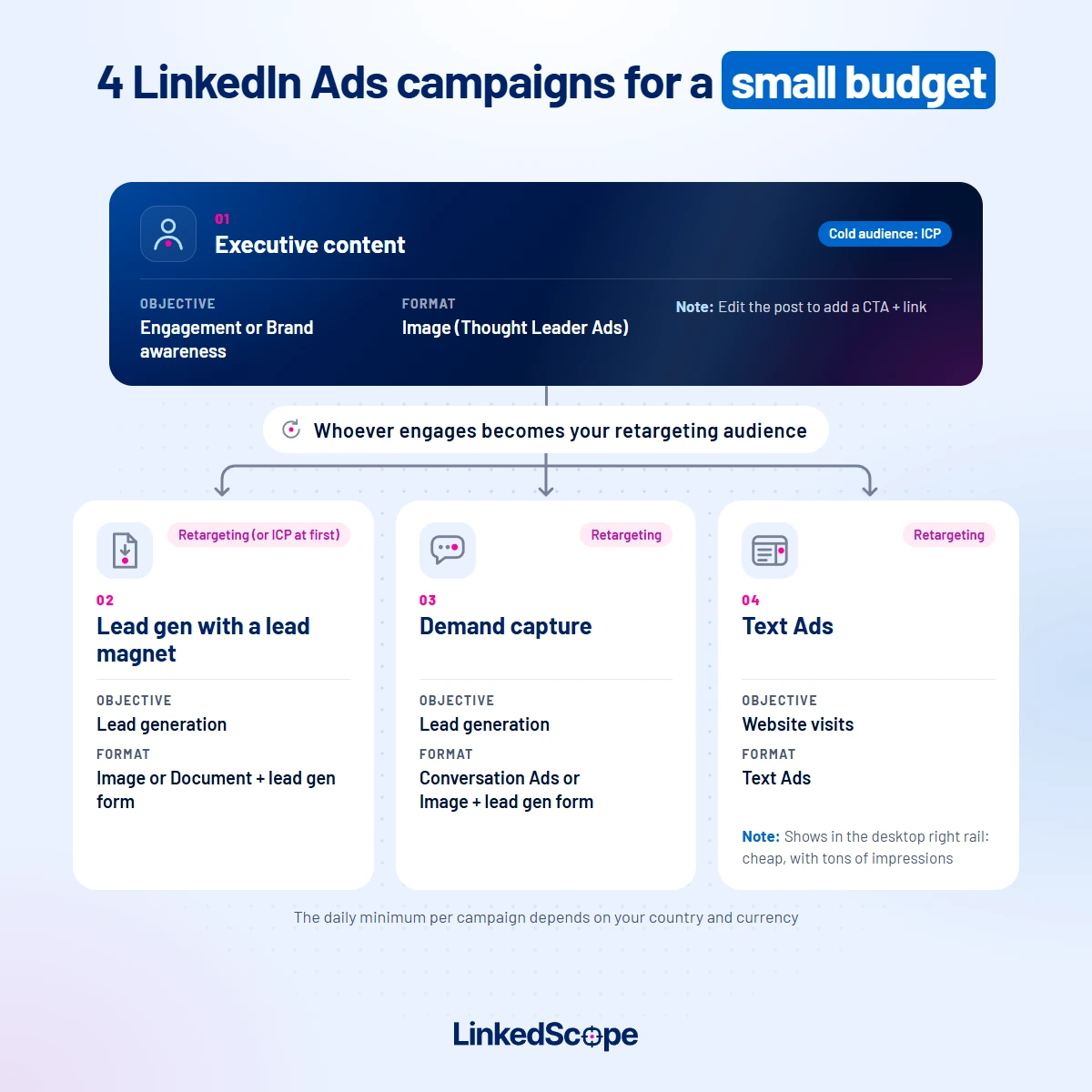
On paper, the four add up to a $1,200 monthly cap. In practice, since Text Ads almost never spend their full budget (more on that below), you’ll end up below that.
Which audience should each campaign target?
Look at the audience column: only the first campaign talks to people who don’t know you yet.
- Executive content: a cold audience built from your ICP (job title, industry and company size, or a company list). This is the campaign that introduces your company to decision-makers.
- Lead magnet, demand capture and Text Ads: retargeting. People who engaged with the posts, visited your site or opened your ads, always crossed with your ICP so you don’t pay for random lookers.
Why split it like this? Because on a small budget you can’t ask for contact details from people who’ve never heard of you. First you show up, then you ask.
One catch: a retargeting audience needs at least 300 members to run. At the start, while it’s still small, keep the lead magnet campaign on your ICP and turn the others on once retargeting fills up.
Which audiences to create and how to build each one is in the LinkedIn Ads retargeting guide.
Now, one by one.
1. Distributing executive content
This is the foundation.
Instead of an ad that looks like an ad, you sponsor posts the founder or an executive already published on their own profile. That’s Thought Leader Ads.
Why I start here:
- People engage with people. A post from a person feels like a conversation, not an ad.
- It costs less per impression. On our own account, over the last 90 days, the CPM (cost per thousand impressions) of Thought Leader Ads was about half that of our retargeting image ads and about a third of our document ads.
- It feeds the other campaigns. Whoever engages with the posts becomes retargeting audience for the capture campaigns.
Here you “inherit” the reach the executive already has organically and put it in front of decision-makers at your ICP companies, not just their own network.
Tip: the post can send people to your site too. Before adding it to the campaign, edit the post and include the link (to the lead magnet, a solution page, a booking page). That way you educate and drive visits with the same ad.
What if nobody at the company creates content?
You can swap this campaign for a website visits one: an image ad pointing to a page on your site to capture demand.
But that’s the traditional play. It’s what everyone does: an ad that sends people to the site.
Executive content plays a different game. It educates and creates demand among people who don’t even know they need you yet, and that’s what makes the capture campaigns cheaper later on.
So:
- Budget for both? Fine, run both.
- Need to pick one? Go with executive content (with a link in the post), followed by the complementary campaigns.
More on this logic in the post on founder-led growth with LinkedIn Ads.
2. Lead gen with a lead magnet
Something genuinely useful for your ideal customer: a guide, a checklist, a spreadsheet, an assessment.
The ad offers the material and the Lead Gen Form opens right inside LinkedIn, prefilled with profile data. The person never leaves LinkedIn and you get name, company and job title.
Tip: the material has to solve a specific problem for the people who buy from you. Generic material brings generic leads.
Audience: retargeting of people who engaged with the executive’s posts and people who visited your site. At the start, your ICP.
3. Demand capture with Conversation Ads (or an image)
The lead magnet catches people who want to learn. The conversation catches people who want to solve the problem.
Conversation Ads land in the LinkedIn inbox, with buttons that walk the person down a path: “I want an assessment”, “show me how it works”, “not now”.
And you can attach a Lead Gen Form to one of the buttons. Whoever clicks leaves their details right there.
Prefer something simpler? An image ad with a direct offer and the same form does the job.
It works best with people who already know you. So, as soon as your retargeting audience is big enough (the minimum is 300 members), point this campaign at it, crossed with your ICP. The step by step is in the LinkedIn Ads retargeting guide.
4. Text Ads: cheap, with tons of impressions
Text Ads are those tiny ads, with a short headline, one line of text and a thumbnail image, that show up in the right rail (and sometimes at the top) of LinkedIn on desktop. Desktop only. On mobile, they don’t exist.
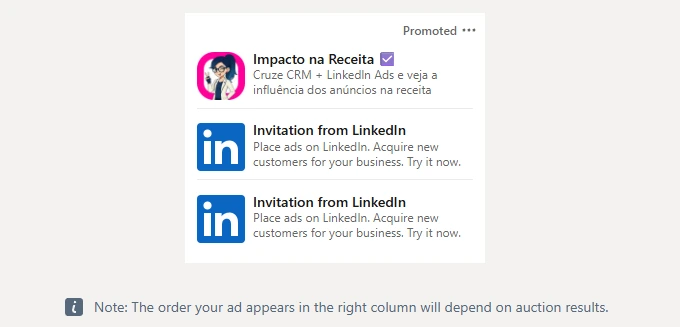
And they have two traits that look like flaws but, on a small budget, are an advantage:
- They almost never spend the budget. The placement is small, it only exists on desktop and few people click. So the campaign simply can’t spend it all.
- They rack up impressions. With cost-per-click bidding (that’s how we set it up) and hardly anyone clicking, impressions come almost for free.
Here are the numbers from our Text Ads campaign in Portuguese over the last 90 days (our ad account runs in Brazilian reais):
| Metric | Text Ads (our account) |
|---|---|
| Daily budget | The Brazilian minimum (R$20) |
| Actual spend | About 30% of the 90-day cap |
| Impressions | 4.1 million |
| People reached | About 64,000 |
| CPM | R$0.13, about 1% of our Thought Leader Ads CPM (R$14.80) |
| Clicks | 192 |
Yep: 4.1 million impressions while spending less than a third of the budget.
Now, to be honest: an impression in the right rail isn’t worth the same as one in the feed. The ad is small, attention is lower and frequency gets really high (on ours, over 60 times per person in the period).
That’s why the job of Text Ads is presence. Your brand showing up all the time to decision-makers, for the price of a coffee a day. Clicks and leads come from campaigns 2 and 3.
Audience: retargeting. Your brand keeps showing up in the right rail for people who’ve already seen you in the feed or on your site, while the other campaigns do their work. On our account, we cross that retargeting with the ICP.
What if I have less than that?
Prioritize:
- Only $300 a month: one lead magnet campaign, with the audience tightly focused on your ICP.
- Around $600: executive content + lead magnet.
- A bit left over: add Text Ads. They spend little and reinforce the other two.
- The conversation campaign comes in once retargeting has enough people for it.
How do you make a small LinkedIn Ads budget go further?
Keep the audience tight around your ICP
On a small budget, a huge audience is money spread thin.
Build a tight audience with the job title, industry and company size of your ideal customer (or a company list), and use it as the base for every campaign. Retargeting gets crossed with it.
The step by step is in the LinkedIn Ads targeting guide.
Turn off what spreads the budget
Keep Audience Expansion and the LinkedIn Audience Network turned off (the network takes your ad to sites and apps outside LinkedIn).
With little money, every cent has to land on the people you chose.
Exclude who won’t buy
Customers, competitors, suppliers, students, companies outside your profile. Every impression on them is budget that never comes back. See how in the post on LinkedIn Ads exclusions.
Few ads per campaign
Two to four ads per campaign are enough. More than that splits the budget too much and it takes longer to learn what works.
Don’t let a few companies eat the budget
On a small budget, it’s common for two or three big companies to take a big share of the impressions. Keep an eye on which companies your campaign is reaching and adjust course.
What should you expect in the first months on a small budget?
No illusions:
- First weeks: learning. The algorithm is still figuring out who responds, and costs tend to run higher.
- Months one and two: reach and engagement growing, the first leads coming in, the retargeting audience filling up.
- Month three: you can read what’s working and decide where to put more money.
With around $1,000 a month you won’t get 50 leads in two weeks. You’ll get the right companies getting to know you, a few qualified contacts and data to decide your next step.
And read the results by what matters: which ICP companies you reached, who engaged and who turned into a conversation. Not just CPC. To measure properly, set up LinkedIn Ads conversion tracking.
When isn’t a small budget worth starting with?
Hold your money if:
- Your ticket is low. If a customer is worth $100, LinkedIn will hardly pay for itself. It shines where one contract pays for months of media.
- You sell to consumers. LinkedIn is for B2B.
- Nobody will follow up on the leads. A lead that sits there never becomes a customer, and no budget fixes that.
- You need volume tomorrow. A small budget calls for patience.
How do you control your budget without checking Campaign Manager every day?
In LinkedScope, you can pause campaigns automatically when they hit a budget limit, turn on the impression cap per company (so no single company eats the budget) and let automatic bid optimization adjust your campaign bids.
And in Reached Companies you see which companies every dollar reached, with each one’s Intent Index.
Want to see which companies your $10 a day is reaching? See how LinkedScope works and try it free for 15 days. 😉
Frequently asked questions
What is the minimum budget for LinkedIn Ads?
It depends on the country and currency of the ad account. In a USD account, the minimum is $10 a day per ad set, about $300 a month.
Can you advertise on LinkedIn with $300 a month?
Yes, with a single campaign and an audience tightly focused on your ideal customer. Start with a lead magnet campaign and a Lead Gen Form, and add the others as your budget grows.
Which campaigns should you run on a small LinkedIn Ads budget?
Few, each with one job: distributing executive posts with Thought Leader Ads, lead gen with a lead magnet and a Lead Gen Form, demand capture with Conversation Ads and Text Ads to keep your brand top of mind.
Which audience should each campaign target on a small budget?
Use a cold audience built from your ICP only for the executive content campaign. Lead magnet, demand capture and Text Ads go to retargeting (people who engaged with the posts or visited your site), crossed with your ICP. Until retargeting reaches 300 members, keep the lead magnet campaign on your ICP.
Why do Text Ads barely spend their budget?
Because they only show in the right rail (and sometimes at the top) of LinkedIn on desktop, with little space and few clicks. With cost-per-click bidding, they generate lots of impressions at a low cost but rarely use up the full daily budget.
How long does it take to see results on a small budget?
The first weeks are a learning period. The first leads usually come in during month one or two, and by month three you can tell what’s working and decide where to invest more.