In a nutshell: signal-based outbound with LinkedIn Ads means prospecting from the signals your ads and content generate. In practice, you advertise to ICP accounts, capture who reacts to and comments on your ads and posts (Engagers), set the signals that make a company a priority (Spark Prospects), find the key people at those companies, send everyone to a sequence (WaLead.ai, Snov.io, Apollo or a webhook) and keep your ads running during outreach. Start with the people who engaged: that’s the signal that converts best. A company with a strong signal but no engaged person calls for outreach with context, not mass cold email. The best signal combinations pair fit with interest: Target Accounts that visited your website (through a retargeting campaign) or that have several engaged people.
Your ad got 40 reactions and 6 comments this week.
Who on your sales team talked to those people?
Yeah.
In most accounts I look at, nobody. The engagement sits in Campaign Manager as a CTR metric while the SDR works a cold list someone bought.
This is the signal-based outbound playbook with LinkedIn Ads that we use: from the ad to the sequence, with LinkedIn and LinkedScope screens. If you want the concept first, start with the post on warm outbound with LinkedIn Ads signals.
What is signal-based outbound with LinkedIn Ads?
Signal-based outbound is choosing who to reach out to, when and with what topic based on observable signals, instead of working through a cold list. With LinkedIn Ads, the signals come from your own media:
- Company signal: the account is being reached by and engaging with your ads. It tells you where and when to act.
- Person signal: someone at that account reacted to or commented on one of your ads or posts. It tells you who to talk to.
The ad generates the signal, the signal builds the queue and sales reaches out with context.
There are signals outside your media too: job changes, hiring, Sales Navigator alerts. They’re useful for LinkedIn prospecting in general. Here I’m sticking to the signals your ads and content generate, which are the ones you control and the ones LinkedScope reads.
The 10 steps below build that machine.
What do you need before you start?
An ad account running to your ICP, the Engagers connection and an outreach tool. The rest is optional, but it helps a lot.
| Item | What it’s for | Required? |
|---|---|---|
| LinkedIn Ads connected | Reached companies, Intent Index and media signals | Yes |
| LinkedIn connection in Engagers | Capture who reacts to and comments on your content (it’s a separate connection from the LinkedIn Ads one) | Yes |
| Outreach tool | WaLead.ai, Snov.io, Apollo or any tool via webhook | Yes |
| Enrichment provider | Apollo, Snov.io or Data Stone, to find people and validate emails | Recommended |
| CRM connected | Separate customers and open deals, and bring new accounts into the funnel | Recommended |
Step 1: How do you define your accounts and key job titles?
Build your Target Accounts lists with the job titles you want to reach at each one.
This step looks like busywork, but it’s what makes step 6 automatic.
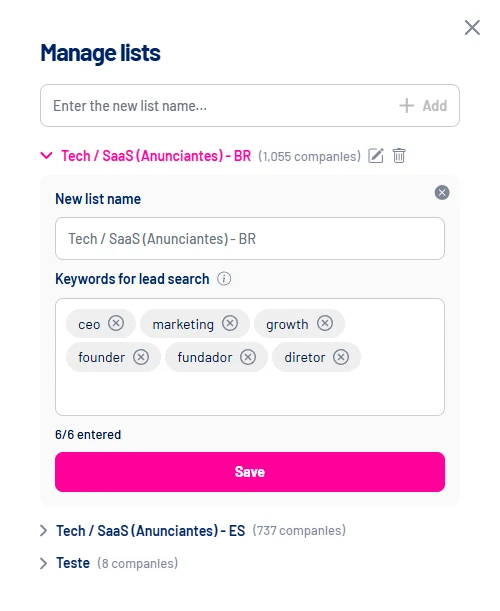
In Target Accounts, organize your ICP companies into lists (by segment, size, priority, whatever makes sense for your sales team). In Manage lists, each list takes up to 6 job title or department keywords, like “finance”, “controller” or “CFO”. LinkedScope uses those keywords to find the right people at each company.
Then:
- Sync the lists with LinkedIn Ads so you only advertise to those companies. See how to create and use Target Accounts.
- Build your Exclusion list with customers, competitors and partners. Nobody wants to prospect their own customer. The why is in the post on LinkedIn Ads exclusions.
If you’re still designing your account strategy, the starting point is the post on LinkedIn Ads for ABM.
Step 2: How do you advertise to generate signals, not just impressions?
Use formats that allow reactions and comments, and content that makes people want to respond.
A person signal only exists when someone reacts or comments. So the format matters:
- Image, document, video and carousel show up in the feed as posts and get reactions and comments.
- Thought Leader Ads (sponsored posts from people) tend to spark more conversation, because they look like content, not ads.
- Message and Conversation Ads land in the inbox and don’t get public reactions. They’re for something else.
And the content matters even more. Opinion, behind the scenes, your own data, a direct question. “Book a demo” doesn’t get a single comment.
Then build your media in layers, starting from the bottom:
| Layer | Audience | Role in outbound |
|---|---|---|
| Bottom | Retargeting of people who visited pricing, opened a form or watched a video | Convert people who are close, no name needed |
| Middle | Retargeting of people who engaged with your ads and Page, plus LinkedIn’s company engagement audience (organic and paid signals) | Keep warm accounts seeing proof and case studies |
| Top | Target Accounts and ICP job titles | Generate the signals that feed the queue |
Why bottom-up? Because the bottom and middle are small, cheap and work with people who already know you. The top is what spends the most, and it only pays off once the other layers are ready to catch the people it warms up.
Let the list run on this media for a few weeks before you start the sequence. The outreach lands as a follow-up, not a first touch.
The formats are in the post on LinkedIn ad formats, and the logic of amplifying founder posts is in the founder-led growth playbook.
Step 3: How do you capture who engaged with your ads?
Connect Engagers and add your ad account, your LinkedIn Page and the profiles that post as sources.
In the Engagers menu, connect your LinkedIn account. Then, in Manage sources, add:
| Source | What gets monitored |
|---|---|
| Ad account | Sponsored posts, including dark posts, which don’t show up on the Page |
| LinkedIn Page | Posts published by the company Page |
| Profile | Posts from the connected profile |
| LinkedIn post | A specific post, from its link (posts from people need to mention the company Page) |
Shortcut: on LinkedScope’s Ads screen, Thought Leader Ads have a Monitor in Engagers icon that adds the post as a source in one click.
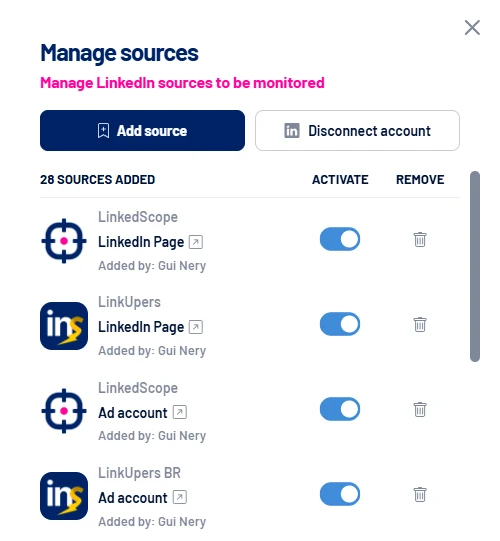
Engagements are collected once a day (the Update button fetches them right away), and each post is tracked for up to 180 days. Each person’s current job title and company show up in the People view.
Now filter. In the People view, use the Target Accounts list filter to see only people from your accounts and the exclusion filter to get customers and competitors out of the way.
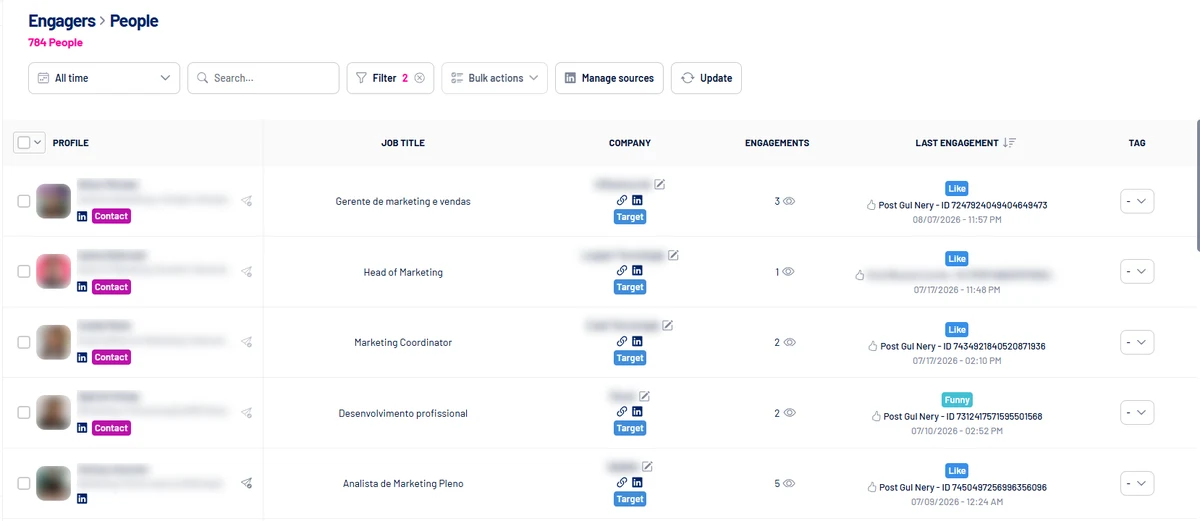
These people are your top priority. They engaged in public, by name, and you have a real topic to start the conversation. More on the dashboard in Engagers: who engages with your content and how to manage sources.
Step 4: What signals make a company a prospecting priority?
In Spark Prospects, combine the signals that, for your sales team, make a company a priority.
You can start with LinkedIn itself. In Campaign Manager, under Plan > Companies, you see each company’s engagement level with your ads and your Page, organic and paid, plus ready-made segments like Highly engaged, High reach, no response and Surging accounts.
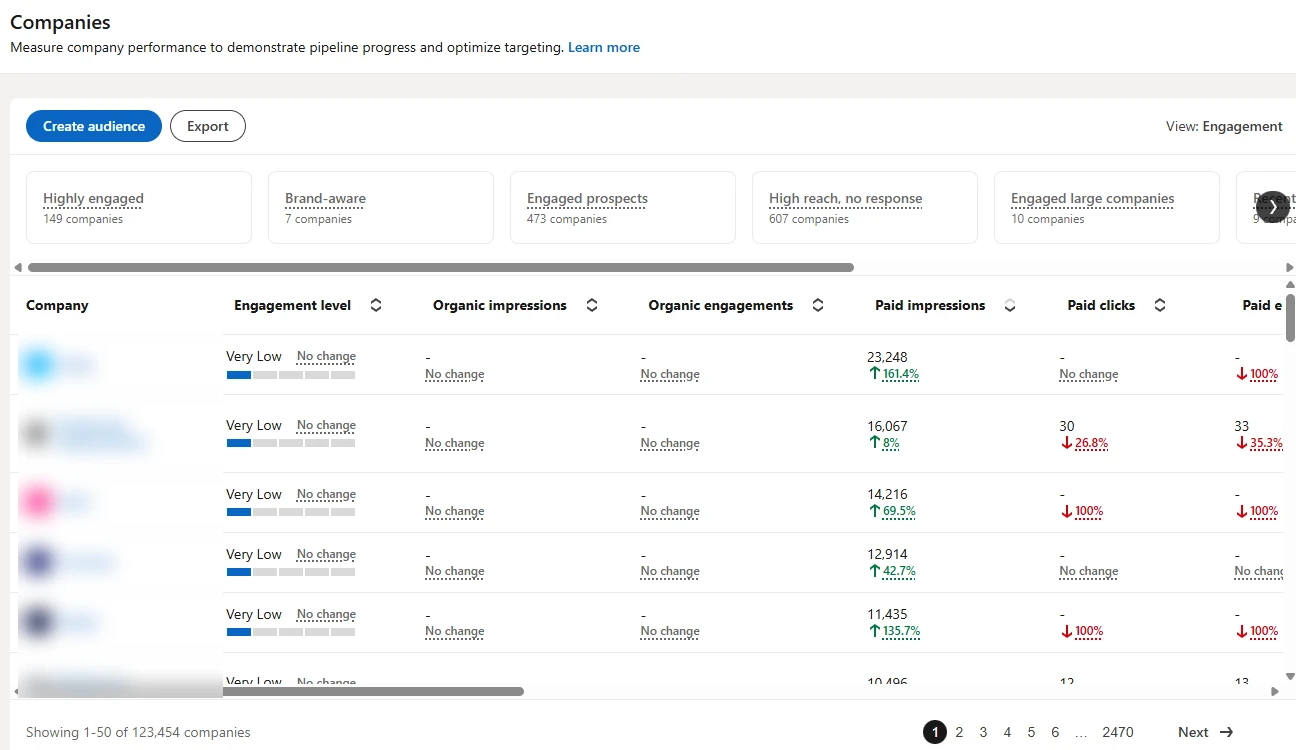
It’s a good thermometer. But it stops at the company: it doesn’t tell you who engaged, doesn’t cross-check open or won deals in your CRM and doesn’t alert you when a new account heats up. That’s where Spark Prospects comes in.
Spark Prospects is the LinkedScope feature that lists, every week, the companies that meet the signals you set, among those reached by your ads and those engaging with your content, crossing media, Engagers, CRM and Target Accounts. The overview is in the help center, in Spark Prospects: how it works.
In Spark Prospects > Set signals, you pick the criteria. A company has to meet all of them at the same time:
- Media (last 30 days): Intent Index, Impressions and Paid engagements.
- Campaigns (last 30 days): Reached by campaigns, meaning the company got delivery from at least one of the ad sets you picked.
- Engagers (last 30 days): Engagements (reactions plus comments), Engaged people (distinct people) and Comments on the monitored posts.
- CRM (current status): Open deal and Won deal, Yes or No.
- Target Accounts and Exclusion (current status): the company is or isn’t in Target Accounts, and is or isn’t on the Exclusion screen.
If you don’t set anything, the default applies: Intent Index greater than 50 and Exclusion = No. You can change or remove both.
Not sure which companies your ads are reaching yet? Start with the post on the companies your LinkedIn Ads reached.
Each combination answers a different sales question. The ones I consider the best are right below, in which signal combinations work best.
The evaluation runs every Sunday and right after any change to the signals. New companies get the New tag and you get a notification. The list is a history: a company that got in once stays there, with the date of its most recent entry.
The detail on each signal is in how to set Spark Prospects signals, and the index math is in Intent Index: how it’s calculated.
What are the best signal combinations in Spark Prospects?
The best combinations pair a fit signal (Target Account) with an interest signal (website visit, engaged people, a comment).
Fit alone is a cold list.
Interest alone might be just curiosity, research or a competitor.
Put them together and you get the right account at the right time. This is the table I use as my reference:
| Use case | Signals | What to do |
|---|---|---|
| Target Accounts that visited your website | Target Account = Yes, Exclusion = No, Reached by campaigns = website visitor retargeting ad set | Find the key people and reach out with account context. Never mention the visit. |
| Target Accounts on bottom-of-funnel pages | Target Account = Yes, Open deal = No, Reached by campaigns = retargeting of pricing or demo page visitors | The strongest company signal you can get without a form. Work it the same week. |
| Buying committee engaged at Target Accounts | Target Account = Yes, Exclusion = No, Engaged people (Engagers) > 2 | Reach out to whoever engaged and use the conversation to map the rest of the committee. |
| Target Accounts talking with your content | Target Account = Yes, Comments (Engagers) > 0 | A comment is the strongest person signal. Pick the topic back up in your invite. |
| Visited your website and engaged | Exclusion = No, Engaged people (Engagers) > 0, Reached by campaigns = website visitor retargeting ad set | Company and person at once. Worth it even outside Target Accounts: check the fit and add it to a list. |
| Warm accounts outside the funnel | Intent Index > 50, Exclusion = No, Open deal = No, Won deal = No | Find accounts outside your list that are heating up. A good source of new Target Accounts. |
| Open deal coming back to your website | Open deal = Yes, Reached by campaigns = website visitor retargeting ad set | Not prospecting: it’s a heads-up for the deal owner that the account is active. |
| Customers engaging | Won deal = Yes, Engaged people (Engagers) > 1 | Several people at a customer engaging can open an expansion conversation with your CS team. |
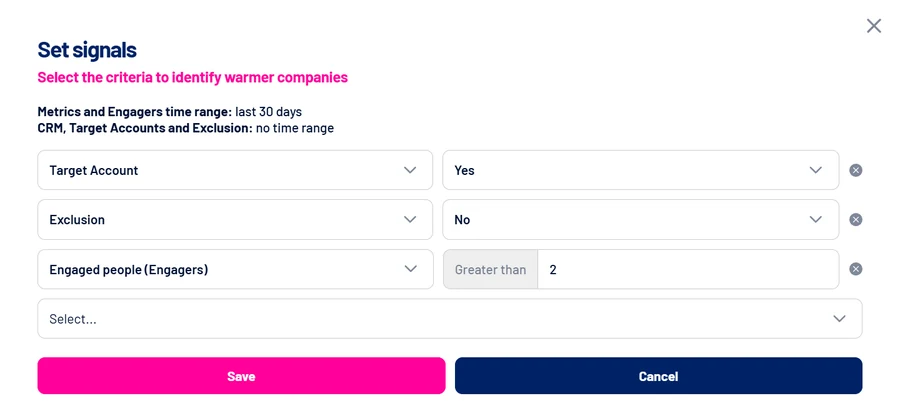
What should you watch before combining signals?
- One rule at a time. Spark Prospects has a single rule per account. Pick the combination that fits right now and switch it when your goal changes. The list is a history, so switching the rule doesn’t remove anyone who already got in.
- Engagers also brings in companies that never saw an ad. The evaluation looks at the companies that got your ads in the last 30 days. When the rule has an Engagers signal, it also includes companies whose people reacted or commented in that window without being reached, like one that only engaged with organic posts. Those accounts have no media data, so they never pass Intent Index, Impressions, Paid engagements or Reached by campaigns. To catch them, build the rule with Engagers signals and filters like Target Account and Exclusion.
- AND across signals, OR across campaigns. A company has to meet every signal. Inside Reached by campaigns, delivery from one of the chosen ad sets is enough. Impressions and Paid engagements still count the whole ad account, not only those ad sets.
- Engagements isn’t the same as Engaged people. One person with 3 comments and 2 reactions adds up to 5 engagements and 1 engaged person. For a committee signal, use Engaged people. The Engagers signals require the Engagers add-on.
How do you find out which Target Accounts visited your website?
Run an ad set that targets only your website visitor audience and use that ad set as a signal in Spark Prospects. If a company got delivery from it, someone there is in your visitor audience.
LinkedIn doesn’t give you named website visitors. Neither does LinkedScope.
But ad delivery is reported by company. That’s the trick.
Step by step:
- Create the visitor audience. With the Insight Tag installed, create a website audience in Campaign Manager with visitors to your whole site. Want to split by intent? Create another one with only pricing or demo page visitors. The how-to is in the post on LinkedIn Ads retargeting.
- Build an ad set with only that audience. You can narrow it with AND (country, job function, seniority). What you can’t do is add another criterion with OR, like skills or industry: then companies that never visited anything get in. Keep Audience Expansion off.
- Use Text Ads with the Website visits objective and manual CPC. You pay per click, so impressions are almost free and the ad set reaches more companies in the audience. In the last 30 days, our CPC Text Ads cost R$ 0.11 CPM, versus R$ 24.82 for our retargeting image ad. Text Ads only show on desktop, so coverage isn’t complete.
- Keep it always on. If the ad set stops delivering, no new company passes the signal, and the rule stops adding entries.
- Pick the ad set in Spark Prospects. In Set signals: Target Account = Yes, Exclusion = No and Reached by campaigns = your visitor ad set. It shows up in the list once it has delivery in the last 30 days.
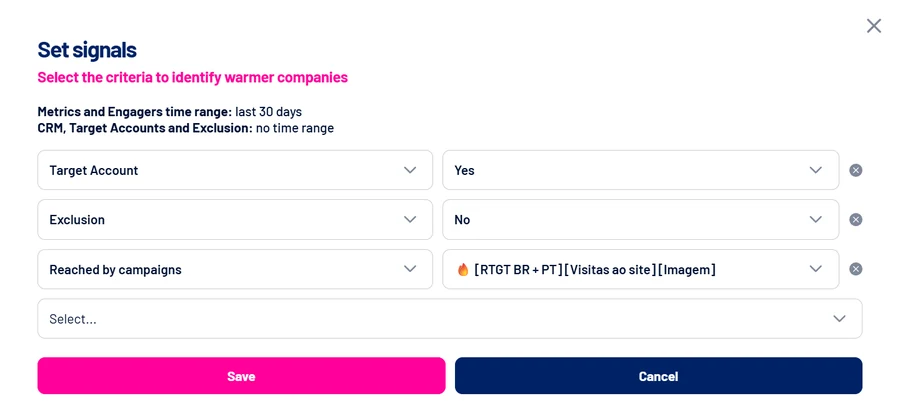
Mind the limits:
- You know the company, not the person. Not the page either, unless you split audiences by page.
- The visit counts for the audience window you picked in Campaign Manager, not an exact date. And Spark looks at delivery from the last 30 days.
- The audience needs at least 300 members to run.
- The company is the one on the person’s current LinkedIn profile.
- Never mention the visit in your outreach. “I saw your team visited our website” sounds like surveillance. Use the account context, as with any company signal.
Step 5: How do you build the outreach queue?
Cross person and company and reach out in this order: people who engaged at a hot company, people who engaged at an ICP company, and the key people at hot companies.
| Priority | Who | Where to find them in LinkedScope |
|---|---|---|
| 1 | Person who engaged, at a company in Spark Prospects | Engagers > People, filtered by the Target Accounts list |
| 2 | Person who engaged, at an ICP company without a strong signal | Engagers > People (check company and job title) |
| 3 | Key people at a Spark Prospects company where nobody engaged | Spark Prospects, Contacts column (step 6) |
The Engagers Companies view helps you see the picture by account: how many profiles engaged and when the last engagement happened. From there, you can send the companies to a Target Accounts list in bulk.
Why this order? Because in our operation, person engagement converted far better than the company signal alone. I share the numbers in the warm outbound post.
How long does a signal last in prospecting?
Not long. A person signal lasts days; a company signal, a few weeks. Signal-based outbound is as much about speed as it is about criteria.
| Signal | Lasts | What to do |
|---|---|---|
| Comment or reaction | Days | Reach out the same week, while the person still remembers the content |
| New company in Spark Prospects | A few weeks (the evaluation looks at the last 30 days) | Work it the week it came in, with the New tag |
| Target Account reached by the website visitor campaign | The visitor audience window (and Spark’s 30 days) | Find the key people the week the company came in |
| Nameless signal (pricing, opened form, video) | The retargeting audience window | Leave it to your media |
It’s no accident that the Engagers webhook only fires for engagements from the last 7 days: an old engagement is no reason to reach out to anyone.
And watch out with Spark Prospects: the list is a history. A company that came in months ago is still there, but its signal has cooled off. Always check the Most recent entry column before prioritizing.
Step 6: How do you find the key people at hot companies?
Put the company on a Target Accounts list with key job titles and use the find-contacts icon.
For a Spark Prospects company where nobody engaged, you need to find the people on the buying committee. The path:
- Send the company to a Target Accounts list with the paper plane icon or through Bulk actions. The list brings the job title keywords from step 1.
- Click the icon in the Contacts column. With an enrichment provider connected (Apollo, Snov.io or Data Stone), LinkedScope looks for the people at the company who match the list’s job titles.
- Pick who goes in. The ones you select become Contacts, with a validated email when the provider finds one.
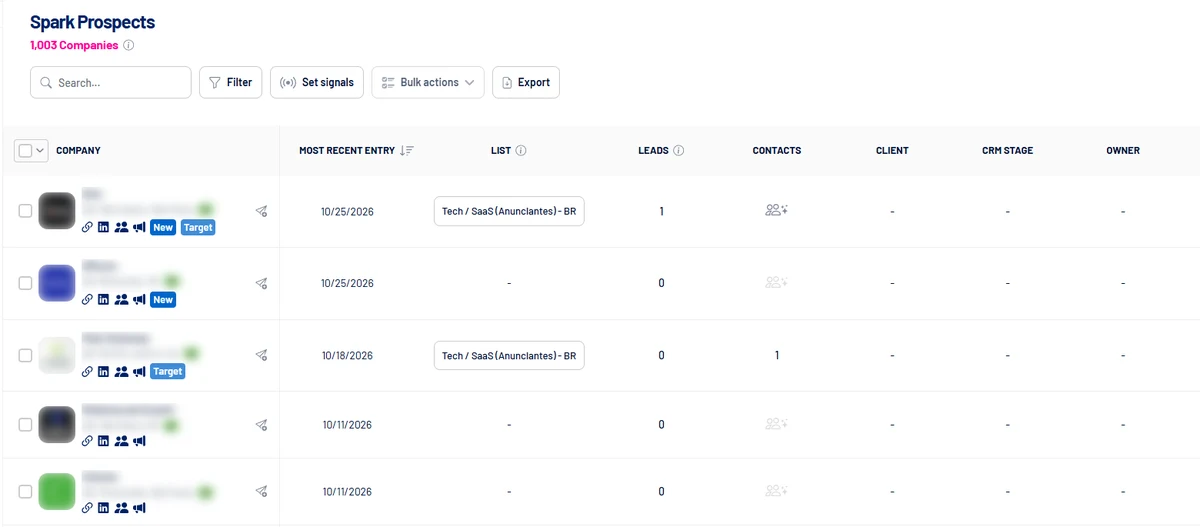
Without an enrichment provider, the people icon opens LinkedIn search with the company’s employees and the list’s job titles, and you pick by hand.
Not sure which job titles to use as keywords? Check Reached Job Titles: it shows which titles your campaigns are actually reaching and engaging.
With your CRM connected, it’s also worth turning on automatic contact import. That way, people already in your CRM show up in Contacts without you searching again.
Step 7: How do you send people to a sequence?
Select the people in Engagers or in Contacts and use Bulk actions > Send to outreach.
You choose the destination tool and campaign:
- WaLead.ai for LinkedIn sequences.
- Snov.io or Apollo for email sequences.
- Outreach webhook for any other tool, via n8n, Make or whatever system you already use.
What gets sent: name, job title, LinkedIn profile, company and, if the company is in Target Accounts, the list name. For engagers, email and phone come from the contact saved for the same person, when there is one. All of it in how to send to outreach tools.
My channel rules:
- People who engaged go to LinkedIn first. That’s where they saw you. Connection request with a short note mentioning the content.
- Key people at a hot company also go to LinkedIn, with account context and without faking familiarity.
- Email comes later, as a second touch. Mass cold email to a “warm” company is exactly what got us zero.
- Split campaigns by source (engager, Spark, cold list). That’s how you’ll measure in step 10.
And the message changes with the signal:
| Signal | Example connection note |
|---|---|
| Commented | “Hi Anna! Saw your comment about LinkedIn Ads exclusions and got curious: do you pull customers out of your campaigns by hand?” |
| Reacted | “Hi Anna! Saw you liked the post about LinkedIn Ads budgets. I’ve got a breakdown with the numbers by format, if it helps.” |
| Company with a strong signal, no engagement from the person | “Hi Anna! I talk a lot with B2B marketing teams about measuring LinkedIn Ads by account, not by click. Want to connect?” |
None of them mentions the ad the person “saw”. In the third row you don’t even know if they saw it. More on that in the warm outbound post.
And use your quota wisely: LinkedIn caps weekly connection requests, so the queue order from step 5 decides who gets each one.
Want to drop the manual click? A real-time webhook in the Engagers category fires for each new engagement (from the last 7 days) detected in the update. On the other end, an n8n or Make flow decides who goes into the sequence.
Step 8: How do you bring hot accounts into your CRM?
Turn on the automation that sends new Spark Prospects to your CRM with an open deal in the stage you choose.
In Settings > Account, the Send new Spark Prospects to connected CRM option creates the company and opens a deal in the chosen stage, in HubSpot, Salesforce, Pipedrive, Dynamics 365, RD Station CRM or Clientify. That way the account enters the funnel with a clear source, and sales sees in the CRM what’s being worked.
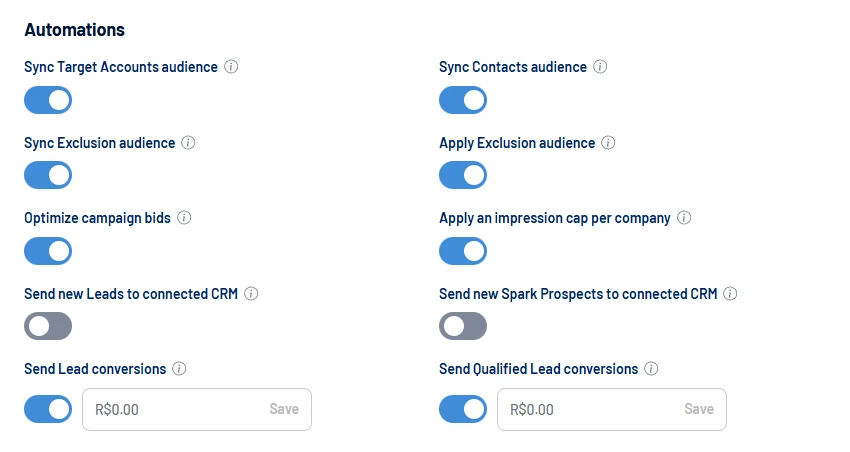
Two things to watch:
- The automation only applies to companies that come in after it’s turned on. Older ones aren’t sent retroactively.
- New records get the CRM’s default owner. If your team assigns accounts by owner, set up the rule in the CRM.
Details in how to send new Leads and Spark Prospects to the CRM. And if connecting media and CRM is still a headache on your side, start with the post on LinkedIn Ads and CRM integration.
Step 9: How do you keep ads running during the sequence?
Sync the accounts and people you’re prospecting as audiences and run a campaign just for them.
- Companies: the Target Accounts list becomes a company audience in LinkedIn Ads.
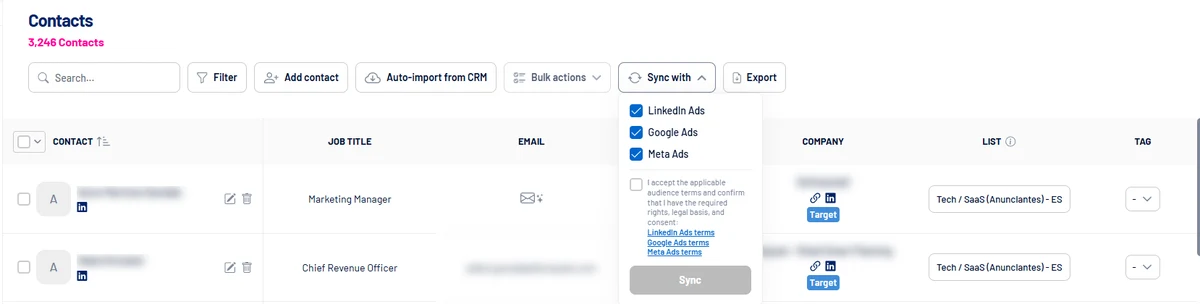
- People: in Contacts > Sync with, each Target Accounts list becomes a contact audience on LinkedIn (and on Google and Meta too, if you want). On LinkedIn, the audience needs at least 300 contacts the network can match.
- Engagers you want to keep close: send them to Contacts with the Send to contacts bulk action, and they go into the audiences too.
Turn on weekly automatic sync so you don’t have to remember.
And don’t forget the nameless signals. A pricing page visit, a form opened and not submitted, a video watched halfway: none of them go into the sequence, because LinkedIn doesn’t show who it was. Create a retargeting audience for each one in Campaign Manager and keep it running in parallel. Whoever reacts or converts comes back into the queue through Engagers or Leads.
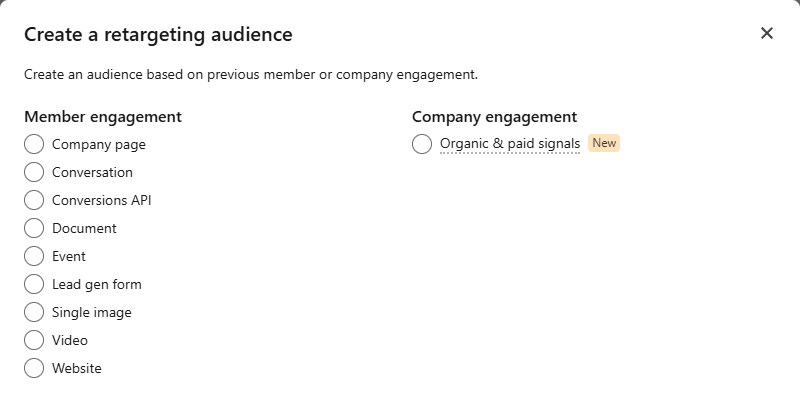
In that campaign, change the message: case study, proof, comparison, testimonial. The person already knows you. No need for an intro ad. It’s LinkedIn Ads retargeting, just driven by the sales list.
Step 10: How do you measure whether signal-based outbound is working?
Compare sequences by signal source and follow the accounts all the way to pipeline.
Every week, I look at:
| What to look at | Where | What to do |
|---|---|---|
| Acceptance, replies and meetings by source | In the outreach tool | Cut or rewrite the outreach for the source that doesn’t respond |
| New companies in Spark Prospects | Spark Prospects, New tag | Find the key people and send them to a sequence |
| New engagers from Target Accounts | Engagers > People | Send them to a LinkedIn sequence |
| Content that drives the most engagement | Engagers dashboard | Sponsor more of that kind of content |
| Open deals at worked accounts | CRM and Pipeline Impact | Tune the Spark Prospects signals to the profile of the accounts that move forward |
And don’t confuse influence with cause. An account that saw your ads and closed a deal was influenced, not necessarily convinced by the ad. I explain the limits of that in the post on influenced pipeline.
What’s the weekly routine for signal-based outbound?
About 30 minutes on Monday, after Spark Prospects updated on Sunday.
- Open Engagers, filter by your Target Accounts and send the new engagers to a LinkedIn sequence.
- Open Spark Prospects, look at the companies with the New tag, find the key people and send them to a sequence.
- Check that the lists synced and that the campaign for people in a sequence is running.
- Look at last week’s replies by source and adjust what didn’t work.
Doesn’t sound like much. It isn’t.
The heavy lifting is in the setup. After that, it’s routine.
Want to see who’s engaging with your ads and which ICP accounts are heating up, without a spreadsheet? See how LinkedScope works and try it free for 15 days. 😉
Frequently asked questions
What is signal-based outbound with LinkedIn Ads?
It’s active prospecting guided by the signals your ads and content generate on LinkedIn: companies that are being reached and engaging, and people who reacted or commented. Instead of working through a cold list, sales reaches out first to people who have already had contact with the brand, using that context in the message.
How do you use LinkedIn Ads for prospecting?
Advertise to ICP accounts with formats that get reactions and comments, capture who engaged, prioritize the companies with strong media and engagement signals, find the key people at those companies and send everyone to a sequence, keeping your ads running during outreach.
Do I need Thought Leader Ads to get engagers?
No. Engagers collects reactions and comments from your LinkedIn Page, from the ad account’s sponsored posts (dark posts included), from the connected profile and from specific posts. Thought Leader Ads help because they tend to spark more conversation.
How often are the signals updated?
Engagers collects engagements once a day and lets you update on demand. Spark Prospects evaluates companies every Sunday and right after any change to the signals, looking at the last 30 days of media and engagement.
Which outreach tools can I use?
WaLead.ai, Snov.io and Apollo, directly through the send to outreach action, or any other tool via the outreach webhook. To find people and validate emails, LinkedScope uses Apollo, Snov.io or Data Stone.
Can I automate sending people to a sequence?
Yes. The real-time webhook in the Engagers category fires for each new engagement detected, and an n8n or Make flow can decide who goes into the sequence. And new Spark Prospects companies can go to the CRM on their own, with an open deal in the stage you choose.
What are the best signal combinations for prospecting?
The ones that pair fit with interest: Target Account = Yes with Reached by campaigns set to a website visitor retargeting ad set, with Engaged people (Engagers) greater than 2 or with Comments (Engagers) greater than 0. To find new accounts, use Intent Index greater than 50 with no open or won deal in the CRM.
Can I find out which companies visited my website through LinkedIn Ads?
You can find the company, not the person. Run an ad set that targets only your website visitor audience and use it in the Reached by campaigns signal in Spark Prospects. Companies that got delivery from it have someone in your visitor audience. With Target Account = Yes, you see which target accounts visited your website.