
The capture script makes your website forms send every conversion to LinkedScope, along with the visit’s source. It’s a one-line snippet you install once on every page that has a form.
- Where: Settings > Account, Website lead capture section
- Time: 5 minutes
- You’ll need: access to edit the website code or the tag manager
How to install
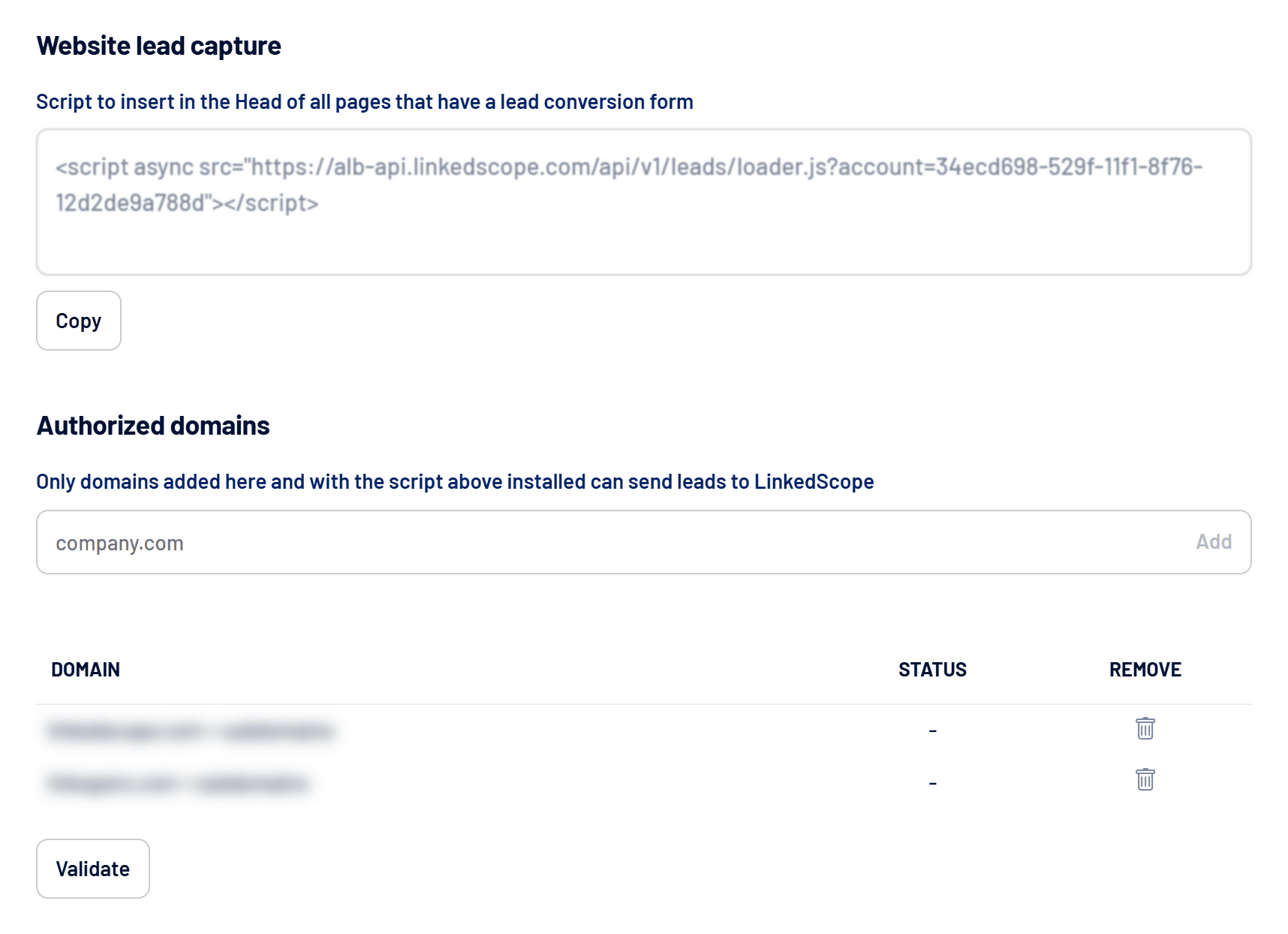
- Copy the script
In Settings > Account, click Copy below the script. It already includes your account identifier. - Paste it into the site head
Add the script to the<head>of every page with a conversion form. On WordPress, use the theme or a code-insertion plugin. In Google Tag Manager, create a Custom HTML tag fired on all pages. - Authorize the domains
In Authorized domains, add the website’s domain (for example, company.com) and click Add. Subdomains are accepted too. - Validate the installation
Click Validate. Each domain’s status changes to Installed once the script is found. - Submit a test
Fill in a form on the site and check the lead on the Leads screen. See Leads screen: sources, filters and qualification.
Authorized domains only
Submissions from websites that aren’t on the authorized domain list are ignored, even with the script installed.
Compatible forms
- Standard HTML forms (regular browser submit)
- RD Station landing pages and similar
- HubSpot forms (new and legacy versions)
- Elementor, Contact Form 7, Gravity Forms and WPForms
With builders that confirm the submission without reloading the page, the script waits for the platform’s success signal before recording the lead, so failed attempts aren’t counted.
What is captured
- The filled-in form fields, with each label’s original text.
- The conversion page (without URL parameters) and the visit’s UTMs.
- Ad click identifiers (
li_fat_id,gclidand similar), used to attribute the lead to a network and to send conversions.
Technical fields are dropped: hidden anti-bot fields, reCAPTCHA, hCaptcha and Turnstile tokens, buttons and plugin internals. Submissions with no useful field filled in aren’t saved. Long answers, such as messages, are kept up to 10,000 characters.
Privacy
The visitor’s IP isn’t stored in plain text. LinkedScope only keeps protected versions, used to improve conversion matching on the networks.
Frequently asked questions
Do I need to change the script when LinkedScope updates?
No. The script always loads the latest version from LinkedScope.
The script stopped capturing leads.
Check that the domain is still authorized, the form is active in Manage forms and your plan includes lead capture. See How to manage lead forms and Plans, trial and subscription.
How is a lead linked to a company?
Through the form’s company field or, if there isn’t one, the corporate email domain. Personal emails (Gmail, Outlook and similar) don’t identify a company.