
LinkedScope has three plans, Professional, Enterprise and Premium Advisory, plus the Engagers add-on. Every new account starts with a 14-day trial. Here is what each plan includes and what happens when the trial ends.
- Where: Upgrade menu or Settings > Subscription > Change plan
- Billing cycle: monthly or annual (annual saves up to 20%)
- Billing: International in US dollars; Brazil (CNPJ or CPF) in Brazilian reais
- Free trial: 14 days
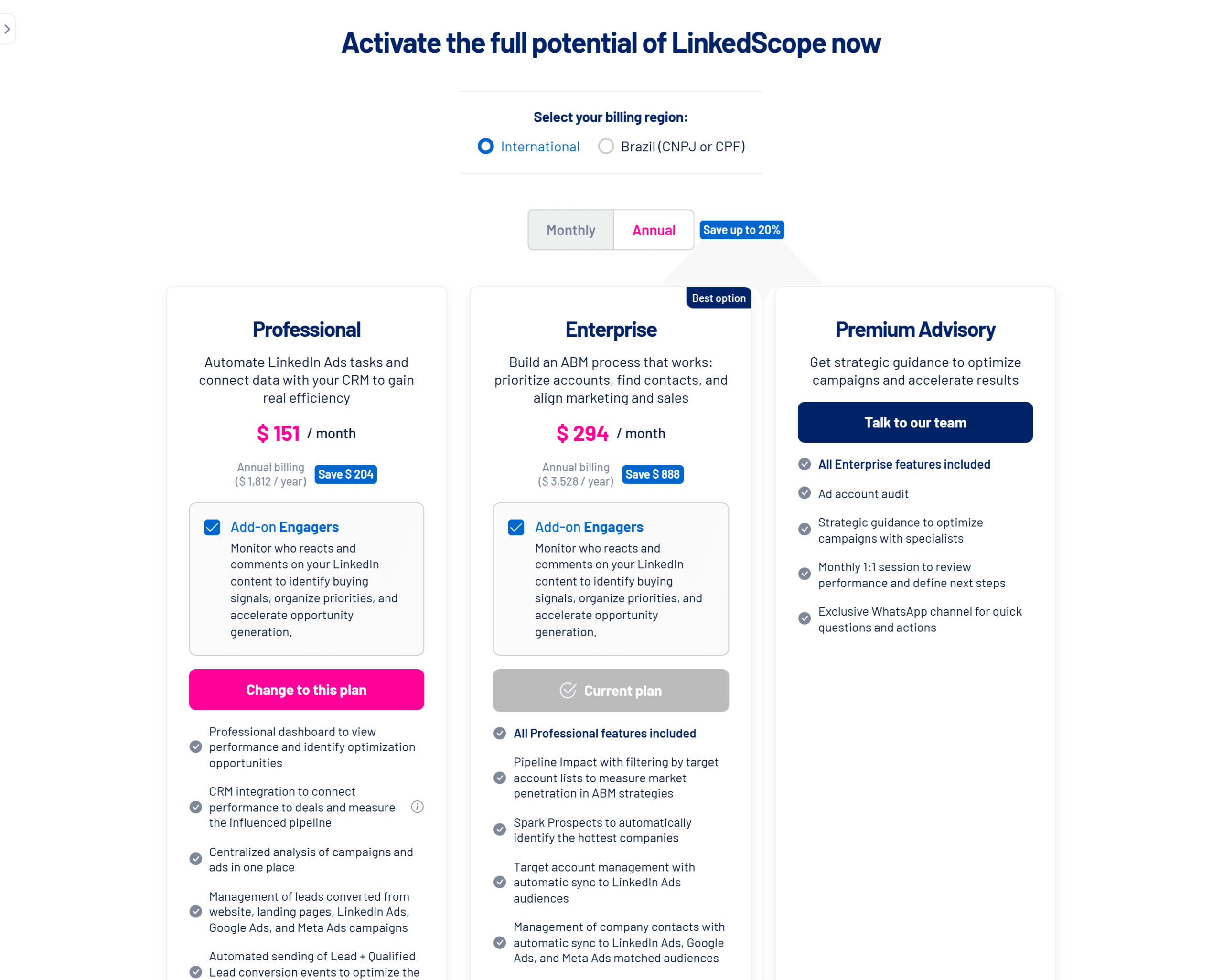
What each plan includes
| Plan | Main features |
|---|---|
| Professional | Dashboard, campaign and ad analysis, website and native form leads, conversion sending, bid optimization, impression cap per company, Reached Companies and Job Titles, Exclusion with sync, CRM integration and up to 3 users. |
| Enterprise | Everything in Professional, plus Pipeline Impact with Target Accounts list filtering, Spark Prospects, Target Accounts and Contacts with audience sync, Insights AI with monthly credits, outreach and enrichment tool integrations, VIP support and up to 8 users. |
| Premium Advisory | Everything in Enterprise, plus an ad account audit, strategic guidance from specialists, a monthly 1:1 session and an exclusive WhatsApp channel. Purchased through our sales team. |
| Engagers add-on | Can be added to Professional or Enterprise. |
Feature locked?
Menu items your plan doesn’t include show as locked, with the option to upgrade.
Trial period
- The trial lasts 14 days. During that time, the account has full access and the top of the screen shows how much time is left, with a shortcut to talk to our sales team.
- Five days before it ends, you get an email with an executive report covering the last 6 months of your ad account. See Executive Report: how to generate and schedule it.
- When the trial ends without a plan, features are locked and the top shows Limited access ➜ Upgrade to unlock the full potential of LinkedScope. Your data and settings stay saved.
How to subscribe
- Open Upgrade
From the side menu or the profile menu. - Choose the billing region
International or Brazil (CNPJ or CPF). The region sets the currency and payment methods. - Choose the billing cycle
Monthly or Annual. On annual, the price is shown per month with the savings next to it. - Choose the plan and add-on
Check the Engagers add-on if you want the module and click Select plan. - Complete the payment
You’re taken to secure checkout. Once confirmed, the plan is activated on the account.
Frequently asked questions
I need more users than my plan allows.
Change plans or talk to our sales team. See Payments, invoices and plan changes.
Prices show in another currency.
Change the billing region at the top of the plans screen.
How do I change plans later?
In Settings > Subscription > Change plan. See Payments, invoices and plan changes.