
Insights AI uses artificial intelligence to analyze every active ad set you have on LinkedIn: it compares the last 7, 30 and 90 days, rates each one’s health and suggests what to do. Each analysis uses one credit.
- Where: Insights AI menu
- Network: LinkedIn Ads
- Plan: Enterprise or higher
- Who can generate: Owner, Admin and Manager
How to generate an analysis
- Open Insights AI
The screen lists the analyses already generated, newest first. - Click Generate insights for campaigns
Every currently active ad set is analyzed. Generation takes a few moments. - Open the analysis and each ad set
Click a row to see the details.
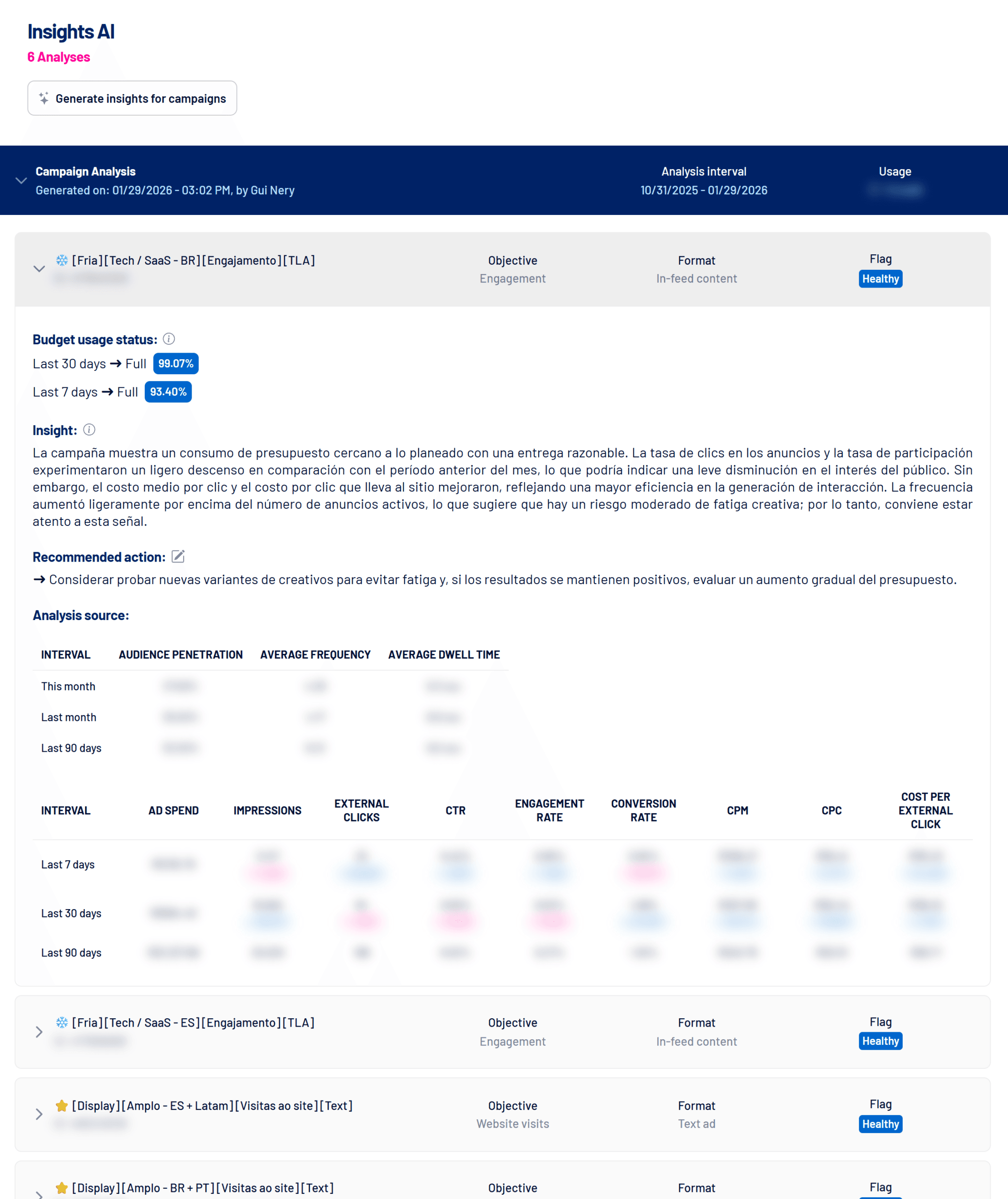
How to read the analysis
| Part | What it means |
|---|---|
| Flag | Healthy, Warning or Critical: the ad set’s overall rating. |
| Budget usage status | How much of the daily budget was spent in the last 30 and 7 days: Full, Fair or Low. It doesn’t apply to ad sets with a total budget or a budget set at the campaign level. |
| Insight | The written diagnosis: what improved, what got worse and warning signs such as creative fatigue. |
| Recommended action | The suggested next step. |
| Analysis source | The numbers used: penetration, frequency and dwell time by month, plus spend, impressions, clicks, CTR, engagement, conversion, CPM and CPC over the last 7, 30 and 90 days, with the change between periods. |
They are hypotheses
Insights are generated from campaign data and don’t consider in depth external factors such as seasonality, strategic goals, industry behavior or business context. Use them as a starting point.
Credits
Each analysis uses 1 credit, shown in the Usage column. Monthly credits depend on your plan. When they run out, the message Your AI credits have run out for this period appears until they renew.
Frequently asked questions
The button is disabled.
Connect LinkedIn Ads and check that your level can generate insights (the Operator level can’t).
Generation failed.
You need at least one active ad set. If you have one, try again in a few minutes.
The analysis is in another language.
The text is generated in the language of whoever requested the analysis and doesn’t change afterwards.