
Is your CRM missing from the native integrations? With Any CRM you can connect any CRM that has an API through an automation tool such as n8n or Make, or through your own endpoint. LinkedScope calls your webhook, receives the list of deals and matches it with LinkedIn Ads.
- Time: 30 to 60 minutes
- Who can do it: Someone who can build a flow in n8n, Make or similar
- Method: HTTPS webhook + token
- Access: LinkedScope only reads what your webhook returns
How it works
- You create a webhook in n8n, Make or your backend.
- LinkedScope calls that webhook with POST, with no body, sending an authentication token in a header.
- Your flow validates the token, fetches the deals from your CRM and returns a JSON list.
- LinkedScope imports the deals and repeats the call once a day (or when you click Sync CRM).
Before you start
- Owner or admin access to the LinkedScope account and a plan that includes CRM integration.
- Access to your CRM’s API and to a tool that exposes a public HTTPS webhook (n8n, Make, Zapier with a webhook, Pipedream or your own server).
- No other CRM connected to LinkedScope. Each account uses one CRM at a time.
Step 1: build the webhook
- Create a webhook trigger
In n8n, use the Webhook node. In Make, the Custom webhook module. Set the method to POST and copy the production (HTTPS) URL. - Validate the token
Pick a long random secret. At the start of the flow, compare the incoming header with it. If it does not match, respond 401 or 403 and stop. - Fetch the deals from your CRM
Query your CRM’s API for deals created or closed in the last 24 months, with each deal’s company and owner. - Map to LinkedScope’s format
Turn each deal into the fields in the table below. - Respond with JSON
Return HTTP 200,Content-Type: application/jsonand the list of deals. Don’t let the flow respond before the fetch finishes.
Which header LinkedScope sends
- If you paste only the secret into the Authentication token field, LinkedScope sends the header
auth: <secret>. If the webhook rejects it (401/403), it retries withx-make-apikey: <secret>, Make’s API key convention. - To use another header, paste it as
Header-Name: secret, for exampleAuthorization: Bearer abc123. The name accepts only letters, numbers and hyphens.
Token security
Never expose the secret in front-end code or repositories. Use a long random value and rotate it if you suspect a leak.
Step 2: response format
The simplest option is to return a JSON array of deals:
[
  {
    "dealId": "D-1001",
    "dealName": "Enterprise plan",
    "dealLink": "https://crm.example.com/deals/D-1001",
    "pipeline": "Sales",
    "dealStage": "Proposal sent",
    "dealValue": 15000,
    "createdAt": "2026-03-01T10:23:00Z",
    "closedAt": null,
    "isWon": null,
    "ownerName": "Ana Silva",
    "ownerEmail": "[email protected]",
    "companyName": "ACME",
    "companyDomain": "acme.com",
    "linkedinCompanyUrl": "https://www.linkedin.com/company/acme"
  }
]| Field | Importance | Description |
|---|---|---|
dealId | Recommended | Unique deal ID. Prevents duplicates. |
dealName | Essential | Deal name. |
dealValue | Essential | Numeric amount, without currency symbol. |
dealStage | Essential | Current stage. Used by stage filters. |
createdAt | Essential | Creation date in ISO 8601. The basis for measuring influence. |
companyName | Essential | The deal’s company name. |
companyDomain | Highly recommended | Company website domain (e.g. acme.com). Greatly improves matching. |
linkedinCompanyUrl or linkedinCompanyId | Highly recommended | The company’s LinkedIn page (/company/slug or /company/123) or numeric ID. The most accurate match. |
isWon | Recommended | true (won), false (lost) or null (open). Text such as won, lost, closedwon, closedlost also works. |
closedAt | Recommended | Close date, for won or lost deals. |
ownerName and ownerEmail | Recommended | Deal owner. Without them, the owner filter is empty. |
dealLink | Optional | Deal URL in your CRM, to open it straight from the deal list. |
pipeline | Optional | Pipeline name. |
Missing fields don’t break the import: LinkedScope applies defaults. But without company and dates, a deal can’t be linked to LinkedIn Ads.
An object with deals and, optionally, lists of users and companies is also accepted. Deals can then carry only owner and company IDs, and LinkedScope fills in name, email and domain:
{
  "deals": [ { "dealId": "D-1001", "dealName": "Enterprise plan", "ownerId": "u-7", "companyId": "c-42" } ],
  "users": [ { "id": "u-7", "name": "Ana Silva", "email": "[email protected]" } ],
  "companies": [ { "id": "c-42", "name": "ACME", "domain": "acme.com" } ]
}
Accepted list names: deals, data or records for deals; users, owners, members or workspace_members for owners; companies, organizations or accounts for companies.
Step 3: connect in LinkedScope
- Open integrations
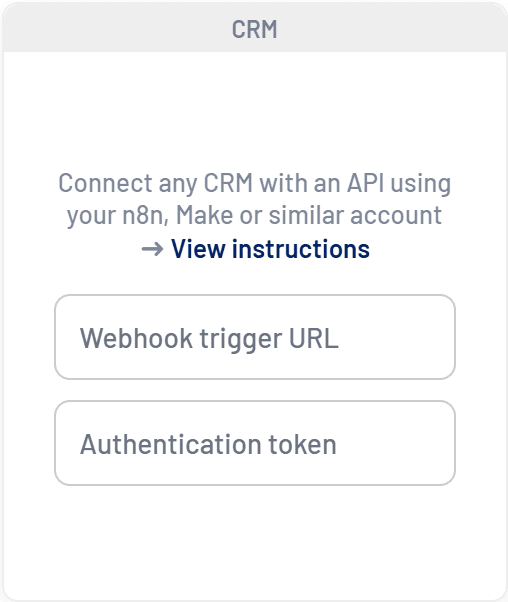
In Settings > Integrations, find the card that reads Connect any CRM with an API using your n8n, Make or similar account.
- Fill in both fields
In Webhook trigger URL, paste the webhook URL (it must start with https://). In Authentication token, paste the secret or the full header. - Save
Click Save. LinkedScope calls the webhook right away to validate it. If the call fails, the connection is not saved and an error message appears. - Test the response
With the connection saved, click Test. The CRM integration test window shows how many deals were received and mapped, the period covered and a sample. Check that names, amounts and companies look right.
After connecting
- The first sync starts right away. After that, LinkedScope calls the webhook once a day.
- To refresh immediately, use Sync CRM on the Integrations tab.
- Any CRM has no pipeline selector. To analyze a single business unit, filter the deals in your flow before responding.
- The limited permission alert does not apply to Any CRM: LinkedScope receives exactly what your flow returns.
Common errors
| Symptom | Likely cause | How to fix |
|---|---|---|
| Error when saving or testing | Webhook offline, wrong URL or token rejected (401/403). | Check that the flow is active in production and that the secret is identical on both sides. |
| “Enter a valid URL” | The URL doesn’t start with http:// or https://. | Use the full production webhook URL, over HTTPS. |
| Test shows 0 deals | The flow responded before fetching data, or returned the list inside a field with another name. | Respond only at the end of the flow and use an array or an object with deals. |
| Deals without a company in Pipeline Impact | companyDomain and linkedinCompanyUrl are missing. | Include each company’s domain or LinkedIn page. |
| Empty owner or stage filter | ownerName/ownerEmail or dealStage are missing. | Send these fields on every deal. |
| Slow sync or timeout | The flow fetches many details one by one. | Paginate CRM queries and limit the fetch to the last 24 months. |
Frequently asked questions
Does LinkedScope send any data to my webhook?
No. The call is a POST with no body. Only the authentication header is sent.
How often is the webhook called?
When connecting, when testing, once a day on the automatic sync and whenever someone clicks Sync CRM. Recent responses are cached for a few hours.
Can I use Zapier?
Yes, as long as the flow receives the webhook and returns the JSON response in the same call. Webhooks that only reply “received” and process later don’t work.
My CRM has a native integration. Should I use Any CRM?
No. Native integrations offer pipeline selection and permission alerts, and need no flow maintenance. Use Any CRM only for CRMs without a native integration.
Need help?
Reach us at [email protected], through the Help menu inside LinkedScope or on our contact page.